Hosting Sites/web browser and picture quality ???

Messages
2,167
Name
Lynda
Edit My Images
Yes
Does your host or web browser affect the quality of the picture when posted?

I'm asking because I was going to comment on an image, in particular the muted colours.
I normally use google chrome, however, when I switched to firefox to check the EXIF data the image was completely different - really saturated?

The image in question was hosted on flickr. Incidentally, when I saved the image to my desktop (I was going to have a wee play) I got the saturated version.

I've checked my competition entry on both browsers and it looks the same (I use photobucket as a host)

Any ideas?
 
The host does not affect the image in any way. It only "serves" up the image to be rendered in your browser.

The only things that can affect it are your PC/screen settings or the software that you are using to display it - in this case your browser.

I know that sometimes my images look different in the browser compared to my image processing program but I only ever use IE so have no experience comparing the image quality in browsers.

Jenny
 
I've been doing some digging and it looks like it's because microsoft suck. It looks to me like photoshop saves jpegs in sRGB and explorer can only read RGB properly.
 
Looks like I was right.

Nikon ViewNX, converted to jpeg then loaded and saved with PS


Imported with lightroom, then edited and saved in jpeg with PS.


I chaned settings in lightroom and none of them worked.
 
Have a look at this image in Firefox and IE :nuts:

OMG!! :eek:

I've been doing some digging and it looks like it's because microsoft suck. It looks to me like photoshop saves jpegs in sRGB and explorer can only read RGB properly.

Sorry, I only read your message so haven't linked the image.

So, I'm guessing that the images I'm seeing in Chrome are ok.

Oh, and thanks Jenny for the explanation
 
Chrome they will both look ok. I don't know if this is a NEF problem or if canon users are having the same trouble with their lightroom converted pictures?

*mutters about money down the drain
 
Helen, I jumped in before you posted the two images and I'm confused now, although TBH when it comes to technical stuff is doesn't take much.

I've looked at your images in IE, Chrome and Firefox and Firefox seems to be the main offender.

Is the edit with the muted colours your chosen image?
:thinking:
 
WOW!! What a difference! How does that happen?

FF supports colour management wereas IE pre version 9 does not if i remember rightly.

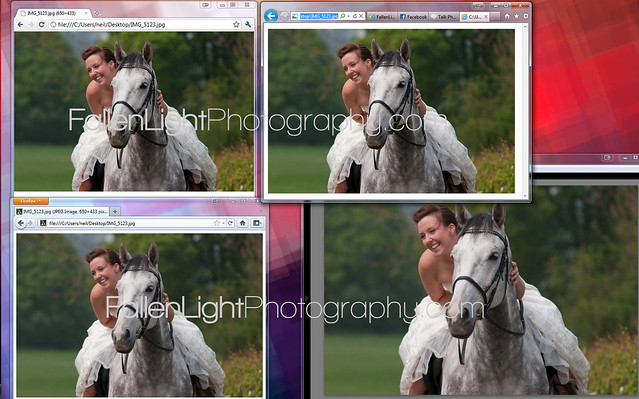
either way i havent seen any issue with Lightroom exported images, rough test across browsers..

top left - latest version of chrome
bottom left - latest version of FF
top right - latest verson of IE
bottom right - Lightroom 2.7

in hindsite i think i left the "sharpen for glossy paper" box ticked on the export dialog. cant be bothered to redo now lol


colour_test by neilgates, on Flickr

no noticable difference there... there might be a little more saturation on the chrome image maybe? if anything the FF image looks much softer than the other despite it being the same file from the desktop. but thats it.
 
Last edited:
I was having the same problem and located the problem with how it was exported from lightroom, I fixed it now. If you need to know i'll look later (as its on the other pc) and let you know what the setting was, it was to do with sRGB & RGB setting IIRC
 
Back
Top