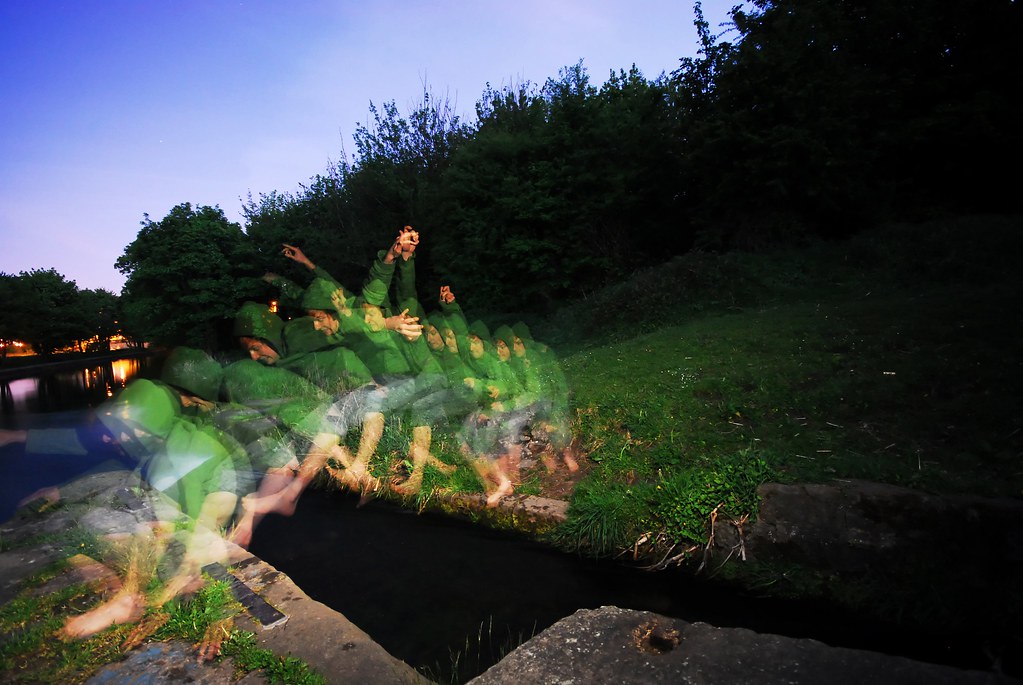
How to do this photo?? help me please

Messages
13
Name
Chris
Edit My Images
No
Hello everybody in my first post on this forum
I have a questions for anyone who may know how to make this photo (what settings) must be use
please give me some ideas i will be grateful
Sorry for my bad English and will be waiting for any answer
Chris
http://s593.photobucket.com/albums/tt20/kiniuber/?action=view&current=jump.jpg

photo 2

http://s593.photobucket.com/albums/tt20/kiniuber/?action=view&current=jump2.jpg

Please click on link to see photos (I dont' know how to post the photos inside post sorry)
 
Fast shutter in continuous shooting mode to catch a few pictures in sequence. Photoshop to merge the images afterwards.
 
thanks but it is not possible to make a photo without editing in photoshop?
 
What camera are you using? The D90 has an option to merge multiple exposures in camera. Not sure if other models have the same. It's not actually an option I've used myself...
 
It's possible to get a similar effect with multi burst flash (can't remember the name) the canon 580exII does it and I guess so does the nikon sb-900(though couldn't swear to it)

needs a dark background and a long exposure on a tripod, the flash the fires a few times in the exposure freezing someone in several steps of a movement, best example I can think of has a dancer in it but it's in a book so cant link :S
 
Weird. :eek: I've just been trying to do something like this for a couple of hours. Unfortunately the subject my images overlaps itself. A lot harder to do. :bonk:
 
The photos in the OP's links look like multiple exposures in a motor-drive sequence, straight out of the camera, in which case you don't need Photoshop.

This was a common feature on film cameras, though a few digi-SLRs also do it.
 
They must have been processed because layered images have been faded manually in the sequence. I can't see how you would achevie that all in camera unles you have a very clever flash that can fire a different strength each time.
 
They must have been processed because layered images have been faded manually in the sequence. I can't see how you would achevie that all in camera unles you have a very clever flash that can fire a different strength each time.

That's how you can tell it's probably a straight multiple exposure, on film. The early images in the squence are faded because they've been overlaid with additional layers of blue sky in subsequent exposures.

You could get the same effect by merging multiple images in post processing, but I would say the fading is a side effect of multiple exposures made in camera.

Of course, you can't be certain from the images on the links. It could be either. But if you shot a sequence of multiple exposures like that, it would look like it does.
 
It's possible to get a similar effect with multi burst flash (can't remember the name) the canon 580exII does it and I guess so does the nikon sb-900(though couldn't swear to it)

Yes, even SB800 has it - repeating flash mode (RPT they call it).
 
They must have been processed because layered images have been faded manually in the sequence. I can't see how you would achevie that all in camera unles you have a very clever flash that can fire a different strength each time.

Erm, what about multiple exposure? Each subsequent one will overlay the background over already exposed subject, making it effectively fade away. You can also blend multiple images together in-camera (at least in Nikons) with the same effect. I'd say it only can be done in postprocessing if all the images were not faded.
 
Yes if you are talking about film it makes sense.
 
You can do it in camera on some Nikon's by using the multiple exposure feature but you wouldn't get the faded look as in this one. The best way by far is continuous shooting and then blending them in Photoshop (I suspect GIMP could as well)
 
You can do it in camera on some Nikon's by using the multiple exposure feature but you wouldn't get the faded look as in this one. The best way by far is continuous shooting and then blending them in Photoshop (I suspect GIMP could as well)

I think you would. Film or digital, it makes no difference. You still get the cumulative fading effect of multiple exposures due to the blue sky behind.

The only way to avoid that is either with a completely black background, or to shoot multiple separate images and then cut and paste the moving element in post processing with layers.
 
I did something similar the other day with the strobe mode of an old Nikon SB 28:
Not compositionally amazing, but was my first attempt, so quite happy how it came out!

3499800639_8ed13aae33_b.jpg
 
Thank you very much to everyone for the idea's how to do it i think this photo what I upload was taken by canon 5 d mark
 
Thank you very much to everyone for the idea's how to do it i think this photo what I upload was taken by canon 5 d mark

The two images on your photbucket site appear to be yours! Did you take them? if not you should at lthe very least link back to the originals! :)

BTW I also suspect a strobe effect was used :thinking:
 
Yes if you are talking about film it makes sense.

No I was talking about digital actually - that's why I said you can blend them in camera post shooting. However for multiple exposure it does not matter - both film and digital will be equivalent in this respect.
 
Multiple exposures without Photoshop? How about a long exposure through a spinning blade/wheel/fan?
 
What's wrong with that? This existed way before Photoshop was invented...
Nothing 'wrong with that' at all. It's why I suggested it. :cuckoo:

But clearly quite a lot of people here don't know (or remember) anything from the time before digital.
 
what about for the sky diver, multiple exposures but only fire the flash on the 3rd image. that way the last pose would come out the clearest
 
Can't a digital image also be exposed more than once? as this is in the canon menu, or at least on the 30D?
 
Easily done with a digital camera without processing - if the camera has the setting of course :p even my D80 does it.

On the skydiver, the 1st skydiver is quite faded because there is 1 photo of him blended with 2 photos of sky, but he is on the bottom.. whilst the last exposure, the skydiver is covering 2 layers of sky.

Its a very simple concept if you think about it logically ;) - It has its limits though and for better results it would probably be better to shoot continuous rapid fire and just blend them in photoshop so that you dont get the faded effect.
 
On the Nikon muliple exposure setting it is possible to adjust the gain manually, you don't have to use auto gain.

What this means is you choose the exposure difference for each shot, so you can create whichever effect you want. If you want the jumper to be the same exposure value, set the gain to a fration of EV the same as the number of exposures....3 shots - 1/3 per shot.
4 shots - 1/4 per shot.

2 shots -1/2 etc.

It is an old technique from the days when you could disengage the wind-on gears of the camera but recock the shutter. Often used in the studio for product shots.

Repeating flash (like the jumping the stream picture) is better if you slow it down a bit. Again a bit of head maths is called for, your shutter speed has to be longer than the time it takes to fire the number of flashes you ask it for and the frequency. Looks like you used 10hz here and I haven't counted the images (8? 10?) If it was 10 flashes at a frequency of 10hz, the shutter needs to be set to 1 sec (because that is how long it takes to fire 10 flashes at 10 flashes per second)- your aperture has to be compatible with the shutter for ambient (for whatever effect you want) BUT, it also has to be such that the power of the flash can cope with the aperture set too.
 
Nothing 'wrong with that' at all. It's why I suggested it. :cuckoo:

But clearly quite a lot of people here don't know (or remember) anything from the time before digital.

Erm, sorry - my fault. I was reading your post as a question of "how is that possible without Photoshop" rather than as a suggestive question...
 
Easily done with a digital camera without processing - if the camera has the setting of course :p even my D80 does it.

On the skydiver, the 1st skydiver is quite faded because there is 1 photo of him blended with 2 photos of sky, but he is on the bottom.. whilst the last exposure, the skydiver is covering 2 layers of sky.

I don't think the OP photos were done in camera though - with the in-camera blending/multiple exposure you get no transparent/ghostly figures only if either they are still for the whole duration of the shot (or on each of the blended shots) or the background is pure black. Since the last figure in each of the OP shots seems solid (not semi-transpared), I'd say it was done in postprocessing.
 
Back
Top