How would you approach this?

Messages
1,329
Name
Ian
Edit My Images
Yes
http://www.darwinday.org/images/lifeimages/shrewsabbey2.jpg

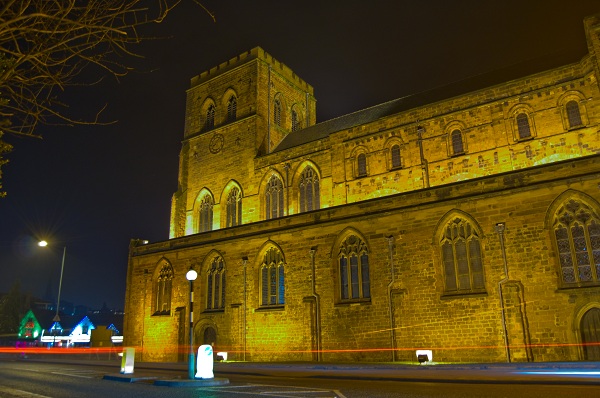
Im planning on photographing this abbey as its only a short walk from me.But im looking to photograph it at night because it has lights which switch on, making it an interesting subject.

i was just wondering on how people would approach this to get an interesting and different shot? also am i correct in thinking a higher iso than normal will be needed or will the lights that switch on at night cover this?

thankyou for any advice
 
I was goining to say i would approach it on foot but changed my mind on that. How does it look from the end looking up at the tower. As for the ISO i would be tempted to try a few different settings to see which i am most satesfied with. You could also try with a longer shutter speed when a car is passing to get the trails behind it to add a differand dimention to the pic.
 
Tripod is probably a must, expose for the highlights and get there at dusk, night shots are generally more intersting if you can retain some sky detail rather than it totally black.
 
I was goining to say i would approach it on foot but changed my mind on that. How does it look from the end looking up at the tower.
thats the most popular end as its the entrance and well lit. to be honest thats probably where i will focus my attention. im wondering if hdr will work on this subject at night too?
 
Tripod is probably a must, expose for the highlights and get there at dusk, night shots are generally more intersting if you can retain some sky detail rather than it totally black.

thats a good point which i will take on board :thumbs:
 
tripod
low iso
long exposure
mirror lockup
long noise reduction turned on (is that on your camera?)
manual mode
set an aperture for dof
review each photo and adjust shutter speed to suit your taste
shoot in RAW for WB PP adjustment
remote shutter release
 
Shrewsbury Abbey! I live near Shrewsbury. Darwin was born there.

Should make a cool photo. Try snapping it from the other side, if you stand by the Peach Tree / C:21, then it will be blocking the main road and there might not be so many buildings in the BG. Or you could include the road, and try to get some light trails from car headlights.

If you use a tripod, you can keep the ISO low and use a longer exposure. Use mirror lock up, and a 2 second timer so you don't have to touch the camera to fire the shutter.
 
all good advice thankyou. i only have a cheap mini tripod currently but i am looking to get one.

long noise reduction turned on (is that on your camera?)

no i dont think so, thanks for the advice though thats just what i was looking for

something i want on my next camera is auto braketing which would make hdr a bit easier.
 
long noise reduction turned on (is that on your camera?)

no i dont think so, thanks for the advice though thats just what i was looking for

something i want on my next camera is auto braketing which would make hdr a bit easier.


Check your camera's manual. Pages 44 and 73 are a good place to start.

You might be better off using raw and doing any noise reduction in PP; in-camera long exposure NR usually involves the camera taking a 2nd exposure of the same length as yours but without opening the shutter. It then subtracts what the 2nd shot shows up from the first to remove any noise. *This isn't too much of a pain if your shutter speed is relatively short but can get annoying when the shutter speed is in minutes rather than seconds.* Any noise reduction will remove a little detail but a strong image shouldn't suffer too much.
 
all good advice thankyou. i only have a cheap mini tripod currently but i am looking to get one.

long noise reduction turned on (is that on your camera?)

no i dont think so, thanks for the advice though thats just what i was looking for

something i want on my next camera is auto braketing which would make hdr a bit easier.


I can confirm your camera does have long noise reduction, it's in the shooting menu.

And I totally agree, I'd love some auto bracketing :(
 
4286552440_b43de9c5cc_o.jpg


just a quick update. not 100 % happy with this shot but i plan to take a better one soon.
 
i don't think the building is particularly interesting in itself so other than using a fisheye/wide angle for some extreme shots i don't think there's much can be done

however for different and interesting shots it's something you're going to have to see yourself imho

apart from that consider shooting some of the finer details of the building and concentrating on what it is in particular that you find appealing

if it's the geometry go for some symmetry etc if it's the size of it shoot it to show this

+2p :)
 
The thing i want to capture most is the car lights and the light from the base of the building so i think i will approach it from further up the road to get a better combination of the two.

Thankyou for the feedback
 
Do your research on on the internet (getty images, flickr, panoramio, etc) before you set out. for example this would be a half decent shot: http://www.flickr.com/photos/dmmaus/4088628223/

It was shot at the blue hour and slightly different angle - see what difference it makes. You could further improve on it. Maybe also use an ultrawide lens, and correct perspective later in PP. Early morning or late evening sunlight light could be another alternative.
 
The white balance looks like it is on Auto? I'd try a few with Tungsten and maybe a custom white balance from the abbey lights too.
 
Do your research on on the internet (getty images, flickr, panoramio, etc) before you set out. for example this would be a half decent shot: http://www.flickr.com/photos/dmmaus/4088628223/

It was shot at the blue hour and slightly different angle - see what difference it makes. You could further improve on it. Maybe also use an ultrawide lens, and correct perspective later in PP. Early morning or late evening sunlight light could be another alternative.

Wow my shot looks pants next to that :lol:

Thanks for your help :thumbs:
 
The white balance looks like it is on Auto? I'd try a few with Tungsten and maybe a custom white balance from the abbey lights too.

yeah i think white balance was on auto, i will give what you have suggested a try thankyou :thumbs:
 
Back
Top