Idiots guide to setting up a blog

Hi Paul

when you have ftp open folder called wordpress which you possibly have on your desktop. Select all the files and then copy that over to the public.htlm folder on your webspace. When someone goes to paulbeggy.co.uk the index.htlm file that you copy over will do the trick

Does that help?

stew
 
Hi Paul

when you have ftp open folder called wordpress which you possibly have on your desktop. Select all the files and then copy that over to the public.htlm folder on your webspace. When someone goes to paulbeggy.co.uk the index.htlm file that you copy over will do the trick

Does that help?

stew
Hi Stew,

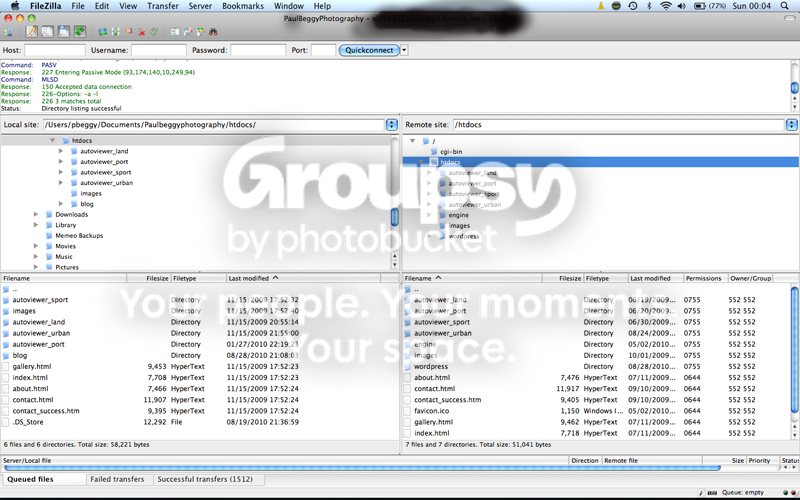
Thanks for your help, but I don't have a public.htlm folder in my webspace that I can see. This is what I'm seeing if it helps :)

Screenshot2010-08-29at000447-1.png
 
Last edited:
Hi Paul

Thats ok, just depends how your hosting space sets it up. If the wordpress software is on your desktop locate it on the local site (left side upper part) open the wordpress folder by double clicking so that all the files expand into the lower left side. Select all the files making sure you do not select the folder at the top of that list if there is one. Drag them all over to the lower box on the right. You will see that the bottom file on that side reads index.html in your pic, this is what controls your site. When you have dragged the wordpress files over the wordpress index.html will now work.

Are you ok with creating a database for your wordpress?

stew
 
Hi Paul

Thats ok, just depends how your hosting space sets it up. If the wordpress software is on your desktop locate it on the local site (left side upper part) open the wordpress folder by double clicking so that all the files expand into the lower left side. Select all the files making sure you do not select the folder at the top of that list if there is one. Drag them all over to the lower box on the right. You will see that the bottom file on that side reads index.html in your pic, this is what controls your site. When you have dragged the wordpress files over the wordpress index.html will now work.

Are you ok with creating a database for your wordpress?

stew

Thanks again Stew. I'm using Freeola, I have followed their wordpress install to the letter, guide was this one.

http://freeola.com/support/wordpress_help.php

After I've double clicked the wordpress folder on the left do you mean to drag the contents across to the index.html on the right hand side?

Are you ok with creating a database for your wordpress?

Haven't a clue truth be told. I thought all this would be somewhat more easy than it is - I'm sure it is easy to someone who isn't a klutz like moi :(
 
the index.html is not a folder its a file and when you drag the wordpress files over the wordpress index.htlm will automatically over right it or you will be asked to confirm over writing it.

Once you have dragged the files over the first time you try to open your site you might get asked for the database name, user and password. I had a quick look at the freeola link and it covers the instructions there.

Going to be logging off for the day in a moment or two

stew
 
Hang on I missunderstood what you were asking. I thought you wanted the url to be .co.uk

Give me a moment to check something

stew
 
I wondered if you could simply rename the folder but no you cannot, it breaks the links

To do what you want in filezilla go to your root directory, in the bottom right hand corner, as per your pic above, right click your mouse and create a new directory, call it blog.

Now over on the left open up the wordpress folder and leaving out the folder highlight all the files, drag them over to the new directory called blog and wait for the job to be done

now go to www......................co.u/blog and it should be there.

Let me set up a pic and I will post it in a moment

stew
 
Picture18.png


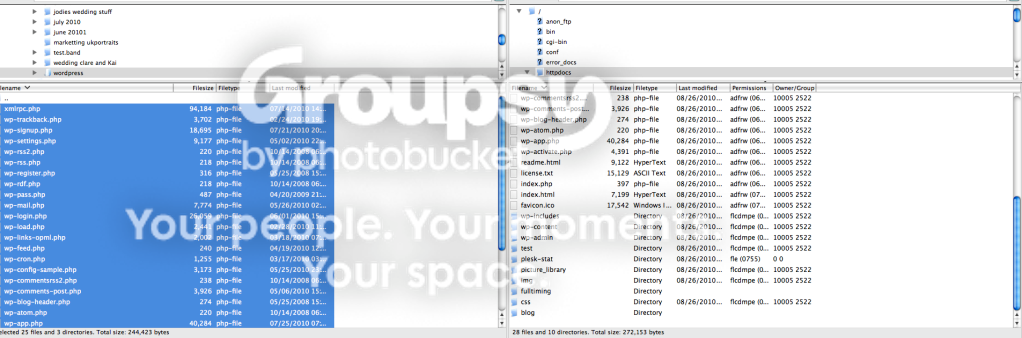
I have highlighted all the files other than the folder above xmlpc.php and all the way down to wp-admin folder at the bottom which you cannot see on this screen grab.

On the right box I have created a folder (directory) called blog and would now drag and drop all the files into this directory

stew
 
This is how I see it

Blogs are for blogging / or can be used like lite versions of CMS's - for sure wang a few images in a post, but using a blog as if it is a gallery is a pain in the butt

Galleries are for serving images - and the good ones allow bulk uploads - (1000's of photo's at once)

Blogs and galleries can be integrated together or mimic each other - offering the user a seamless experience, and offering you the best tools in the backend to do the job swiftly and easily

There is no point messing about with free or next to free hosting if you are hosting a gallery that sells images - you want a decent amount of bandwidth and storage space, and all the options for SSL, databases and the like. It doesn't cost much to get decent enough hosting, and you dont want to be deleting stuff to get new stuff in
 
Last edited:
totally agree Richard. We have now gone with dedicated hosting. Totally new set of knowledge to learn but nice to know we are not going to have issues with bandwidth or disc space.

Our previous hosting company claimed unmetered bandwidth but they took our site down when we hit the bandwidth limit???!!!!!!

stew
 
totally agree Richard. We have now gone with dedicated hosting. Totally new set of knowledge to learn but nice to know we are not going to have issues with bandwidth or disc space.

Our previous hosting company claimed unmetered bandwidth but they took our site down when we hit the bandwidth limit???!!!!!!

stew
and that's "EXACTLY" when you dont want the site to wobble... when it starts getting busy
 
Picture18.png


I have highlighted all the files other than the folder above xmlpc.php and all the way down to wp-admin folder at the bottom which you cannot see on this screen grab.

On the right box I have created a folder (directory) called blog and would now drag and drop all the files into this directory

stew

Stew,

Thanks again for all your help - all sorted now :) .
 
Back
Top