j peg or raw

Your completely missing my point.

Listen in a semi mode that means that you control some settings whilst the camera not you determines the rest.

OK. Explain the difference between these two scenarios.

1. I determine that I want to shoot at f4 and 1/100s with an ISO of 100. I enter 'M' mode and dial in those settings and sit back, smug in my feeling of complete control.

2. I am in Tv mode and the cameras metering has determined that I require an aperture of f2.8, shutter speed of 1/100 and ISO 100. However, I know that I'm shooting something dark and the camera's metering system hasn't got it right. So I dial in one stop of Exposure Compensation, thus changing the aperture to f4.

In scenario 2, exactly which camera settings for the final exposure have been selected by the camera and not me?
 
Maybe we should have a debate on Raw 14bit VS 8bit Jpeg and end this war

JPEG shooters are amateurs who don’t know how to extract the maximum IQ from a digital file and are too lazy to learn how to use Photoshop. Why would they even buy a DSLR if they’re going to shoot JPEG? They’d be better off just shooting with a P&S camera Real professionals only shoot RAW.

The thing about pros shooting only JPEG is most convenient for them. Sports shooters and journalists shoot mainly JPEG because they need to get their photographs uploaded to their agencies or newspapers as soon and quickly as possible. They don’t have time to upload 10-20MB files at a time.

Shoot RAW if you enjoy postprocessing or you feel the subjects you shoot are too complex from a dynamic range perspective and/or the camera cannot capture the scenes you shoot as you see them. If you shoot B&W and want to do more than just press the monochrome button, then RAW is probably the best option. If you are shooting under tough lighting conditions (and pressed for time) and are not sure the camera will meter correctly, shoot RAW to give yourself some leeway if you need to adjust a shot in postproduction.

Shoot JPEG if you don’t enjoy postprocessing and have your camera set up such that the photos that come straight out of it are to your liking. If you are strapped for space on your computer, shooting JPEG will allow you to store many more files, and you can also fit more images on each memory card when you’re out shooting. Many people are not computer savvy and would like to stay as far away as possible from a laptop—there’s nothing wrong with that, and these people are one of the reasons engineers spent so long programming the JPEG engine in those cameras

That said, there will be sports photographers that shoot RAW and landscape photographers that shoot JPEG. JPEG and RAW are more than just file formats—they’re tools. Good artists use tools to their advantage and start off by choosing the appropriate ones; remember that
 
Last edited:
Blimey. I think that I actually agree with something that Michael posted for once!
 
And unlike many people assert on here it IS possible to adjust many of the parameters of JPEG including sharpness, WB, contrast, colour saturation on my computer.

You can sharpen the Jpeg again. Generally the Jpeg has already been sharpened as part of the process to turn the data from a RAW file to Jpeg in camera. Not many people have no sharpening applied in camera. Most people say if you are doing any editing leave sharpeing till the last step, with final display medium, print or internet/computer, having an on the final amount of sharpening.

You can not apply a WB to a Jpeg. You can alter the colours, because the colours have been fixed when saved as a Jpeg, and in the process possibly degrade the pixels, especially if it is a big change. Until a RAW file is saved as a Jpeg or Tiff it has no fixed WB or colour, so making changes doesn't degrade pixels.

A RAW file is a 12 or 14bit file giving more levels/colour to change than an 8bit Jpeg. Yes, at the final step may be an 8bit, but there is more data to allow for more subtle changes before that final step.

And JPEG also takes up less space and permits many more shots on continuous shooting than RAW.

Yes it does. But depending on the camera, and the situation, it may be of little or no consequence. :shrug:


A lot of people say Jpeg if you don't image editing and RAW if you do, but it's not as black and white as that. If you brighten/darken, sharpen most of your Jpegs that come out of the camera then that could be as much as you do to a RAW, and the action of re-saving the edited Jpeg is as much work as saving the RAW as a Jpeg/Tiff. :shrug: If you open a RAW file and it is how you want it to be, because just because it has been recorded as a RAW file doesn't automatically make it wrong, just as a recorded as a Jpeg doesn't make it right. :shrug: The RAW data gives you more information to work with should you want to edit, or print at a larger than usual. If not at least you can save the image with the amount of compression appropriate for the final result/purpose, rather than the fixed amount applied in the camera.

I'm pro using RAW in case you are in any doubt, but it is up to the individual to decide what is best for them and the situation. But at least know the pros and cons of the choice you make. ;) :lol:
 
In Michael’s original post he stated that he was new to dslr photography, a bit like myself. I initially tried all the different modes with varying success/results.

At my local club I was advised at this stage to shoot in auto or program mode. This would ensure I got reasonable images whilst I learn to handle the camera and I could concentrate more I what I was actually taking the picture of.

When I am getting “good” images I will look to learning how to process RAW files but for now I have been able to adjust JPEGs in iPhoto and end up with pleasing results.

I think becoming embroiled in the RAW versus JPEG is pointless at the early stages although I do accept that this was the substance of Michael’s post.

A Happy New Year to all!

Phil
 
Once an image is compressed to JPEG your pretty screwed in regards to any serious photo post processing and you've already lost tons of pixel quality and important image information.

Jpeg is fine for the novice hobby happy snapper, but for serious post pro Photographer then RAW is the way to go.

Getting it right in the camera is a bit of a myth, even pros don't get right in the camera most times, you can get close in the camera, but never perfect .

I like a good laugh before I go to bed...

I only ever shoot jpeg. Messing around with raw processing for a bulk of commercial images just isnt profitable. Although a RAW may hold slightly more data than a jpeg, what you can do to a raw image, you can do to a jpeg. Sharpen, colour correct, white balance, etc, etc, etc..

Get it right in camera. Give it some PP to your taste if you want. Job done.
 
Last edited:
what you can do to a raw image, you can do to a jpeg. Sharpen, colour correct, white balance, etc, etc, etc..

Nope. You cannot alter white balance in a jpeg. You can attempt to muck about with the colours, but it's not the same.

The best thing to do is try it. Go outside on a sunny day, set your WB to 'Tungsten' and take two shots - one raw one jpeg. Now import/open them into your favourite raw processor. It may not let you alter the white balance of the jpeg. In that case open it in any image processor and try to get the colours correct. Now try the raw image. In LR's develop module you can try all the different WB options all without losing any data at all.
 
Nope. You cannot alter white balance in a jpeg. You can attempt to muck about with the colours, but it's not the same.

The best thing to do is try it. Go outside on a sunny day, set your WB to 'Tungsten' and take two shots - one raw one jpeg. Now import/open them into your favourite raw processor. It may not let you alter the white balance of the jpeg. In that case open it in any image processor and try to get the colours correct. Now try the raw image. In LR's develop module you can try all the different WB options all without losing any data at all.

Yup you can. Once upon a time shot a whole indian engagement in jpg and raw and thanks to the lovely videographers and their rubbish and inconsiderate lights the white balance was all over the place for the set. For processing started using the RAW editor to get the white balance consistent, but equally had a play with the jpg in CS2 (as I had at the time) using exactly the same method my raw editor has. The results were the same so I completed the edit with the jpg and never shot raw again. Too time consuming. Speedy workflow equals more profit.
 
Last edited:
Agree that white balance can be altered with jpegs by putting jpegs through the raw editor in adobe iirc.

I apologise to FirebrandNIRE using the BS term, but in fairness your posts do, IMHO, come accross as My Way...the Only Way, which is BS. You may have not meant this and it may only be my perception, if so, I again apologise.
 
Yup you can. Once upon a time shot a whole indian engagement in jpg and raw and thanks to the lovely videographers and their rubbish and inconsiderate lights the white balance was all over the place for the set. For processing started using the RAW editor to get the white balance consistent, but equally had a play with the jpg in CS2 (as I had at the time) using exactly the same method my raw editor has. The results were the same so I completed the edit with the jpg and never shot raw again. Too time consuming. Speedy workflow equals more profit.

You may be able to neutralize the colours, but you are adjusting the recorded colours, actually altering the pixels. The RAW file isn't an image until it is saved.

You also don't have the same options in, Adobe Camera Raw at least, with a Jpeg as with a RAW file in relation to WB. The WB presets are lost because you are not altering the WB because the program doesn't know what colours it is starting with, it can't use presets.

You can still use the White Balance Tool and the Temperature and Tint sliders, though instead of Kelvin values (again, because you are not altering the WB) it is +/-100. That would be fine enough if you have something neutral to click on, but what if you have a red rose against green foliage? The White Balance Tool becomes virtually useless so you are left with the sliders, whereas if it were a RAW file you could click on a preset to get you closer to the correct colours to continue editing. There is the Auto 'WB' option, but that is dependent on the colours in the scene, and could change for each image.

Using RAW isn't just about WB though, as most of the time the WB is close enough to correct to only need subtle changes which is fine enough with the Jpeg.

If it works for you though, do what works and makes the money. :)
 
The worse advice I have ever seen on talk photography is probably the most constant.. especialy when it comes to white balance...


Shoot raw and fix later


That is basically telling you to take bad pictures but take them in raw and you can fix them them later.....

I have nothing against raw and will use it myself for important pictures such as the rare occasion all my grandchildren are in the same room or an important team piucture... I will use raw just incase........ But to live your wholle photography life shooting in raw just in case you get it wrong is plain....well....wrong.


like anything else on your camera ..raw has its place.. but if you live by it you will never have the confidence to take a good picture without it..
 
Last edited:
The worse advice I have ever seen on talk photography is probably the most constant.. especialy when it comes to white balance...

Shoot raw and fix later

That is basically telling you to take bad pictures but take them in raw and you can fix them them later.....

I think a lot of people emphasize the fixing rather than getting the best image when talking about using RAW. You should always get the best image no matter what. :shrug:

But to live your wholle photography life shooting in raw just in case you get it wrong is plain....well....wrong.

Do you use both the memory card slots on your camera 'just in case'? ;)

like anything else on your camera ..raw has its place.. but if you live by it you will never have the confidence to take a good picture without it.

Just because you're shooting RAW doesn't mean you don't have the confidence to take good pictures without it. :shrug:


I can see what you're trying to say though. ;)
 
You can not apply a WB to a Jpeg. You can alter the colours, because the colours have been fixed when saved as a Jpeg, and in the process possibly degrade the pixels, especially if it is a big change. Until a RAW file is saved as a Jpeg or Tiff it has no fixed WB or colour, so making changes doesn't degrade pixels.

I'm sorry but I just don't understand what that means.

Whether you apply WB to RAW or JPEGs the final result is that pixels change colour - or are you saying that applying WB to a RAW file does not change the colours because if it doesn't then what is the point?

I can apply WB to JPEGs in Canon DPP in the same way as I can apply it to RAW.

I can also set custom WB in my camera to the JPEGs.

ALL result in a change of pixel colours.

.
 
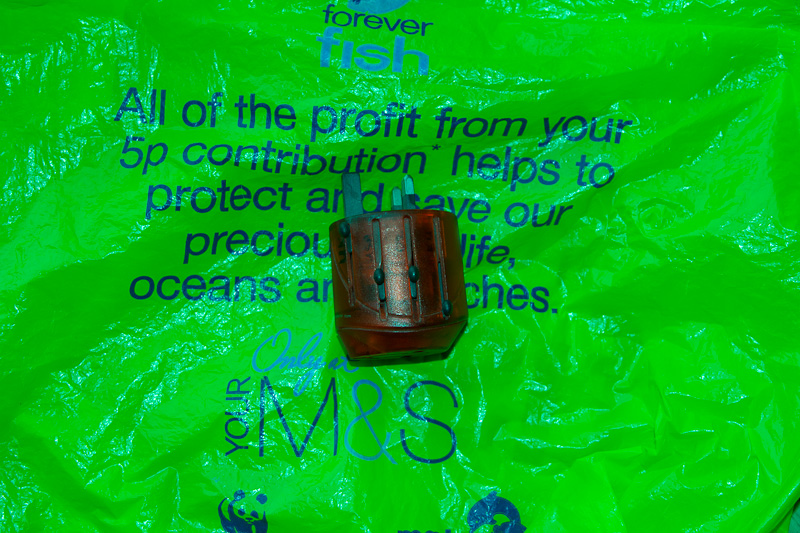
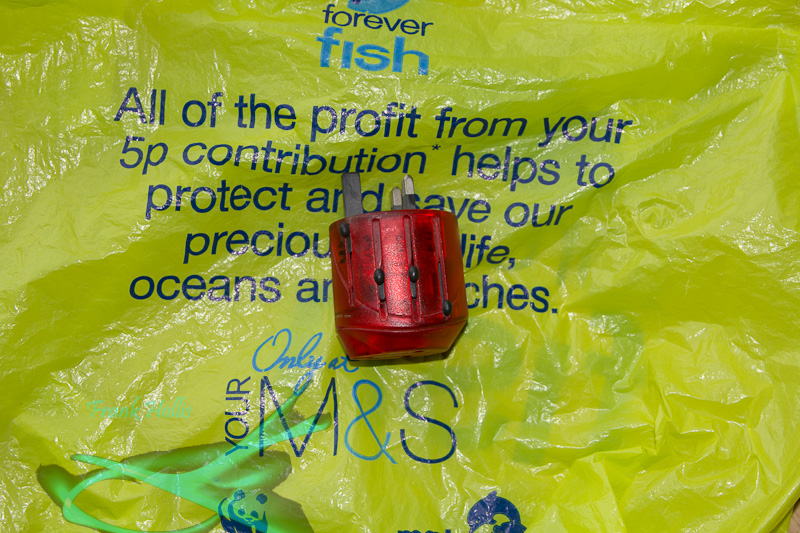
Here's the jpeg from a shot with the wrong WB.

Wrong%20WB%20Jpeg.jpg


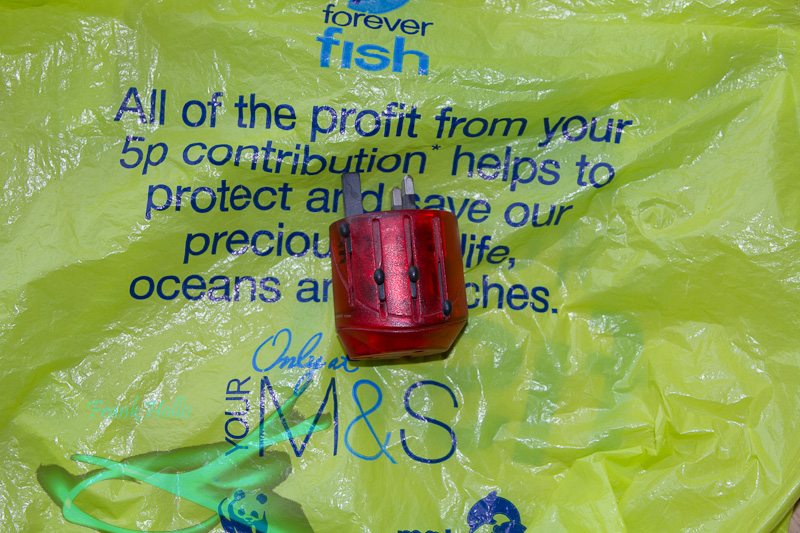
Here's the raw file, processed solely by importing into LR and selecting 'Auto' for the WB, then exporting.

Wrong%20WB%20raw.jpg


I'd love to see the results of the jpeg being processed to get the correct colours.
 
Here's the jpeg from a shot with the wrong WB.

Wrong%20WB%20Jpeg.jpg


Here's the raw file, processed solely by importing into LR and selecting 'Auto' for the WB, then exporting.

Wrong%20WB%20raw.jpg


I'd love to see the results of the jpeg being processed to get the correct colours.

And what are the correct colours because the only "Forever fish" bag I can find is this:

http://www.google.co.uk/imgres?q=fo...0&ndsp=15&ved=1t:429,r:1,s:0&biw=1024&bih=639

which looks totally different from both the pics above.

.
 
I'm sorry but I just don't understand what that means.

Whether you apply WB to RAW or JPEGs the final result is that pixels change colour - or are you saying that applying WB to a RAW file does not change the colours because if it doesn't then what is the point?

I can apply WB to JPEGs in Canon DPP in the same way as I can apply it to RAW.

I can also set custom WB in my camera to the JPEGs.

ALL result in a change of pixel colours.

.
It's not about changing the colour of the pixels, it's about the colour of the light falling on objects and the fact that different colours react differently to that light.;)

if we process a JPEG shot under tungsten light, we will have a yellow colour cast, we can attempt to balance that in PS by boosting the blue (simplified but you get the point). However, even if the white point now appears to be white, you have shifted the colour of everything in one direction.

But some of the other colours will shift in the wrong direction, so some things might look OK, but if you're aiming for consistent colour in different conditions you'll have a nightmare on your hands.:'(

To prove this; try this experiment; take a series of JPEGs using daylight WB (for consistency) of a red a green and a blue object - add a flesh colour too if you like. Then take a picture of these objects under daylight, tungsten and flourescent light. Straight away, what you'll see isn't simply a colour cast, it's that the tones will differ in relation to each other. Doing a straight B&W conversation of these will be illuminating, and proof that a WB change to a RAW file isn't simply something you can fake by altering the colour information held in a JPEG.

BTW, I haven't tried this experiment or even seen it done, but a rudimentary understanding of light from O level physics (32 years ago) is enough for me to predict the outcome.:geek:
 
I'd love to see the results of the jpeg being processed to get the correct colours.

Challenge accepted. ;)


WB Challenge-2 by Carousels Spin, on Flickr

Not a bad effort, although in retrospect I would mess around with the colours to make them less yellow and more green. However, now I have to rush to get ready because I elected to do this instead ... so said messing will have to wait until later. :bonk:
 
And what are the correct colours.

It matters not one jot. The claim is that it is possible to manipulate WB in a jpeg exactly the same as it is possible to manipulate WB in a raw file. Whether said manipulation is to acheive the exact correct colours or the users desired colours is immaterial.
 
The worse advice I have ever seen on talk photography is probably the most constant.. especialy when it comes to white balance...


Shoot raw and fix later


That is basically telling you to take bad pictures but take them in raw and you can fix them them later.....

I have nothing against raw and will use it myself for important pictures such as the rare occasion all my grandchildren are in the same room or an important team piucture... I will use raw just incase........ But to live your wholle photography life shooting in raw just in case you get it wrong is plain....well....wrong.


like anything else on your camera ..raw has its place.. but if you live by it you will never have the confidence to take a good picture without it..

That is basically telling you to take bad pictures but take them in raw and you can fix them them later.....


thats what i am hearing as well

as i said you cant tell if a good photo is raw or jpeg by looking at it its just a good photo
 
After reading all this, I turned to DPReview where their top 100 Challenge winners have just been put up. Here http://www.dpreview.com/news/2012/01/04/challengeofchallenges

I'm struck by the fact that, if you want to take great pictures, the best thing to do is point your camera at something interesting and press the shutter release at the right moment. On the evidence of the fantastic images shown there, the technical niceties are almost irrelevant.

The equipment used is often modest, with some of the best shot on compacts. I defy anybody to say which ones were shot as JPEGs or Raw, though clearly a lot of them must have been JPEG.

The winner, an amazing capture of a kingfisher with fish, was taken on a 20D and 300mm lens, which means that unless the bird was perched on the end of the lens it's a very big crop from a fairly old camera with only 8mp. Looks pretty good to me.
 
How different is this?

Don't know what the intent is so all I did was.... create adjustment levels layer, then select colour... highlights.. clicked on layer adjustment and picked white eye dropper and looked for the whitest highlight pixel I could find in the selection clicked and bish bash bosh WB adjusted. Is it right? Well I have no idea as 10 people here could do it and we could have 10 different results. Not sure about your auto WB to be honest, doesnt look right.

WillywavingWBcompJpeg.jpg
 
Last edited:
JPEG and the colours are exactley as they where in real life.

shoot raw to fix mistakes if you like,i prefer to get it right at the start.


"could you see this is a JPEG if i hadnt told you"?


JM7_0146.jpg


more JPEGs


JM7_0127.jpg


ea29cbc7.jpg


rock and roll JPEG taken in changing light WB what WB?


65f0f3aa.jpg


robin JPEG


b9159f2f.jpg


fast action,moving lights JPEG


DSC_0643A.jpg
 
It's crazy to suggest that you can't correct white balance perfectly well on a JPEG. The evidence of my own eyes quite clearly says you can.
 
if you can tell me how any of those would be a better photograph if i used RAW then i will think about changing. :)
 
if you can tell me how any of those would be a better photograph if i used RAW then i will think about changing. :)

I agree, on the whole, but the last one is a poor example. You'd get more out of those blitzed highlights from the Raw.
 
It's crazy to suggest that you can't correct white balance perfectly well on a JPEG. The evidence of my own eyes quite clearly says you can.

But 'your eyes' fool you all the time by filling in missing information. They're hardly a basis for a scientific test of the colour of light. If you see a Man Utd shirt in different coloured light, you'll 'know' what colour it is, your eyes and your brain work together to tell you what you're looking at, your camera sensor will see completely different things.
I'm guessing you won't take the time to try the experiment I suggested, but hopefully in reading it a penny may drop. By altering WB on a RAW file, we're not changing the colour of pixels, we're changing the way that they reflect the colour of light falling on them.

It's not about changing the colour of the pixels, it's about the colour of the light falling on objects and the fact that different colours react differently to that light.;)

if we process a JPEG shot under tungsten light, we will have a yellow colour cast, we can attempt to balance that in PS by boosting the blue (simplified but you get the point). However, even if the white point now appears to be white, you have shifted the colour of everything in one direction.

But some of the other colours will shift in the wrong direction, so some things might look OK, but if you're aiming for consistent colour in different conditions you'll have a nightmare on your hands.:'(

To prove this; try this experiment; take a series of JPEGs using daylight WB (for consistency) of a red a green and a blue object - add a flesh colour too if you like. Then take a picture of these objects under daylight, tungsten and flourescent light. Straight away, what you'll see isn't simply a colour cast, it's that the tones will differ in relation to each other. Doing a straight B&W conversation of these will be illuminating, and proof that a WB change to a RAW file isn't simply something you can fake by altering the colour information held in a JPEG.

BTW, I haven't tried this experiment or even seen it done, but a rudimentary understanding of light from O level physics (32 years ago) is enough for me to predict the outcome.:geek:
 
what you can do to a raw image, you can do to a jpeg. Sharpen, colour correct, white balance

How different is this?

Vastly.

Don't know what the intent is

The intent is for you to exactly duplicate the image I produced from the raw data by pressing 'Auto' for the WB. But to do it from the jpeg image - to back up your statement above.

I don't care about getting it exactly the same is in real life, just replicate what the raw data produced.
 
JPEG and the colours are exactley as they where in real life.

It must be so great to be perfect.

Unfortunately I am a human being and I make mistakes. I once shot half an hour in Africa with the wrong WB (hey, it was 06:00 the day after my 50th birthday - I think I had an excuse).
 
Vastly.

The intent is for you to exactly duplicate the image I produced from the raw data by pressing 'Auto' for the WB. But to do it from the jpeg image - to back up your statement above.

I don't care about getting it exactly the same is in real life, just replicate what the raw data produced.

Why would I want to duplicate a workflow which doesnt (didn't?) produce practical results? :thinking:
 
Last edited:
It matters not one jot. The claim is that it is possible to manipulate WB in a jpeg exactly the same as it is possible to manipulate WB in a raw file. Whether said manipulation is to acheive the exact correct colours or the users desired colours is immaterial.

Well it certainly matters for a great number of pictures - portraits, landscape indoor shots, etc.

.
 
Raw all the time, sharpening, as just one example, in Lightroom or Photoshop gives nicer results, to my eyes anyway, than the cameras jpeg engine, I do use a Sony though which is criticised for its jpeg output.
 
Oh and I noticed it was nearly a stop under exposed so I've corrected that as well. Looks different again. The original image is stored within my CS5 file as I've used layers to adjust this. Switch them off and I have my/your original image.

WillywavingWBcompJpeglevels.jpg
 
Last edited:
Why would I want to duplicate a workflow which doesnt (didn't?) produce practical results? :thinking:

Well it certainly matters for a great number of pictures - portraits, landscape indoor shots, etc.

Excuses, excuses, excuses.

OK. Even though it matters not one jot. I went and used my Colorchecker to give me a custom WB setting - which gives extremely close colours compared to real-life.

Wrong%20WB%20raw%20fiddled.jpg


Actually, I think this version will make it more difficult as the reds appear brighter - and that's the hard part for the jpeg conversion. The application of the wrong WB settings has eliminated a huge chunk of the red colour info and it's just not possible to retrieve what ain't there.

Conversion of raw data to a viewable 8 bpc image requires a lot of data to be thrown away. The WB setting is one of the more important parameters in deciding just what information gets thrown away. And once that info is gone, then it's gone for good.

Oh, and it's not that I don't trust people, but a history, or recipe, for any successful conversion would be neat - just in case somebody tries to cut'n'paste the red power adaptor.
 
But 'your eyes' fool you all the time by filling in missing information. They're hardly a basis for a scientific test of the colour of light. If you see a Man Utd shirt in different coloured light, you'll 'know' what colour it is, your eyes and your brain work together to tell you what you're looking at, your camera sensor will see completely different things.
I'm guessing you won't take the time to try the experiment I suggested, but hopefully in reading it a penny may drop. By altering WB on a RAW file, we're not changing the colour of pixels, we're changing the way that they reflect the colour of light falling on them.

I'm not sure I follow your logic there (and note that you haven't done the experiment yourself either!).

If you photograph different coloured objects under different coloured light, yes the tonal relationship between them is fundamentally altered. Same principle as using an orange filter in balck & white photography to make clouds stand out - darkens blue/green and lightens red/yellow. But that happens before any light reaches the sensor and what is recorded is the same regardless of Raw/JPEG.

I'm not sure what you're saying exactly, but is it that with a JPEG that tonal relationship is locked, and on the Raw it's fluid? Meaning perhaps that you can't adjust individual colours? In which case, I beg to differ.

I'm not suggesting that you can change a JPEG in absolutely the same way as Raw or that there is the same room for manoeuvre (there isn't) but if all you want to do is tweak the colour a bit to make things look better, rather than correct a total disaster, then JPEGs are fine.
 
Excuses, excuses, excuses.

OK. Even though it matters not one jot. I went and used my Colorchecker to give me a custom WB setting - which gives extremely close colours compared to real-life.

Wrong%20WB%20raw%20fiddled.jpg


Actually, I think this version will make it more difficult as the reds appear brighter - and that's the hard part for the jpeg conversion. The application of the wrong WB settings has eliminated a huge chunk of the red colour info and it's just not possible to retrieve what ain't there.

Conversion of raw data to a viewable 8 bpc image requires a lot of data to be thrown away. The WB setting is one of the more important parameters in deciding just what information gets thrown away. And once that info is gone, then it's gone for good.

Oh, and it's not that I don't trust people, but a history, or recipe, for any successful conversion would be neat - just in case somebody tries to cut'n'paste the red power adaptor.

At least that's cleared one thing up Frank - I wondered what the heck it was! :D
 
Back
Top