Let's see your focus stacking

Messages
61
Edit My Images
Yes
Hiya, I'm learning about focus stacking, I like this photo but there was a lot of ghosting around the feather, any tips would be appreciated, using Lightroom and Ryan's raw tools.

Dan :)
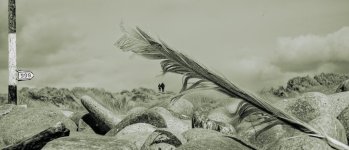
1000054685.jpg
 
Have a look at Macro studio for stacking, very simple to use and has a lot of features. Currently £79 one-off with free updates, there's also a 30 day trial.

This one is 24 frames stacked in MS and edited in LR.

Tethered by nigel addecott, on Flickr
 
Have a look at Macro studio for stacking, very simple to use and has a lot of features. Currently £79 one-off with free updates, there's also a 30 day trial.

This one is 24 frames stacked in MS and edited in LR.

Tethered by nigel addecott, on Flickr
Wow, so detailed! Thanks for sharing. I currently use Ryan's raw tools plugin on lightroom. I'll change to that when I can afford it :)
 
  • Like
Reactions: mex
I tried focus stacking with my digital microscope to get a high power image of a flies ankle sadly the focus control was far to crude to manage more than 5 images to stack
House fly ankle by Mike Kanssen, on Flickr

Results were a bit better with some macro shots of a large scorpion.
black scorpion 2 stack by Mike Kanssen, on Flickr

It's probably 10 years since I tried focus stacking, probably time to try it again
 
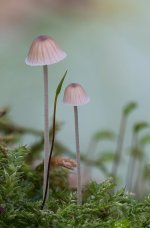
I have played with stacking in photoshop, then after the frustration of having to hand edit the stack tried a couple of software packs - now use a different shoot process to get the effect I want - this was in PS with abit of a twiddle

mycena-stack-sml.jpg
 
Last edited:
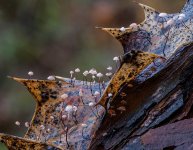
Marasmius hudsonii - not stacked - single frame. I got tired of editing errors in the stacked image- completely agree Affinity is better than PS but i try to get the required in focus i want in 1 frame now :) - thats about 1/2 of a holly leaf and aprox 1/4 of the full frame

M-hudsonii-sml.jpg
 
Last edited:
Hiya, I'm learning about focus stacking, I like this photo but there was a lot of ghosting around the feather, any tips would be appreciated, using Lightroom and Ryan's raw tools.

Dan :)

View attachment 496385

Just my tips
Good Tripod - flash with defuser, (I used a home made one) -I used a 100mm MF lens, (manually micro adjust distances) - experiment with different f setting - try f16, (that's why flash is needed) - at least 5 shots - but sometimes 10, but the more the merrier depending on the subject and the DoF you want - PS provides basic stacking software - but other apps are better..........if using a DSLR - mirror up
Takes some time to get even a reasonable shot - can be very frustrating - I have only used focus stacking for macro shots

not done much photography recently, so a bit "rusty"
 
Last edited:
Just my tips
Good Tripod - flash with defuser, (I used a home made one) -I used a 100mm MF lens, (manually micro adjust distances) - experiment with different f setting - try f16, (that's why flash is needed) - at least 5 shots - but sometimes 10, but the more the merrier depending on the subject and the DoF you want - PS provides basic stacking software - but other apps are better..........if using a DSLR - mirror up
Takes some time to get even a reasonable shot - can be very frustrating
add to that - use a remote release and Mirror up ( if not a mirrorless camera ) for each shot - no ( or very little ) vibration or camera movement to compensate for then.


OM 1 with the 90 mm Macro using the in camera stacking

The in-camera stacking with OM is very good and generally accurate, as long as the subject and you are still, but the 15 shot limit.............meh.
 
Wow, so detailed! Thanks for sharing. I currently use Ryan's raw tools plugin on lightroom. I'll change to that when I can afford it :)

Get the 30 free trial, see if it's for you before parting with your hard earned.
 
The in-camera stacking with OM is very good and generally accurate, as long as the subject and you are still, but the 15 shot limit.............meh.
Yes the 15 shot limit is a factor but assuming things are still, then the outcome for something that takes what 30 seconds is pretty good.

I would still use Affinity for anything more serious, but for a quick capture the OM system is fab
 
I always found the old Affinity Photo was better at stacking than photoshop.

I haven't done much in the way of photography recently however, so things may have changed.

I found the same , its one reason that I now use Affinity along with DXO photolab
I recently tried Zerene and intend to get that soon, Affinity is excellent but Zerene is easier to make corrections in the stack, for example if the Damselfly moves its wing a little bit during taking the images
 
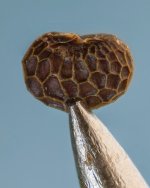
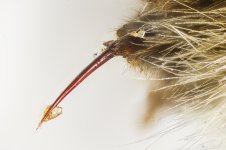
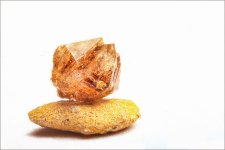
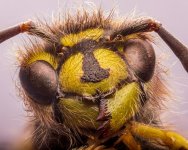
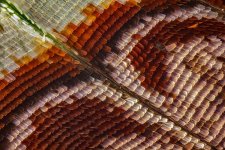
A few of my more successful stacks from recent times, mostly done with either a reversed lens on bellows, a 8x microscope objective on tubes and a slide rail, or a reversed lens on a tube lens/ slide rail. Not sure I can remember off hand how many layers were in each one but for the micro pics its between 20 and 40 layers sometimes a bit more. All stacking done with Affinity and then tidied and edited in PS.

1. Poppy seed on a pin head, 8x microscope objective
needle2-topaz900.jpg

2. Bumble bee stinger, 8x microscope objective
Stinger1600.jpg

3. Sand garnet on a piece of sand 28mm Takumar lens reversed on bellows
sand1024.jpg

4. Wasp portrait same setup as the sand above but with less magnfication
wasp8v1024.jpg

5. Cellar Spider portrait, reversed wide angle lens on a tube lens
cellar spider2v1024.jpg

6. Scales of a butterflies wing reversed 28mm lens on a 150mm tube lens
ButterflyWing4colour1024.jpg
 
Last edited:
Back
Top