MacBook froze up again

Messages
6,385
Name
Emily
Edit My Images
No
Having Mac issues this time, (Julie is behaving... Knocks on wood)

here's the scenario....

I was mixing on the 1s and 2s, using Traktor Scratch Duo and the Audio 4 DJ USB soundcard, all my music is stored on a 1TB USB HDD.

halfway through a scratch routine, everything froze solid, no mouse movement, keyboard stopped responding, no sound output, in fact the only thing I could do was hold the power button down for a few seconds to turn it off and back on.

I'm really stumped on what caused this, now bearing in mind my MacBook is 5 years old and the only upgrades it's had were a new hard drive and memory, this is the first time it's started acting up.

could it be software or hardware ie logic board starting to "let go"

:thinking:

any ideas appreciated

Thanks


Emily
 
Did you get a spinning beach ball or did it just lock up?

When you restarted did everything work OK and did the hang re occur ?

I'd run Disk utility and do repair permissions. Might not do any good but won't do any harm. I'd also repair permissions on the ext HD as well
 
hiya cheers for the reply....

when the system crashed, there was no spinning beach ball, it just froze, after restarting it seems to work ok.

this problem happens every other day, which is why I suspect a hardware fault

:)
 
Don't know anything about macs but if it were a PC or laptop I'd say overheating. Is the fan working and intake etc clear of fluff?
 
May be a bit of a pain, but try running without the ext HD. See if it still hangs. It's really a question of eliminating potential causes.

The overheating idea may be a route to take as well. If the inlets are clear of fluff try raising the Mac Book a few centimetres above the work surface to give a better circulation.

You could install a temp monitor, like SMC Fan Control. This monitors the temp of the CPU's and will give you an idea if overheating is the problem
 
5361102628_13e0dc0ae7_z.jpg


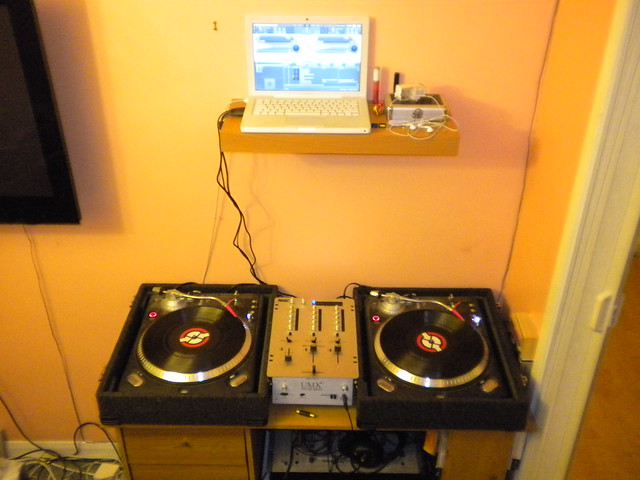
This is how it's setup,

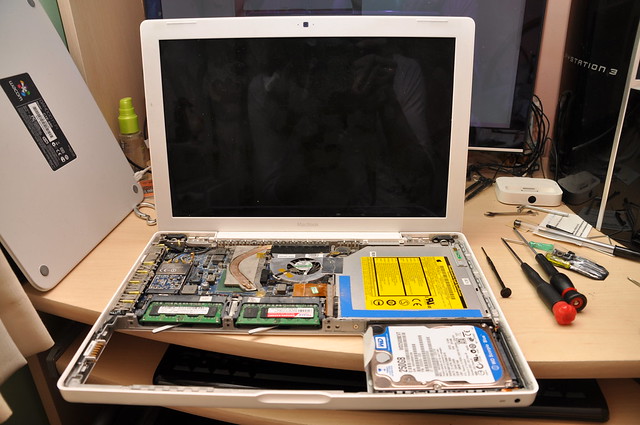
anyways I'm going to take the cover off and clean the inside of any fluff, re-paste if needed.
I know it's not USB device related as it hangs when nothing is plugged in.

overheating is likely cause :)


cheers for you help so far :thumbs:
 
Sudden freezes are usually overheating or a firmware issue.

You can do the PRAM reset which often helps if the innards have got themselves confused. Had to do this on my 3 year old macbook as the keyboard and touchpad kept freezing.

If you install itstat menus then you can see what temp everything is running at. A good clean out is advised though as my imac used to freeze til I remembered to remove the fluff off the vents :)
 
5367269694_9105c8bffa_z.jpg


Partially disassembled MacBook


5366661635_f8864a9028_z.jpg


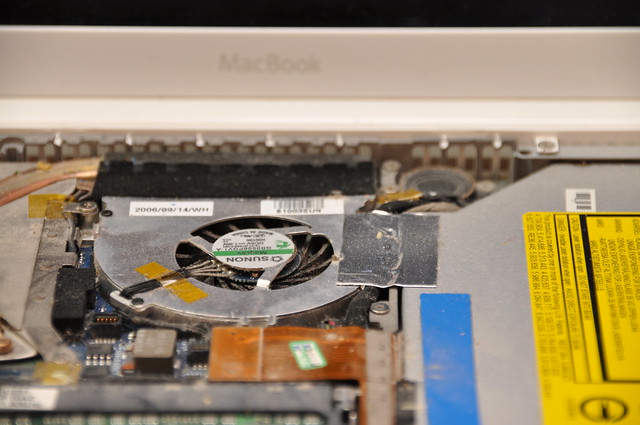
MacBook Fan


5366665019_b5483e1b86_z.jpg


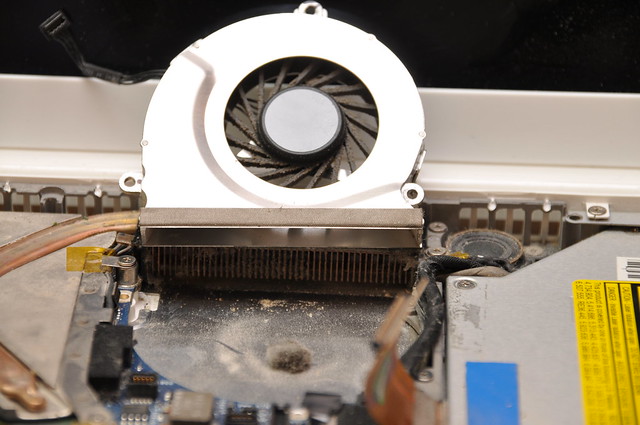
Fan Dust

:)
 
Overheating sounds like the most likely thing. As others have said SMC fan control is great for monitoring temp and controlling fan speed yourself (i have to do this on my macbook pro when watching 1080p). Also try raising it about a cm above the table top and that'll hugely improve how efficiently it can stay cool.
 
out of interest, what can be done when you get the spinning beach ball?

nothing seems to respond.

can you kill an app in mac, like in windows where you can bring up task manager?
 
Overheating sounds like the most likely thing. As others have said SMC fan control is great for monitoring temp and controlling fan speed yourself (i have to do this on my macbook pro when watching 1080p). Also try raising it about a cm above the table top and that'll hugely improve how efficiently it can stay cool.

it's all back together now, will have to leave it running, to see if it freezes again


maybe just the applications fault? any updates available for it?

the applications and USB soundcard drivers are all up to date, one of the first things I checked, thanks for the mention anyways :thumbs:
 
If it is just the app that has frozen then if you right-click on the icon you can select the Force Quit; or open up Activity Monitor (like task manager) and force quit from that.

If the whole computer has frozen then it has to be a hard restart
 
out of interest, what can be done when you get the spinning beach ball?

nothing seems to respond.

can you kill an app in mac, like in windows where you can bring up task manager?

you can force quit an application with a spinning beach ball
 
how do you force quit?
 
Back
Top