Need some serious landscape exposure help!

Messages
632
Name
Jonny
Edit My Images
Yes
Hi

I am very new to DSLR's and my main photography interest is of landscapes and outdoor photography. Basically i went out around the rural parts of where i live to take some shots. I did get a few decent ones (http://www.talkphotography.co.uk/forums/showthread.php?t=151721) however most had serious exposure issues.

Ok so first if i take the exposure reading off the green grass then i get a correctly exposed foreground but a hohrrifically overexposed sky:
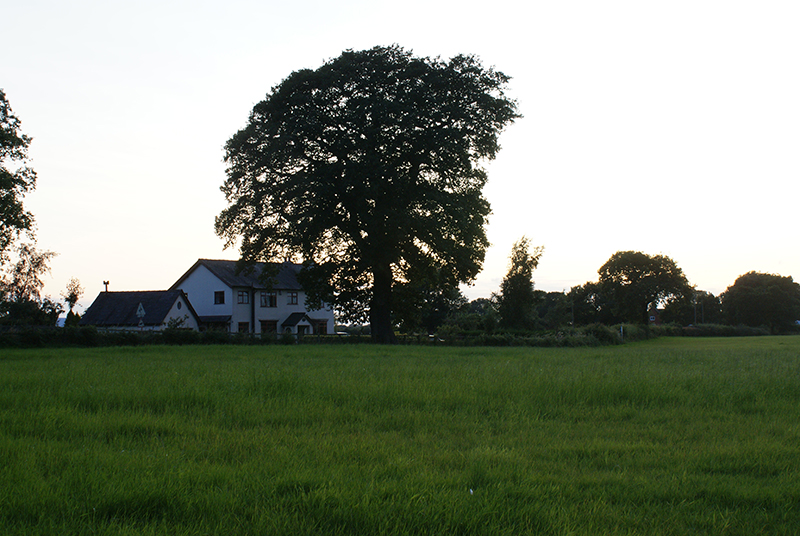
3754206673_bd9db4182e_o.jpg


Similarly if i expose off the sky, i get a beatifully exposed and detailed sky but then a poorly underexposed foreground:
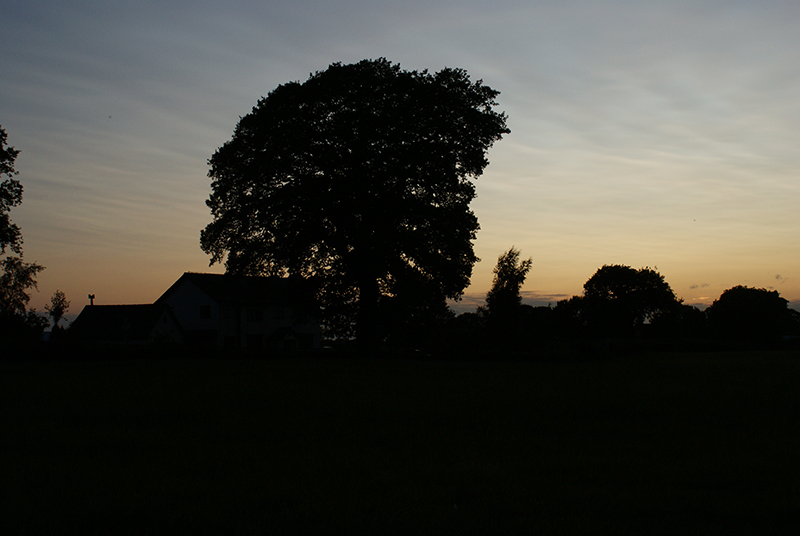
3755007354_7a4acff58d_o.jpg


I really really really want to have both parts correctly exposed, i reallys truggle withthis and i need it sorted, so any help would be greatly apreciated.

All my pics are in manual mode and i dont understand what the exposeure lock is for, does it apply to manual mode.

Sorry for the long post!
 
This is a problem that's been around as long as the hills.. sorry :geek:

Options:

1. Get a graduated neutral density filter, so that the same exposure can be used to reveal detail in the land and sky. The tried-and-tested solution in the days of film cameras. Natural effect, but only really works if the horizon is flat!

2. Darken the sky in Photoshop. Not ideal if you've lost highlight detail due to overexposure though.

3. Take several exposures optimised for the sky, land etc. and create an HDR image. Needs to be done carefully and subtly, otherwise the result will look weird and artificial.

A.
 
hmmm so there the only options i thought i must have some problem with my technique, how can it be that extreme? Surely people are able to expose both land and sky properly in the same shot?

Would shooting in RAW help?

I have never shot in raw so dont know much about it?
 
What time was this shot? If you take your photos earlier in the morning, or later at night, the sky will be darker and less blown out.
If you shoot RAW, you may be able to pull back some of the detail in PP, but it's not really a solution.
 
It could be that you are using spot or partial metering, which only take exposure readings from a small section at the centre of the viewfinder. If so try using evaluative or average which will take a reading from a much larger area of the viewfinder.

Failing that an ND grad is the best bet, expose for the darker areas (ground), lock the exposure/switch to manual and then insert the ND grad to bring down the exposure on the sky.

You could also try blending two exposures in PS.
 
personally, in that shot, if i didnt have a set of grads on me, i would have exposed for the mid point, (so half way inbetween, the two you have shown) In Raw, I would have then recoverd the sky/grass to what they should be using *insert your chosen raw software*... that would be the simplist i think,
Just make sure you try and keep as much detail in both halfs as possible, so that it is possible to recover them

:)

or buy a nice set of grads:D they would have darkened the tree in this shot, but that should have been recoverable...
 
ok so what do you think is the best metering option, because you were right i was using spot metering. Is the best one the whole frame metering.

What does the exposure lock button do? And anybody know of a site with a cheap set of grads?

Thanks for the help.
 
The problem here is simple

The sky is a direct light source so it bright, the landscape doesnt have its own source of light and therefore reflects the light that the sky or sun emits.

There are a few things you can do however. Clouds are very useful tools. They are like floating reflectors which help to bounce light back down onto the landscape. The effect of this, however is only most noticeable after the sun has set and is illuminating the clouds above. They reflect some of the light back down onto the landscape, sometimes offering a stop or so more brightness on the land. Another thing you could try to do, is include water. Wet sand or a body of water reflect light really well, and will help to brighten the landscape no end.

Graduated neutral density filters are the only other option really. You can get them from 1 to 3 stops, increasing in half stops. This means that you can get up to six and a half stops coverage of difference between the sky and the landscape.

The tried-and-tested solution in the days of film cameras. Natural effect, but only really works if the horizon is flat!

A.

This is not so true however. I have a set of graduated neutral density filters and i also shoot with large format film. Dont feel that if the horizon isn't straight then these filters become redundant. Careful placement on the horizon is the key to using them, making them an "invisible" tool to viewer should be the result. I have photographed mountains and coasts with towering cliffs using these filters. The horizon is far from straight with these sort of subjects.

The possibilities of landscape photography are endless, but you must aquire a certain range of skills and equipment, along with the most important thing your creative vision to make successful landscape photographs
 
Having moved from film to digital, it's one of the major differences, digital cannot record the same range of tones that film can. When I used to shoot landscapes with film I would more often than not be using an ND grad filter. Now with digital landscapes it's more or less permanently on the lens. They're not cheap but if you can get some Lee filters you'll be laughing. Keep an eye on ebay.
 
Having moved from film to digital, it's one of the major differences, digital cannot record the same range of tones that film can.

That's quite a statement. Care to back it up with some facts? I'm not arguing here mind, just wondering why you make the statement.
 
That's quite a statement. Care to back it up with some facts? I'm not arguing here mind, just wondering why you make the statement.

*Seems* to be true from what I've seen, although I only shoot digital. Went camping with my mate and his film camera and on the photos where I've had to add a graduated filter in PP, his skies are already deep blue.

Not saying this is the case for everything, as I don't know.. but from my experience I would agree.
 
That's quite a statement. Care to back it up with some facts

Hmmmm.. well....er....I read it somewhere??:shrug:

Seriously though, I thought that was an excepted fact that the current state of digital sensors aren't as sensitive as film. Certainly in my limited experience of digital with several different DSLR's, none can match film for tonal range, close, but not there yet.
 
Youre only going to get a compromise, even with ND grads you aint going to get those identical results into one shot.
Photoshop is the only way in my opinion
 
ok so what do you think is the best metering option, because you were right i was using spot metering. Is the best one the whole frame metering.

What does the exposure lock button do? And anybody know of a site with a cheap set of grads?

Thanks for the help.

Back to the OP's question.

I don't use a Sony, so I don't know the metering options on them, but on my 40D I would use evaluative for that shot, which gives an average reading over the full screen. BUT I would only have taken that shot with one exposure using an ND grad. As I mentioned earlier the other option is to take two shots and blend them. You can also get away with taking one shot in RAW exposing for the brightest areas, then make a copy, up the exposure in the copy and blend them from there. It's not as good as 2 exposures but it works. The thing to remember is that you can rescue underexposed areas in Raw, but blown areas are gone forever.

The way exposure lock button works is, you take an exposure from one area of the photo, press the exposure lock, you can then recompose the shot but the exposure will remain the same.

The cheapest route for filters is the Cokin "P" series although the ND grads sometimes have a bit of a tint to them. The more expensive but safer option is to go for a set of Lee filters, which is what I will be doing as soon as I can find a hammer to bust open my piggy bank.

Hope this helps :)
 
Hmmmm.. well....er....I read it somewhere??:shrug:

Seriously though, I thought that was an excepted fact that the current state of digital sensors aren't as sensitive as film. Certainly in my limited experience of digital with several different DSLR's, none can match film for tonal range, close, but not there yet.

OK - I did wonder. My understanding is that that was the case a few years back but isn't the case now. But having asked you for facts, I'd have to confess that I don't have the facts to back that up... :shrug:
 
This is a circumstance where I judiciously use HDR. The fact is that the scene contains to much dynamic range to handle so you need to squeeze it in somehow.

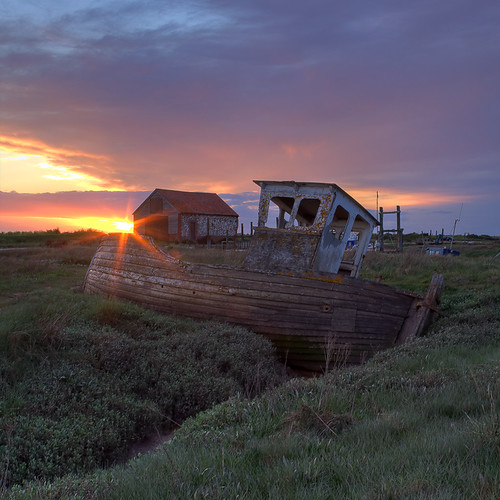
This shot of mine was done under similar circumstances:

3538589164_4301303ea7.jpg


There's no way I could expose for both the sky and the boat at the same time so I bracketed the exposures and combined them in an HDR.

You can do a fairly simple blended exposure of the two images you've supplied and get this:


Open both images in Photoshop [or Elements], copy the underexposed image and paste it into the bright image as a layer. Add a layer mask to the dark layer and paste itself into the layer mask. Then add gaussian blur on the mask [radius around 50-100, experiment] followed by auto levels, still on the mask. Flatten and Robert's your mother's brother.

Out of curiosity I've just ran them through the exposure blending tab [not HDR] of Photomatix and came up with this result which looks better as it avoids the slight haloing around the trees:

 
thats brilliant i didn't know photomattix could do that! It works really well, i would however definitely prefer to do it in the first place, on camera!
 
Back
Top