New Laptop

Messages
11,427
Name
Graham
Edit My Images
Yes
It's time I retired my laptop, despite my upgrades it's still severely underpowered and I've never liked the screen quality.

But looking for a replacement is fast becoming a nightmare. It doesn't need to be super powerful, but ideally a dedicated graphics card and preferably 16"+ but if the screen is amazing then 15" will be ok. But it would seem that to stay in budget with a good processor and GPU (up to £1,200) the screen quality is usually compromised. To get 100% DCI-P3 it ends up missing a dedicated graphics card, but as Lightroom uses the GPU (and I do some big stitches), I'm not sure I can compromise on that.

A few I've looked at, although I don't know what their screens are like except for the ACER which apparently is a bit crap and washed out:

Acer Nitro (good processor)
Gigabytre A16 (missing numerical keypad but I can compromise with that, good processor)
MSI Cybord 15 (only 15", processor is okish)
ASUS V16 (processor is okish)

Any thoughts or suggestions for something better?
 
It's time I retired my laptop, despite my upgrades it's still severely underpowered and I've never liked the screen quality.

But looking for a replacement is fast becoming a nightmare. It doesn't need to be super powerful, but ideally a dedicated graphics card and preferably 16"+ but if the screen is amazing then 15" will be ok. But it would seem that to stay in budget with a good processor and GPU (up to £1,200) the screen quality is usually compromised. To get 100% DCI-P3 it ends up missing a dedicated graphics card, but as Lightroom uses the GPU (and I do some big stitches), I'm not sure I can compromise on that.

A few I've looked at, although I don't know what their screens are like except for the ACER which apparently is a bit crap and washed out:

Acer Nitro (good processor)
Gigabytre A16 (missing numerical keypad but I can compromise with that, good processor)
MSI Cybord 15 (only 15", processor is okish)
ASUS V16 (processor is okish)

Any thoughts or suggestions for something better?
Perhaps your needs could be met by a custom configuration laptop? Though would that be too far outside your budget?

 
Perhaps your needs could be met by a custom configuration laptop? Though would that be too far outside your budget?


During lockdown when there were shortages I got a 17" one from PC Specialist and I'm still using it. There's a crack in the case and some of the letters have worn off the keys but it's still going.

I'll get a new one when I can be bothered and it'll be another 17". I like larger screens as I don't have a desktop these days as I hate to see computers set up as I think they dominate the room so I like laptops which can be put away out of sight when not in use.

Would a 17" interest you Graham?
 
Perhaps your needs could be met by a custom configuration laptop? Though would that be too far outside your budget?


Aye, I'm guessing a custom one will be very expensive but I might have a look around, you never know! Cheers.

During lockdown when there were shortages I got a 17" one from PC Specialist and I'm still using it. There's a crack in the case and some of the letters have worn off the keys but it's still going.

I'll get a new one when I can be bothered and it'll be another 17". I like larger screens as I don't have a desktop these days as I hate to see computers set up as I think they dominate the room so I like laptops which can be put away out of sight when not in use.

Would a 17" interest you Graham?

Anything 16" and upwards, the bigger the screen the better as I find 15" a little small. I forgot about PC Specialist, I've have a look cheers!


I've never been very keen on Dell as historically I've found them a little restrictive when it comes to upgrading etc, although that was desktops. I never really thought about them for laptops, I think there was an XPS range that was meant to be good. I'll have a look at these links thanks!

EDIT: Ah, Alienware. I know of this and they have a good rep.
 
Last edited:
Those Alienware laptops look perfect, especially with 1 year onsite service seeing as they are refurbs. I think it's now a case of deciding which one... that last one would be pretty future proofed but up goes the budget! lol
 
I've just had a look and they seem cheap for the spec. There's no 17" though but there is a 16". I'm a bit reluctant to settle for a smaller screen though.
 
I quite like that PC Specialist site, it's nice that you can make some custom choices. Prices aren't actually all that bad considering the components and that they are brand new.
 
I quite like that PC Specialist site, it's nice that you can make some custom choices. Prices aren't actually all that bad considering the components and that they are brand new.

When I stopped working in computers I lost all interest and didn't keep up with developments so didn't really know what spec I needed so I called them and they were very helpful.

One thing that worries me is that the letters have worn off some of the keys and I've never seen this before with any other laptop and this doesn't fill me with confidence about the components they choose. I bought mine years ago so hopefully they're buying in better bits now.
 
Last edited:
When I stopped working in computers I lost all interest and didn't keep up with developments so didn't really know what spec I needed so I called them and they were very helpful.

One thing that worries me is that the letters have worn off some of the keys and I've never seen this before with any other laptop and his doesn't fill me with confidence about the components they choose. I bought mine years ago so hopefully they're buying in better bits now.

There certainly seems a lot to look through. Their 17" choice seems rather restrictive compared to 16" and 18", but I'll need to spent some time and look through all of their options.

One thing I forgot is that I need 32GB because I often saw my current laptop go well above 16GB of ram when doing big stitches. I think I might have to compromise a little with the graphics card in order to get the screen size and the RAM I need for this budget. A 3xxx series should be fine, I won't really be gaming on it anyway.
 
I've just seen that there's an 18" Alienware, it costs a bit though but I didn't know anyone made an 18".
 
I think there was an XPS range that was meant to be good.

I bought an XPS15 for work from Dell's outlet for the same price as the most basic Macbook from their refurb store in 2014. The battery failed after 3 years, which seems quite common these days, and the keyboard was also replaced under warranty at the same time. I still have it now, and the screen is still fantastic, while the rest of the machine runs quickly enough for casual use and even a bit of photo-processing. If I were to buy another laptop intentionally for work then I'd get an XPS13 or 15 depending on how much travel was required.
 
Cheers all, my brain is a bit frazzeled from looking at so many laptops and specs, so I'm going to revisit this tomorrow when fresh.
 
Check the speeds of any processor you consider, and i7 isn't necessarily faster than an i5.

An off board video card is essential for image processing.

My i7 with a NVidia graphics card (from PC specialists nearly 2 years ago) takes 35 seconds do do a large merge and process, an Apple M4 30 seconds for the same files, and my old laptop 1min 40secs :(
 
Check the speeds of any processor you consider, and i7 isn't necessarily faster than an i5.

An off board video card is essential for image processing.

My i7 with a NVidia graphics card (from PC specialists nearly 2 years ago) takes 35 seconds do do a large merge and process, an Apple M4 30 seconds for the same files, and my old laptop 1min 40secs :(

Aye, I got caught out with that with an i5 in a rushed business computer purchase thinking it should be decent, but turned out to be poor. There's i5's out there that are slower than my old i7 3770k from 2012!

I always use https://www.cpubenchmark.net now to check processors and GPU's. Whilst it's not necessarily the most accurate, it does provide a reasonable guide and comparison.
 
I'm stuck between two laptops. Both the same price with same specs excempt that one has a far superior processor (Intel Core Ultra 7 255HX) but only 16GB of RAM, whereas the other one still has a good processor (Intel Core 7 240H) but it has 32GB of RAM.

To buy 32GB of decent 5600MT/s DDR5 SoDIMM costs around £330, so that's a fair amount extra to sink straight after buying. But unlike the RAM, the processors are soldered directly so there's no option to upgrade them, making me wonder if I should get the better processor.
 
If you can live with the slower processor, take the 32gb RAM. Otherwise upgrade in a couple of years.
 
If you can live with the slower processor, take the 32gb RAM. Otherwise upgrade in a couple of years.

I'll have a think about this. I'll be using a wider lens, so will most likely be stitching fewer photos in one session. I might do some tests on the big rig and see how much RAM is used up with smaller stitches. It'll be a similar MP sensor, so individual file sizes hopefully similar as well.
 
Just came across this with Costco, no idea if the screen is good?


Was just going to mention this one - spec is on the link below - be careful there seems to be lots of variations of this model - some are a 64Gb max and this one apparently is 32Gb - seems to have the screen you want though

 
That's a great find, I forgot about Costco (I loath going there, it's like village of the damned). They all seem to link back to a 16GB version, but with the higher spec GPU and being brand new yet cheaper, I think that might win over the Alienware one.
 
Ended up getting the Acer Predator Helios NEO 16 AI today as suggested and linked above. Cheers for that - an excellent find.
 
Arrived this morning, that was a pleasant surprise. Let's see how this beast performs. :D
 
OMG what an idiot. Guess what button I've been pressing for the last hour to try and power it on... :rolleyes:


1785168489566.png


Edit: it's moot anyway, it won't boot up. Already gone into recovery.
 
Last edited:
OMG what an idiot. Guess what button I've been pressing for the last hour to try and power it on... :rolleyes:


View attachment 488781


Edit: it's moot anyway, it won't boot up. Already gone into recovery.
On a side note.......until I adjusted the power settings in my refurbished Dell I found it would not power up if unused for over 5 days. I found that it would power up with the PSU plugged in and equally importantly the battery had plenty of juice
 
When I stopped working in computers I lost all interest and didn't keep up with developments so didn't really know what spec I needed so I called them and they were very helpful.

One thing that worries me is that the letters have worn off some of the keys and I've never seen this before with any other laptop and this doesn't fill me with confidence about the components they choose. I bought mine years ago so hopefully they're buying in better bits now.
They are just rebadged Clevo units, 2 minute job to change to keyboard. Clevo are one of the world's biggest laptop manufacturer.
Quick Google will tell you which Clevo chassis you have then you can now easily get parts for it.
 
OMG what an idiot. Guess what button I've been pressing for the last hour to try and power it on... :rolleyes:


View attachment 488781


Edit: it's moot anyway, it won't boot up. Already gone into recovery.

Any success so far? Do you think it's a hardware or software fault?
 
Any success so far? Do you think it's a hardware or software fault?
If they have been pressing it on and off again I think 3 times it will auto boot into recovery, turn it fully off then turn it back on and leave it - if it’s in recovery mode then just do a full reset - literally takes no time at all on a new modern laptop
 
Any success so far? Do you think it's a hardware or software fault?

Aye cheers. I'm not sure what happened, but I think when the screen stayed dark when first powering on it was actually doing stuff in the background and when I restarted it the OS may have got corrupted. I did a "reset" to effectively reinstall Windows and didn't touch it at all this time, it took ages and there were moments where it looked like it had powered down or froze, but it was indeed doing stuff. I've never seen a computer do a blank screen like that for so long, it really does feel like it's froze or something.

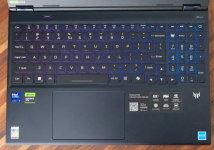
I think these laptops need a big note on the screen telling people not to touch anything when you first power it up! Anyway, I'm typing this post from it, so all is good! Getting used to the keyboard, although that was the same with my other laptop. I like the old Dell keyboard I have with my desktop with the traditional keys and layout, but I'll get used to it. There's a button that has the "Predator" logo on it above the numeric keypad. I'm curious as to what it does, but kinda nervous to press it! lol


EDIT: Ah, it's Predator Sense for those extra features. I've read that this Predator Sense thing can cause crashing, so I'll need to keep an eye on it.
 
Last edited:
Glad it worked ok in the end, and yes, sometimes modern laptops seem to do the blank screen thing far longer than seems reasonable.
 
Just testing a 24 image stitch and this thing is fast when importing the images, but it has slowed down when doing the actual stitch and I noticed the RAM is at 94%. It was to be expected, but I feel 24 images is overkill anyway and as I don't have Flickr Pro I can never show the full resolution. I think I'll calm the number of photos down rather than spent £300+ on extra RAM.

I do like how using the same Microsoft account with this laptop has meant it could automatically detect some MS Office purchaes I'd previously made but no longer using and could activate them on the laptop, so Word, Excel etc is instantly available.
 
If they have been pressing it on and off again I think 3 times it will auto boot into recovery, turn it fully off then turn it back on and leave it - if it’s in recovery mode then just do a full reset - literally takes no time at all on a new modern laptop

This one took ages to do a reinstall, but I think there's a fair amount of ACER software that gets installed.
 
Get CrapFixer

The black screen is one of M$'s improvements, usually happens when you turn the machine on to do something in a hurry. We have several different makes of laptop in the house and they all do it at times, especially after/during updates.
 
Get CrapFixer

The black screen is one of M$'s improvements, usually happens when you turn the machine on to do something in a hurry. We have several different makes of laptop in the house and they all do it at times, especially after/during updates.

I suspect something called CrapFixer doesn't beat around the bush! lol I'm sure I had something similar for my desktop to remove bloat, but after an update I forgot to go back to it. I'll have a look at this one cheers.


Looks like the Costco deal has expired, that's a pity as what a great price that was. I noticed that I don't have the OLED screen as often advertised in the reviews, mine is matte but it's got no glare and unlike my previous laptop it seems to have more tolerance with the screen angle.
 
Back
Top