No sound

Messages
1,935
Name
Stephen
Edit My Images
Yes
Back off holiday and the sound, which comes from an internal speaker within the monitor, is non existent. Running Windows 10, checked all the plugs, leads etc. Can't think what it might be. Headphone socket works but I hate wearing headphones. Anything to do with Windows 10 support ceasing on October 14th?
 
I have on occasion found that Windows forgets it's Sound settings.

You mention checking all the physical connections, have you also checked the Windows sounds settings i.e. is the correct speaker selected?
 
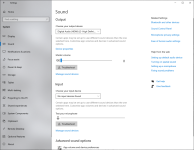
Checked the sound settings. When I try to increase the volume on the sound settings, it just drags the "needle" back to zero. It won't let me set a volume level.
 
Checked the sound settings. When I try to increase the volume on the sound settings, it just drags the "needle" back to zero. It won't let me set a volume level.
Sorry to ask again but can you confirm that in the sound settings that the speakers in the monitor are specific ones chosen for sound output and that the IIRC the correct driver is set?

I'm relying purely on memory of experiencing the exact issue and IIRC how I remedied it?
 
Last edited:
I can use both the speaker and the headphones. I can increase the volume for the headphones but not for the speaker. No idea where the correct driver is. I'll just have to wear these giant headphones. Really appreciate your help.
 
Last edited:
i suspect its a driver issue
go into device manager and have a look and remove the device and just reboot and see what the PC does
 
I've even been asked for my Adobe account details for Lightroom, that's not happened for years!
I have on occasion found that Windows forgets it's Sound settings.

You mention checking all the physical connections, have you also checked the Windows sounds settings i.e. is the correct speaker selected?

Have you tried running the troubleshooter?
Still doesn't work.
 
Last edited:
If the volume is being reset to zero then either the speaker isn't being found, or there's a driver issue. Can you post a screenshot of the panel where you try to adjust the volume of the screen speaker?
 
OK, I'd go with a driver issue, because it looks like it's found the speaker via the HDMI connection. Probably go with @Mr Bump suggestion of removing the device & rebooting.

Just occasionally windows will stop supporting hardware, but that seems unlikely for a speaker connected through HDMI. You might also look on the screen makers website for recent drivers for W10.
 
If the volume is being reset to zero then either the speaker isn't being found, or there's a driver issue. Can you post a screenshot of the panel where you try to adjust the volume of the screen speaker?

Master volume will NOT allow me to move the "level" to the right. It just shoots back to zero.

OK, I'd go with a driver issue, because it looks like it's found the speaker via the HDMI connection. Probably go with @Mr Bump suggestion of removing the device & rebooting.

Just occasionally windows will stop supporting hardware, but that seems unlikely for a speaker connected through HDMI. You might also look on the screen makers website for recent drivers for W10.
Just thinking out loud....

Is the monitor (with it's inboard speakers) connected via HDMI or DP & USB cables?

In other words, even though the screen grab shows Digital Audio (HDMI) is that actually the designated connection?
 
It's all to do with the 14th October, "No more support from Microsoft for Windows 10" It specifies that audio may not play ball any more. Try to fix driver but no luck.
 
It's all to do with the 14th October, "No more support from Microsoft for Windows 10" It specifies that audio may not play ball any more. Try to fix driver but no luck.
AFAIK the support referred to is primarily the security updates... ...and I have no idea what you were reading in regard to audio ?

So FWIW
My PC is still running W10 Pro but with MS ESU (Extended Security Updates) which was due to expire this month but was quietly extended until October 2027

Furthermore, my monitor does not have speakers but when I update my Nvidia driver it always offers by default the nVidia audio driver which I always deselect.
My external speakers are connected to the audio output on my motherboard. So, on the surmise that for whatever reason not yet resolvable you cannot get the audio output sorted, it might be worth trying some external speakers?
 
1. Select update driver, then select the option to choose driver. Win should offer you 3 or 4 driver options. Try each one in turn.
2. If the above fails try removing the last couple of win updates.
3. See if the sound chip provider has a driver update on their website.
 
Back
Top