Noise Ninja!

Messages
791
Edit My Images
No
Hey,

I downloaded noise ninja, having a few problems actually using it, First of all i put it into the folder for photoshop?

Like i went to

Start-my computer- Local disk- program files- adobe- adobe photoshop - plugins, and then dragged it in there :thinking:


Confused frankee!

Helpies ?:p:D:lol:
 
That should be right....it looks it anyway! It should show up on your Filters menu when you open photoshop :)
 
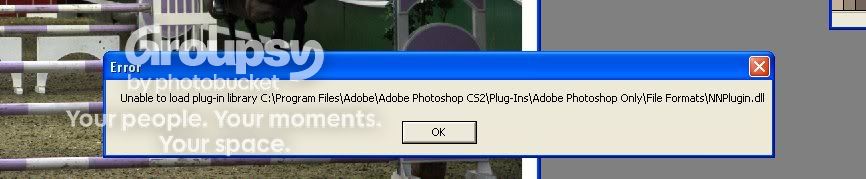
Its saying;

faotp.jpg
 
C:\Program Files (x86)\Adobe\Adobe Photoshop CS3\Plug-Ins\NoiseNinjaPlugin_Win32

That's the directory mine is in! You have it in 'File Formats' which is perhaps why it isn't working, that folder is for telling Photoshop how to open various types of files.

Not sure if it would effect it, with it being a plug in, but worth a shot!

Do you just have the .dll, as I have a fair few files and a couple of subfolders too..
 
I just put that plugin. like the file itself if i make sence, like i got a whole folder with readme etc shall i put all those in aswell like the whole folder

ETA; its doing the same ahhh
 
Now it's saying

"could not complete the noise ninja compand as file cannot be found" :\

I'm clearly not winning hear loool
 
Back
Top