

Outdoor photography

Messages
268
Name
Amy
Edit My Images
Yes
Hey everyone,

Am hoping that you can help me please. I've had my D40x 4 days now, and today my mum and I took our puppy for a walk through the woods. Im finding judging what settings I need difficult. Putting the apperture up higher seemed to make the pictures quite dark, also, I needed the shutter speed to be quick as I dont have very steady hands and the dog moves fast and just he just blurs in the pictures. Here are a few examples from today:
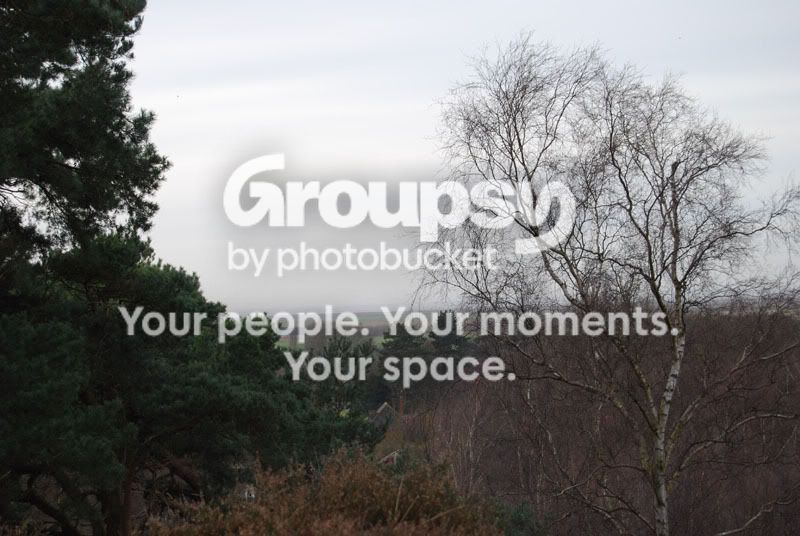
040.jpg

Exposure Time: 0.0050 s (1/200)
Aperture: f/5.6
ISO Equiv.: 200
Whitebalance: Auto
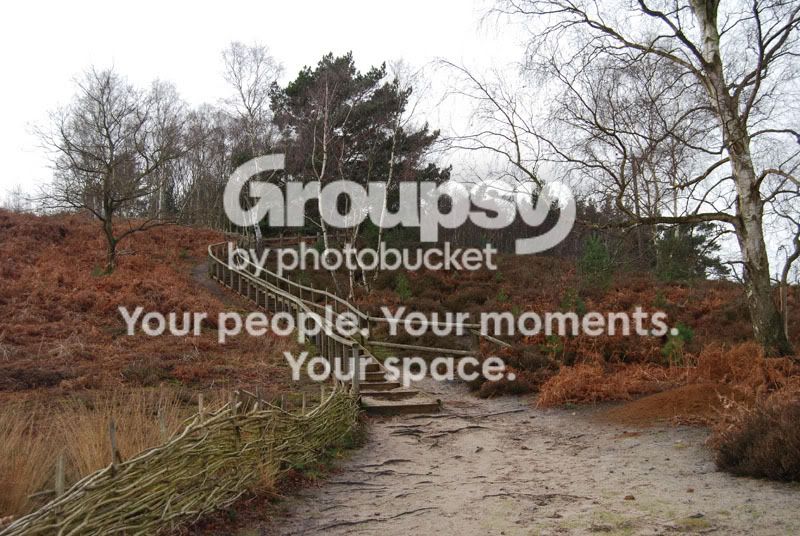
047-1.jpg

Exposure Time: 0.0063 s (1/160)
Aperture: f/5.6
ISO Equiv.: 200
Whitebalance: Auto
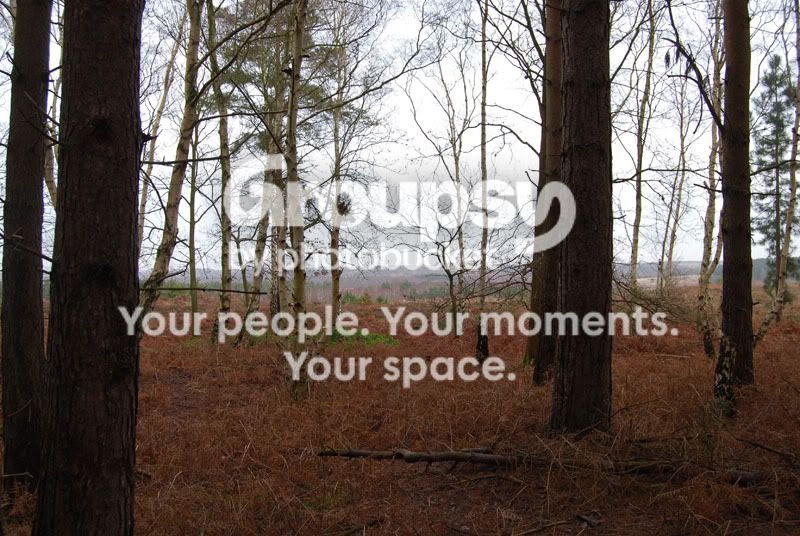
064.jpg

Exposure Time: 0.017 s (1/60)
Aperture: f/7.1
ISO Equiv.: 200
Whitebalance: Auto

What im wanting to know is, how its possible to make the pictures sharper, clearer and brighter, without having them bluring. Also needs to be hand held as the tripod is a bit cumbersome to carry around for 2-3 miles.

Also, was wondering if anyone can help me with taking pictures inside.
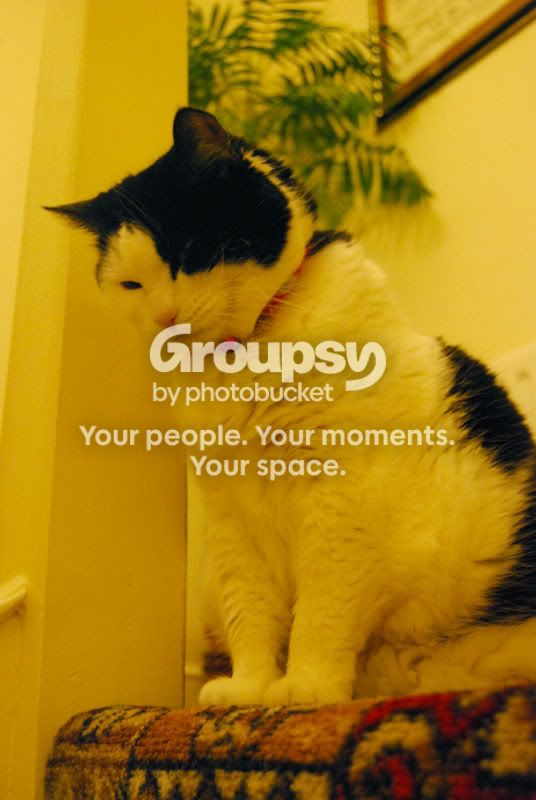
Holly3.jpg

Exposure Time: 0.077 s (1/13)
Aperture: f/5.0
ISO Equiv.: 1600
Whitebalance: Auto

This is a picture I took last night. Trouble is it seems abit yellow. The lights where the picture was taken, and consequently around the whole house, do give off a yellow glow/tint. I've tried ajusting the aperture, and ISO but its doesnt seem to make much difference as the shutter speed needs to be quick as if the animals move, the picture just blurs. I also dont want to use the flash as I dont want to blind them.

Am hoping someone can help me and give me some hints and tips on the sort of settings I should be using on this type of photography. Im sorry for the bad pictures, but I have just started on the steep learning curve :)

Many thanks in advance

Amy x
 
For the cat image, you need to set the white balance to tungsten. Your manual will show you how, this will remove/reduce the yellow cast when taking the photo. If you shot in RAW then you can adjust the white balance very easily in your raw editor. (not sure how new you are to photography so RAW files might not make much sense to you yet)

With the aperture, you need the lower values for faster speeds, i.e. f4, f5.6 the large apertures i.e f16, f22 will give you slower shutter speed, but a greater depth of field, i.e. more of the photo will be in focus. For the dog shots, I'd put the aperture to 5.6 and see what speed you get, ideal you'll need 250th of a second plus. If the light is low then up the ISO until you get this speed.

A monopod might help with you wanting the sharper, clearer and brighter pics, but the landscapes shown above seem to have been shot on a cloudy day (please correct me if wrong) so they will look a little dull and flat (lacking contrat). Nothing is going to beat a tripod to give you what you are looking, yes they are cumbersome, but try buying a tripod back so you can carry it over your back.

Hope this helps

Gerald
 
Amy, looking at the last picture you don't have a cats (sorry) chance in hell of getting a sharp picture if you're hand holding with a shutter speed of 1/13. The yellow cast is because the white balance is set to auto and dSLR's are notorious for NOT being able to cope with artificial light very well when set to auto. I don't know your camera but you'll be well advised to read up on setting a custom white balance, or at least changing the white balance to suit the type of lighting you have in your house. As regards the other shots, I don't really see too much wrong except the first one is under exposed probably due to the relatively bright sky dominating a good proportion of the shot.
 
Thank you for your answers. I did have a fiddle with the white balance, but in the menu where you change it, it doesnt tell you what the different white balances are called, they are just represented with pictures. Will have to look that one up.
Ahhh, I found the white balance settings, they are:
auto
incandescent
fluorescent
direct light
flash
cloudy
shade
and white balance preset

Which of these would be best to use?

I have shot some pictures in RAW but the trouble is, my computer doesnt seem to be able to cope with them very well, and when I tried to open them with photoshop, they would open.

So when taking such a picture of a cat, or a dog, what sort of shutter speed would be more suitable?

So the lower the aperture, the faster the picture will take? So higher aperture is better when using a tripod and shooting scenery and things? Oh and yes it was an overcast day.

Thanks again

Amy x
 
Thank you for your answers. I did have a fiddle with the white balance, but in the menu where you change it, it doesnt tell you what the different white balances are called, they are just represented with pictures. Will have to look that one up.
I have shot some pictures in RAW but the trouble is, my computer doesnt seem to be able to cope with them very well, and when I tried to open them with photoshop, they would open.

So when taking such a picture of a cat, or a dog, what sort of shutter speed would be more suitable?

So the lower the aperture, the faster the picture will take? So higher aperture is better when using a tripod and shooting scenery and things?

Amy x

Raw files are a whole can of worms by themselves. But if you can use them then do. It's not clear from your post if photoshop will open the raw files. If not see if there is an update from the Adobe website.

Whan taking animal pictures, the faster the better, at least 250th of a second, but if your lens is 300mm then you really need to be shouting over that speed to avoid camera shake, i.e always shoot faster than the maximum focal length of your lens to avoid camera shake.

With the aperture i think you have the rule correct. It's not hard and fast but you have the general idea :thumbs:
 
incandescent, translates to tungsten on a Canon camera. Use this one inside your house and it will remove the colour cast
 
Ahhh sorry, no, photoshop wouldnt open for some reason. I will have to see if there is an update, but it was updated not long ago.

I only have two lenses, a 18 -55mm and a 55 - 200mm, and the pictures I posted were on the first lens. So basically, a fast shutter speed, a low aperture and a low ISO is generally best for animal shots?

Thanks

Amy x
 
normal light bulbs are incandescent. With custom white balance you take a shot of something which you know to be white and the camera will work out how to get the colours correct for the following shots.


What mode are you using? Auto/program/Av/Tv?

The smaller the aperture number the more light gets in and so the faster the shot.


A higher ISO will allow the image to be taken with less light - so will be faster, but at the cost of some degradation in image quality through noise.
 
Ahhh ok thank you who? I didnt know that about the custom white balance, do you think it would be worth trying that out? I have changed between Aperture priority and Shutter priority mode, but have also given the sports mode a go seeing as that was for fast moving objects.

Ive just given it a go, and the higher the shutter speed the darker the picture is. And when on the aperture priority mode, the lower the f number the slower the shutter speed seems to be in the light of my living room. I think im going to have to work out the manual mode so I can adjust both myself.

Amy
 
Definately change the white balance to suit your subjects lighting.

use Aperture priority of fast moving objects, cats, dogs, birds, as it controls the depth of field so you can isolate the subject and let the camera take care of the shutter speed. The ISO setting will give you some control as well.

A little test set the camera to aperture priority mode, leave the iso setting alone and then set the aperture to the widest aperture, f4, f.56 and look at the aperture speed. Now adjust the aperture to f16, f22 and look at the aperture speed setting. Make sure the subject and lighting are the same and you'll see a longer exposure time for the 2nd setting. This is telling you that f16, f22 is letting less light to the sensor so the shutter has to be open for a longer period.
 
I only have two lenses, a 18 -55mm and a 55 - 200mm, and the pictures I posted were on the first lens. So basically, a fast shutter speed, a low aperture and a low ISO is generally best for animal shots?

Thanks

Amy x

You've got it.

Remember the higher iso settings will degrade image quality, so keep them as low as possible. To get the photo you need then up the iso, because a noisy photo is better than none. :)

I hope I'm not confusing you to much :)
 
Ok, I think i've got it thank you :) I think im just going to have to practise practise practise to get it all right.

Im going to read through the manual and find out how to change both the aperture and shutter speed on the manual mode, as I dont know how to do that, and will just have to give it a go and see.

Thank you for making it clearer for me, I think I understand it more now :)

Amy x
 
yep practice, practice and practice some more. I'm happy you've got it. Just happy to help.
 
That is awesome, thanks. When I had a play on photoshop, I couldnt get it that good, how did you do it?

Amy x
 
Amy, Regarding Photoshop, Which version do you have? You may need a spacific download for CS3/4 in order to use your Nikon Raw files. If you have no joy then your camera should have come with some free software, one of which should be a RAW editor. Here you can edit the white balance aswell as a load of other settings like sharpen and colour adjustments etc. If you don't have the software then go to Nikon's website to see if they do a free download of a RAW editor.

I have a Canon and we get DPP for free which is also available from the canon website. I don't know if it will open your RAW files, maybe someone could tell us this. Another option if you have an older version of Photoshop is to get Photoshop Elements 7whichhas a good RAW editor and should support your camera. Check out the Adobe website for details.

BTW i thought pic 2 of the steps was a nice image so you can take a picture :thumbs:

Good luck and let us know how you get on.
 
Definately change the white balance to suit your subjects lighting.

use Aperture priority of fast moving objects, cats, dogs, birds, as it controls the depth of field so you can isolate the subject and let the camera take care of the shutter speed. The ISO setting will give you some control as well.

A little test set the camera to aperture priority mode, leave the iso setting alone and then set the aperture to the widest aperture, F, f.56 and look at the aperture speed. Now adjust the aperture to f16, f22 and look at the aperture speed setting. Make sure the subject and lighting are the same and you'll see a longer exposure time for the 2nd setting. This is telling you that f16, f22 is letting less light to the sensor so the shutter has to be open for a longer period.


I'd tend to disagree with this - using AP for fast moving objects can cause the shutter speed to drop below the minimum required to get a sharp shot or freeze the action when hand holding you need to try to keep your shutter speed to a least 1.5 x focal length (for a 1.5 crop sensor - disregarding image stabilization etc) so using your lens at 200mm you would need

1.5 X 200 = 300

so you would need a shutter speed of at least 1/320 to hand hold a sharp shot. If you are using AP and set the Aperture to 5.6 the camera will alter the shutter speed to try and maintain the Aperture of 5.6 so the shutter may go a lot lower than 1/320 resulting in a soft / blurred picture resulting from camera shake.


If you use Shutter priority and set the shutter speed to 1/320 the camera would always alter the aperture to maintain a shutter speed of 1/320 so you would not have to worry about camera shake.

so personally I'd use shutter priority for fast moving object / long focal lengths when hand holding and AP for landscape type shots when the camera is tripod mounted. - once you get the hang of it you can switch to manual which will give you control over both the shutter and the aperture.
 
Hi Amy,
Go out and get 'Understanding Exposure'. Its a brilliant book for learning how to use manual settings. Its about £15 if I remember correctly.
I opened your 'holly' picture as a Raw file and just clicked on auto white balance. This is the result.

Holly3.jpg


If I lived nearer I would happily give you half an hour using Nikons manual settings.I'm sure you would find it very easy after a bit of practise. I shoot manual all of the time
now.


Kev.
 
I'm with Paul on this
Having spend a lot of time shooting dogs - often at speed, aperture priority is not the way to go. You need to know what shutter speed you are getting with action shots and if you are inexperienced with the camera it is very easy to let the shutter speed drop below the require minimum.

Animal portraits, AP all the way, but action needs shutter speed.
 
I'd agree with Kev, you really need to get to grips with understanding exposure. Just a simple play with white balance can completely change an image. Here's my attempt:

Holly3.jpg


Maybe still a bit on the warm side but goes to show what can be done post processing.
 
I'm with Paul on this
Having spend a lot of time shooting dogs - often at speed, aperture priority is not the way to go. You need to know what shutter speed you are getting with action shots and if you are inexperienced with the camera it is very easy to let the shutter speed drop below the require minimum.

Animal portraits, AP all the way, but action needs shutter speed.

+1
 
I have Adobe Photoshop CS. I didn’t pay for it myself and can’t really afford for an upgrade. Is there any way of changing the white balance with this version? I’ve had a look but can’t seem to find it. I do have the software the camera came with, so I am going to upload that to the computer and see what happens with that. Ahh just a thought, would image ready open RAW files? I’ve never used image ready before though.

So Paul, when I’m taking pictures of fast moving objects such as animals when I’m out and about its better to use sp mode then and let the camera take care of the aperture? I get what you mean about the focal length, but where does the 1.5 number come from? Or is this a generalisation and you use that number whatever?

Someone else has suggested that I get the “understanding Exposure” book, and I think I will. I was going to get it out of the library but I think I’ll buy it as I don’t think 3 weeks will be enough to read it all and understand it.

Thank you for the post processing images, they are brilliant. But how do I do that myself in Photoshop? I not a novice at Photoshop, but what I use to use it for, is different that for photo processing.

Thanks for all the answers and help, it really does mean a lot. I was going to go out with the dog and try taking some pictures, but its heaving it down with rain :(
Amy x
 
So Paul, when I’m taking pictures of fast moving objects such as animals when I’m out and about its better to use sp mode then and let the camera take care of the aperture? I get what you mean about the focal length, but where does the 1.5 number come from? Or is this a generalisation and you use that number whatever?

Amy x

Amy - Yes use shutter priority and set the shutter speed to the minimum required for a hand-held shot .

Have a look at this for how ISO/SHUTTER/APERTURE affect each other

The multiplier is governed by the size of the sensor in the camera - a Nikon D40 x has a crop factor of 1.5.

tut_digital_sensor-sizes.png


The image above is from this site which tells you about sensor sizes.
 
I have Adobe Photoshop CS. I didn’t pay for it myself and can’t really afford for an upgrade. Is there any way of changing the white balance with this version? I’ve had a look but can’t seem to find it. I do have the software the camera came with, so I am going to upload that to the computer and see what happens with that. Ahh just a thought, would image ready open RAW files? I’ve never used image ready before though.

There's various ways to remove the colour cast in photoshop. My method involves converting the image into a threshold in your layers, plotting lightest and darkest points, removing threshold layer and then using levels tool to bring the image into correct colour balance using your plotted threshold points. Finally, make sure your RGB levels are the same in your histogram, using the levels function to adjust each colour (red, green, blue).

With a program like Lightroom or Aperture, it's easier - there's a tool to use to select a neutral grey and that will bring the rest of the image into correct balance.
 
Hi Amy,
The easiest way to do it is to go into 'File' and then 'open as' and scroll down to raw file and double click.
The it will open it the same way as a RAW file and you can alter white balance etc.

Kev.
 
Hi I have a D40, the custom White Balance is easy to set up & gives good results.

Remember a small aperture number = a large hole (aperture) and more light gets through.
A large aperture number = a small hole (aperture) and less light gets through.

When you read stuff take note of what is being said as people use different expressions eg large aperture, small aperture value, greater aperture all mean the same.
 
Hope you're not confused by all this Amy! Dogfish's link is good :)

Also try reading this. I wrote it for people in your position, called Understanding Photography, and it should cover most things. Let me know if you find it useful... or not!

http://www.talkphotography.co.uk/forums/showthread.php?p=1122264#post1122264

Richard.

Don`t mean to jump in on your thread Amy, but that is massively good link Hoppy. Must have taken a while to write that up...

I`ll be flicking through that one later. :)

Good luck Amy. :)
 
I'm with Paul on this
Having spend a lot of time shooting dogs - often at speed, aperture priority is not the way to go. You need to know what shutter speed you are getting with action shots and if you are inexperienced with the camera it is very easy to let the shutter speed drop below the require minimum.

Animal portraits, AP all the way, but action needs shutter speed.

I've had very good results, using aperture priority, with the wildlife photography photos that I take. I think it's a matter of horses courses.

If I find that I need a fixed speed I simply move to manual, meter of the ground, using a mid tone (sorry if this is confusing you even more), adjust the exposure as required and bobs your uncle. Most birds will be 2 stops darker than the sky, so that work well.

What i find with shutter priority is that it may reduce your ability to isolate your subject. It will reduce the aperture, so giving you a greater depth of field, to reduce the speed, showing more of the background in focus. :shrug:

Gerald
 
When I had a play on photoshop, I couldnt get it that good, how did you do it?

The answer is years of practice - unfortunately, Photoshop is just one of those things you can't pick up overnight... However, there's plenty of tutorials here, on YouTube, and umpteen different websites. Start with the basics, and work your way up.

By the way, I think that shot of the steps is rather nice, took the opporchancity to have a play with it...

0471xp3.jpg


So what did I do? Firt of all, I sharpened on opening using a little Unsharp Mask. I then duplicated the original layer, and copied a sky from another photo into a third layer, between the two layers with the original image in them. On the top layer, I used the Magic Wand tool to select all the overblown sky, and inverted that selection to use as a layer mask. This allowed the sky from the image below to show through. Bit of curves, hue/contrast, and a final flatten of the image got me this.
 
Dogfish magnet, thanks for that site, a lot of the information on there is actually very easy to understand. I’m not really understanding the whole crop factor thing. The whole picture to me is just coloured lines with no meaning.

I will have to give your way a go ekimeno on Photoshop and see how that works out for me. Are there any free programs out there that you suggest me downloading to have alongside Photoshop?

Thanks for that Kev, only trouble is when I try to open a picture in Photoshop in the RAW format, it says “Could not complete your request because the file-format cannot parse the file”, so I don’t have a clue really.

So to get the custom white balance, you need to get something white e.g. a piece of paper and take the picture of that so it can adjust on that?

Wow Richard, that is brilliant! And so so useful. Will definitely be reading that word for word, it’s just fantastic, and exactly what I need.

I do know how to use Photoshop, not really in depth, but I do have a fairly good knowledge, but as I’ve said before, I use to use it for graphic making and the such, and not altering photos.

For some reason reddeathdrinker, I can only see the top the photo that you altered :( I do like what I can see, but are the colours a bit too false?

Been just shooting random things inside trying to work out what kind of shutter speed I need inside, the trouble I keep coming across though is, the higher the shutter the speed, say something like 1/60, means the picture doesn’t blur, but it seems unnaturally dark. I’ve tried upping the exposure comp, but that doesn’t help greatly. Also if I lower the ISO from 1600 it just gets darker. What can I do to make it better?

Thanks for all your answers, they all really do help :)

Amy x
 
For some reason reddeathdrinker, I can only see the top the photo that you altered :( I do like what I can see, but are the colours a bit too false?

It was only a couple of minutes in PS, to give you an idea of what could be achieved. If I was processing a similar shot of my own, I'd be looking at taking anything from 10 minutes to half an hour...
 
Ahhh ok I see. I do appreciate you doing that, and I wasnt having a go. I will have to have a go myself and see how it works :)

Amy x
 
I have found the auto WB on my Nikon D40 to be pretty bad, especially indoors. It gives OK results, on Auto -3. I have heard this is a general problem with Nikons.

There is an option to set your own, choose Pre, and shoot a white wall or door or something, and that sets, it but it can be a hassle to continually reshoot the setting. You can also set it from a picture already taken, so If you have a picture already correctly WB adjusted on your memory card, just choose that and it will read the WB info from it and use that.

To get shots of jumping animals and kids, I found if you set the ISO to Auto, and set the appropriate shutter speed, if the light falls, or the shutter is too fast for the aperture size, then the camera will automatically up the ISO to give the correct exposure. This works amazingly well.
 
That is a great idea actually jaffamuffin. I might give that a go. Means the camera is doing most of the work. What sort of shutter speed do you use for those types of shots? I dont know whether im trying to do too much, too soon, and whether it would be best to get to grips with the camera and all the settings slowly as if I try to do it all in one go, I may confuse myself even more.

I seem to understand what every does, in terms of ISO and the f stop number and shutter speeds, its just a case of puting it all to use that im finding difficult.

Amy x
 
That is a great idea actually jaffamuffin. I might give that a go. Means the camera is doing most of the work. What sort of shutter speed do you use for those types of shots?

It depends, but using auto ISO will give 4 stops more, if I understand it correctly. To freeze motion you require 1/500 or more. I confess for these 'snap shotty' type pictures I have been using P mode which as far as I can tell tends to favour higher shutter speeds, to smaller aperture.. Most of these kind of shots I have taken recently have been indoors and work well, certainly much better than any digital compact I have used.

I still have to get a good day out in nice light to really get a handle on the camera, to be honest, as the subtleies and exactly how the functions work can only become apparent in better light.

I dont know whether im trying to do too much, too soon, and whether it would be best to get to grips with the camera and all the settings slowly as if I try to do it all in one go, I may confuse myself even more.

It took me a while to get the D40, and I'm still learning it. Beware of things like auto ISO, if this is on in manual mode, and you adjust shutter/aperture, you may not see any change in the exposure meter - as the camera is compensating behind the scenes... it's a double edged sword.

I seem to understand what every does, in terms of ISO and the f stop number and shutter speeds, its just a case of puting it all to use that im finding difficult.

Amy x

I think it's like the case of knowing How to drive a car... but actually doing it, and taking in road signs and observations, hazard perception etc, is a different matter... and doing it all at once, without crashing.
 
Wow Richard, that is brilliant! And so so useful. Will definitely be reading that word for word, it’s just fantastic, and exactly what I need.

Thanks Amy, and also tjc. You've made my day :)

Richard.
 
I seem to be picking up the techinal stuff fairly quickly, its jsut a case of being able to put it all into practise. I'll ahve to give P mode a go and see what it is like as I havent used it before. Im at sixth form at the mo, but at home I seemed to be able to find a fairly good setting with the shutter priority mode so hopefully im getting somewhere with it.

When the weather is better and less overcast, im going to go out and try and get some better pictures :)

Amy x
 
Amy, I think you'll be better off using P for expsoure setting. Some people believe that using manual will allow you to do things that are not possible in P, aperture priority or shutter priority. This isn't true. There is only one 'correct' exposure setting for a given level of light and you can set that by which ever method is most convenient, but they all end up delivering the same basic exposure.

Richard.
 
Back
Top