Photos dark and WB not right help!

Messages
360
Name
Anna
Edit My Images
Yes
Ok, I am having trouble understanding why my photos are coming out too dark with white blown and red/greens very vivid.

An example of this today was shooting landscapes/my horses/my son in lovely countryside surroundings. Weather great but it was mid afternoon so no sun.

I used auto but the flash just blew everything too bright and my horses kept legging it (they were in the field) so I changed to p mode and set ISO to 800 and they looked ok on screen except my sons face and my horses (who are white) seemed blown.

I also tried manual but they came out really dark.

I feel like I'm crap and just can't get my head around lightening the photos. I'm not confident with photoshop either so that limits my pp ing.

Sorry for the long winded post. I will add some pics later to show you examples.
 
Firstly, it's not a WB issue here it's exposure. The auto mod used the flash, which is usually poor at the bet of times. So you changed to p, which would have got a decent photo, but why did you change the ISO to 800? You don't need to do that in daylight.

In manual, you say the pictures were too dark.. What settings did you set? If they were too dark, then you didn't set the correct exposure and they were under exposing.
 
In all honesty I thought it may not be bright enough so changed the ISO which I realise now I didn't need to do!

In order to correctly expose in manual I'm not sure of which settings to change! I tend to just centralise the fstop on the screen and set ISO which was obviously not right today.

Thanks for your reply! Sorry for the rookie questions!

Even when I've used correct ISO I still get blown whites and if I take it off auto to say cloudy or similar, everything goes yellowy.
 
Rookie questions are exactly what this section is for. Sometimes on dark scenes there is just too much difference between the highlights and shadows to display everything correctly. The human eye has much better dynamic range. Do you have an example with exif information so we can see what might be happening?
 
Thanks for your reply, I can't get on my laptop yet but will post some examples with exif when I can. I must admit I hold my breath for fear of ridicule when pressing post! But yes, this section is firmly saved in my favourites!
 
Thanks for your reply, I can't get on my laptop yet but will post some examples with exif when I can. I must admit I hold my breath for fear of ridicule when pressing post!
Don't worry about posting what you feel are 'bad' photos - for two reasons
1) - its how others can see what went wrong and help you to improve and...
2) - we've all got it wrong at times! Everyone makes mistakes when they start going into more of the manual modes. :)
 
daizylindsay said:
In all honesty I thought it may not be bright enough so changed the ISO which I realise now I didn't need to do!

In order to correctly expose in manual I'm not sure of which settings to change! I tend to just centralise the fstop on the screen and set ISO which was obviously not right today.

Thanks for your reply! Sorry for the rookie questions!

Even when I've used correct ISO I still get blown whites and if I take it off auto to say cloudy or similar, everything goes yellowy.

In manual your main two settings are the aperture and shutter. Think of ISO as a fall back. Only use it when you run out of options on the other two, Or If you must have a certain aperture for the required DOF and can't get a suitable shutter speed

Say for instance you are shooting a landscape. My first priority would be the aperture , as I want the maximum DOF, so i'd set my aperture to maybe F/11. Now if I didn't have a tripod, I'd need to make sure my shutter speed was fast enough to be able to handndhold and not get any blur. This might not be possible, and the photo might be underexposed, so in that situation I'd raise the ISO so I can get a handhold able shutter speed.. ( usually 1x1.5 or your focal length or near enough, so a 100 mm lens wants a 1/150 shutter speed minimum)

I only raise my ISO from my cameras base of 200 when the light really starts to fade, otherwise I just leave it alone.
 
Do you have CA on your camera? I found this on my camera last week but i have managed to learn enough to shoot in manual but it would have been such a handy place to start a year ago
 
I used auto but the flash just blew everything too bright and my horses kept legging it

Flash + Horses = :nono:

If your a horse owner you'll know that even the smallest of thigs can freak a horse out and flash is definately one of them!

I feel like I'm crap and just can't get my head around lightening the photos. I'm not confident with photoshop either so that limits my pp ing.

You learn from experience! Your getting some great advice here and the next time you'll have some great pics to boot!

My settings tips are -

Set your Camera to Manual.
WB = Auto
ISO 100 or 200 (whichever is the lowest your camera will go to. 400 Max.
Apperture = 8-13
Shutter = 250 if they are moving or 125 if not (they never keep their heads still!).

Use the last 2 to get the Exposue correct. If your horses are blown out you need to get less light to the sensor by closing the apperture or by having the shutter open for less time (or a combination of both!)

Hope this helps and sorry if I've repeated any of the adice already given (I've not read it all as I'm at work!)

Dean
 
Guys whilst the info here is correct, if I read this as a newbie I think I would still be stuck - things like "closing the aperture"? (I understand it but didn't when I started out).

I'm also going to buck the trend a little. Manual can be quite daunting for a newbie who doesn't understand eposure too well. Before going down that road it's worth reading "Understanding Exposure" by Bryan Petersen. Pretty simple easy to understand way of recognising the link between Exposure/Shutter Speed/ISO.

Manual mode can be fine where you know better what you're doing and when the light is pretty consistent but Av or Tv mode should be fine for most circumstances. You set the aperture in Av and the camera will provide the correct shutter speed (opposite with Tv). Remember the smaller the aperture value (like f2.8, f4, f5.6, f8 etc) the larger the actual aperture is on the lens (sounds odd but if you read up on exposure you'll see why). Openng te aperture means lowering the f-number and closing the aperture means making the lens opening smaller (making the f-number (or f-stop) a larger number.

You used the Auto mode and the flash came out. That tells me immediately that light was very low. You also said no sun! And that says it all really. In mid afternoon just now, the light level is actually very low and your eyes see much better than the camera and what looks bright to your eyes is probably not what the camera sees through the small opening in the lens (the aperture).

If you have a lens that is lets say an 18-55 f3.5-5.6 and you use it zoomed, the largest aperture you'll get is f5.6 so that will likely require a slowish shutter speed in the light you describe. So you may need to up the ISO a little to get a decent SS (depends on what you are shooting).

The on-camera flash is also prettty poor really although you can dial that power of the flash down a little rather than affect the overall exposure - look at the Flash Exposure Compensation section of your manual (FEC).

There's a whole lot more to it but this is just a couple of pointers.
 
Last edited:
Guys whilst the info here is correct, if I read this as a newbie I think I would still be stuck - things like "closing the aperture"? (I understand it but didn't when I started out).

I'm also going to buck the trend a little. Manual can be quite daunting for a newbie who doesn't understand eposure too well. Before going down that road it's worth reading "Understanding Exposure" by Bryan Petersen. Pretty simple easy to understand way of recognising the link between Exposure/Shutter Speed/ISO.

Manual mode can be fine where you know better what you're doing and when the light is pretty consistent but Av or Tv mode should be fine for most circumstances. You set the aperture in Av and the camera will provide the correct shutter speed (opposite with Tv). Remember the smaller the aperture value (like f2.8, f4, f5.6, f8 etc) the larger the actual aperture is on the lens (sounds odd but if you read up on exposure you'll see why). Openng te aperture means lowering the f-number and closing the aperture means making the lens opening smaller (making the f-number (or f-stop) a larger number.

You used the Auto mode and the flash came out. That tells me immediately that light was very low. You also said no sun! And that says it all really. In mid afternoon just now, the light level is actually very low and your eyes see much better than the camera and what looks bright to your eyes is probably not what the camera sees through the small opening in the lens (the aperture).

If you have a lens that is lets say an 18-55 f3.5-5.6 and you use it zoomed, the largest aperture you'll get is f5.6 so that will likely require a slowish shutter speed in the light you describe. So you may need to up the ISO a little to get a decent SS (depends on what you are shooting).

The on-camera flash is also prettty poor really although you can dial that power of the flash down a little rather than affect the overall exposure - look at the Flash Exposure Compensation section of your manual (FEC).

There's a whole lot more to it but this is just a couple of pointers.

100% agree. An example shot would still be useful to give some quick pointers though.
 
Guys whilst the info here is correct, if I read this as a newbie I think I would still be stuck - things like "closing the aperture"? (I understand it but didn't when I started out).

I'm also going to buck the trend a little. Manual can be quite daunting for a newbie who doesn't understand eposure too well. ....

Very true - it has taken me a long time to get my head around aperture - stopping down, sweet spots, depth of field - it's a lot to take in especially when you also have to remember to bare in mind your focal length as well as your subject when thinking of your shutter speed and that's just for starters
 
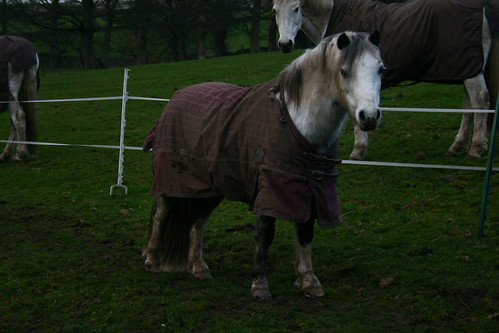
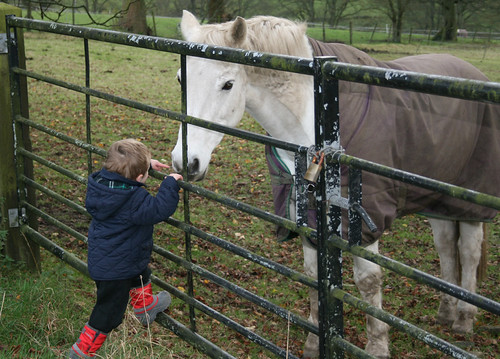
Right here are the example shots...

Taken in manual - very dark.

1.
MiloManual by daizylindsay, on Flickr

Flash on this one - can't remember which setting I used though! EXIF should show this. Horse looks bright.

2.
WillPad Flash by daizylindsay, on Flickr

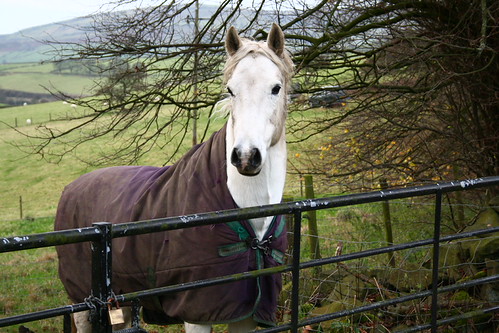
I love this one and think I was in P mode but the horse (Ralph) looks very blown to me?

3.
RalphBlown by daizylindsay, on Flickr

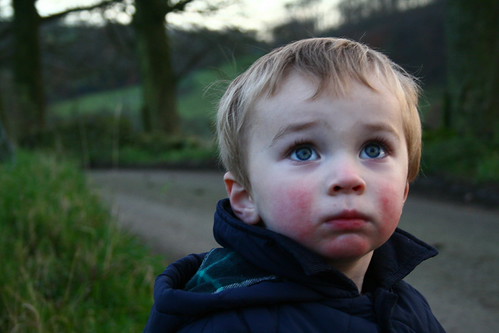
I thought these two were ok...

4.
William1 by daizylindsay, on Flickr


5.
Climbing by daizylindsay, on Flickr

Thanks for all the replies I really appreciate your time. I must admit I don't really understand alot of the points but am keen to learn! Hope these help show my frustrations - although they look better than I originally thought.
 
I can only echo what has already been mentioned Anna so long as you have patience and dont give in things will be fine. It is like learning anything in life, if you have the attitude and think positive instead of negative it will all of a sudden fall into place and become second nature to you :thumbs:

One not so dark Horse :D Very rough edit.

6358580267_1c16f541a2.jpg
 
Thanks Rich, I just need to crack on and keep absorbing all the info and hopefully one day it will click! I'd live to be able to produce shots in proud of one day!
 
Right here are the example shots...

Taken in manual - very dark.

1.
MiloManual by daizylindsay, on Flickr

Flash on this one - can't remember which setting I used though! EXIF should show this. Horse looks bright.

2.
WillPad Flash by daizylindsay, on Flickr

I love this one and think I was in P mode but the horse (Ralph) looks very blown to me?

3.
RalphBlown by daizylindsay, on Flickr

I thought these two were ok...

4.
William1 by daizylindsay, on Flickr


5.
Climbing by daizylindsay, on Flickr

Thanks for all the replies I really appreciate your time. I must admit I don't really understand alot of the points but am keen to learn! Hope these help show my frustrations - although they look better than I originally thought.

No 1 is very dark because it's just under-exposed - no flash went off on this one.

No2 Just about perfect with the fill flash balanced for the daylight. Probably taken on P Mode which is probably the best mode to use until you gain a better understanding of flash and the different modes.

No3 As No2 - just about bang on - not blown at all.

No4. Just under-exposed. No flash used or you'd see it in the eyes.

No5 Really nice shot and properly exposed.

By far the easiest way to use flash is set the flashgun to TTL and the camera to P and these settings deals with this for you pretty much spot on most of the time, Nothing wrong with using P Mode - lots of wedding photographers use P for easy fill flash in outside shots.
 
Thanks Rich, I just need to crack on and keep absorbing all the info and hopefully one day it will click! I'd live to be able to produce shots in proud of one day!

I am sure you will very soon Anna :thumbs: There is always good advice on here for you but if you have a manual then that usualy gives a non complicated view of things. If you have one then take it out with you and set yourself a task of following the guidelines for making the best use of DOF or fill flash etc etc. Dont go mad and take hundreds of shots but just enough to see what is happening when you alter a few basic settings.
 
No 1 is very dark because it's just under-exposed - no flash went off on this one.

No2 Just about perfect with the fill flash balanced for the daylight. Probably taken on P Mode which is probably the best mode to use until you gain a better understanding of flash and the different modes.

No3 As No2 - just about bang on - not blown at all.

No4. Just under-exposed. No flash used or you'd see it in the eyes.

No5 Really nice shot and properly exposed.

By far the easiest way to use flash is set the flashgun to TTL and the camera to P and these settings deals with this for you pretty much spot on most of the time, Nothing wrong with using P Mode - lots of wedding photographers use P for easy fill flash in outside shots.

I agree

I actually think the OP has been hard on herself. The images look ok to me - A couple under exposed but with a little work in PP would be perfectly fine and No5 to me looks great!
 
Yeah I agree too, they look ok to me. Not blown at all.

To the OP, without sounding condescending (please don't read this that way), I think you should forget about using M for now. Av and Tv are your winners. You'll grasp exposure in no time.

If you want to control depth of field use Av and the camera will pick the shutter speed to match whatever aperture you choose. Bigger F number = bigger depth of field (eg landscape shots), smaller F number = smaller depth of field (eg portrait shots).

If you want to freeze action, like a horse running, use Tv. You pick a shutter speed and the camera will select the correct aperture to match.

Only change the iso if you're in Av and your finding the camera is selecting a shutter speed too slow and so your images are blurred. Alternatively, use the auto iso setting, if your camera has that feature.

Hope this helps. Keep at it, you'll get it. And as I said, Av and Tv are your friends!
 
Last edited:
The Boz said:
Yeah I agree too, they look ok to me. Not blown at all.

To the OP, without sounding condescending (please don't read this that way), I think you should forget about using M for now. Av and Tv are your winners. You'll grasp exposure in no time.

If you want to control depth of field use Av and the camera will pick the shutter speed to match whatever aperture you choose. Bigger F number = smaller depth of field (eg portrait shots), smaller F number = bigger depth of field (eg landscape shots).

If you want to freeze action, like a horse running, use Tv. You pick a shutter speed and the camera will select the correct aperture to match.

Only change the iso if you're in Av and your finding the camera is selecting a shutter speed too slow and so your images are blurred. Alternatively, use the auto iso setting, if your camera has that feature.

Hope this helps. Keep at it, you'll get it. And as I said, Av and Tv are your friends!

Not condescending at all and I understand all your advice thanks!

Thanks to all who have replied, it's easy to get lost in it all but I'll get there!

Unfortunately I don't have the manual for my camera but will keep going :-)
 
It's a common miss understanding with f-stops

f2.8 is considered a big aperture (large opening) , this gives a short depth of field.... where as f22 is termed a small aperture (small opening) and that would give a longer depth of field

Lots of the terms in photography and especially lighting seem back to front :thinking:
 
Eek, my bad! Apologies to the OP. Embarrassing. Clearly I shouldn't be writing on here after a few drinks ha ha. Edited to be correct.
 
Last edited:
Back
Top