POST PHOTOS

lawrenceots

Banned : Trading/Abuse of Classifieds
Suspended / Banned
Messages
4,395
Name
Lawrence
Edit My Images
Yes
I want to upload some photos on here, but for the life of me can't work out how. I'm on Mac and have the photos on my desktop but there don't seem to be any options for that. Can someone tell me how I do it please - slowly !:bonk::bang:
 
More or less just been discussed!! HERE
 
Thanks all - haven't got flicr etc yet but will sort something out.
 
NOT JUST U LAURENCEOTA ive been messing around for agaed trying to use the on site gallery as i dint use flicka.....i'll read the instructions again...andagain but cant get them from gallery to post
 
Tks again, I've just uploaded some photos in the TP gallery. ;)
 
NOT JUST U LAURENCEOTA ive been messing around for agaed trying to use the on site gallery as i dint use flicka.....i'll read the instructions again...andagain but cant get them from gallery to post

What are you struggling with? Maybe I can help.
 
NOT JUST U LAURENCEOTA ive been messing around for agaed trying to use the on site gallery as i dint use flicka.....i'll read the instructions again...andagain but cant get them from gallery to post

I was trying for ages before I realised they still have to be no more then 800px on the longest side to upload to the gallery.
 
its not the file size its copying the url i think....the add picture box has a place for this and a drop down menu which is blank...any offers
 
Maggie, I can`t see any images in your gallery.


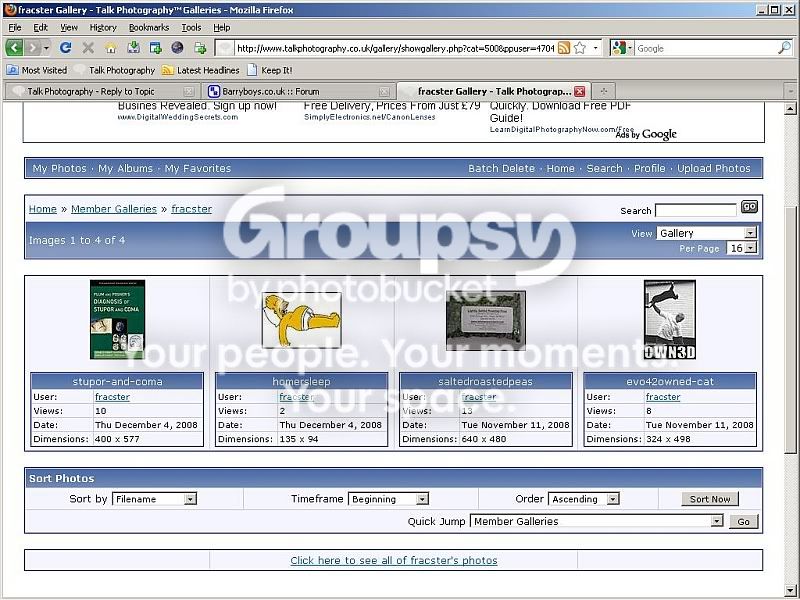
Step one, open your gallery.


one.jpg


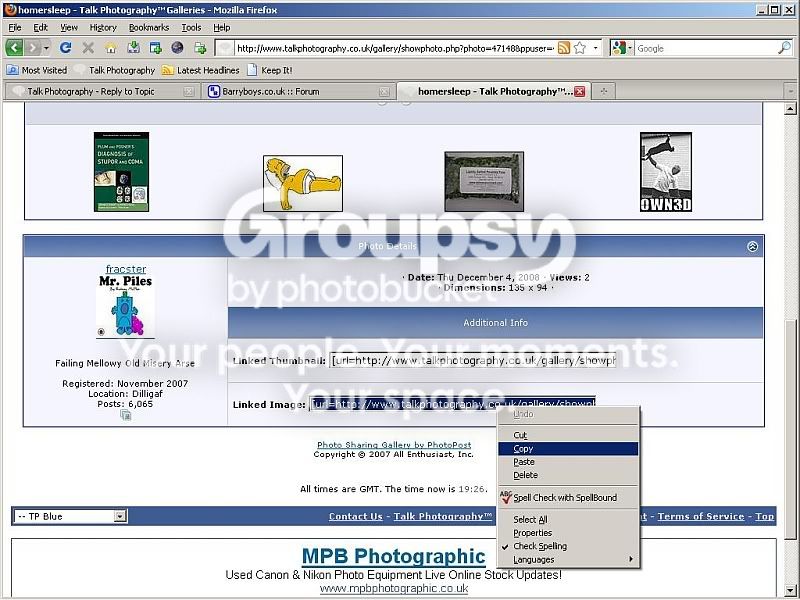
Select a pic and this page will open, copy the linked image info.Paste it into the thread like this:


two.jpg


and the piccie should appear.


Huzzaaa.
 
i just did 3 on a gallery and they went up ok
used the golden rule for most forums
200KB max and 800 on longest side...or both..
usually mine are 6x4 format

to put a pic on the thread i use imageshack and copy the full url for forums
dont need the img img brackets then
 
Back
Top