- Messages
- 472
- Name
- Andy
- Edit My Images
- Yes
OK, so I'm having a bit of a play with my new Canon IP4600 and the results are a little random.
I always use LR2 to process my images, so I decided I'd use the print module as well. Selected paper settings, etc in print settings and then selected use printer colour management - printed one off.
It didn't quite represent what I had on the screen, lol!! In general it looked underexposed, and also the white balance looked a way of, with whites looking a little brown, and greens coming out kahki.
I decided to try using the Canon print software, and although a little better as far as exposure, it still looks a touch underexposed, and again the white balance looks different.
I'm using Canon paper so the printer knows what it's printing on.
I can't believe my monitor would be that far out, although I've never calibrated it. Are there any basic free calibrations to see how far out it is?
What else should I try, letting Lightroom handle the colour management rather than the Canon?
I'll upload the image I'm playing with so maybe others could comment on the original sources exposure, colour, etc?
EDIT: here's the image:
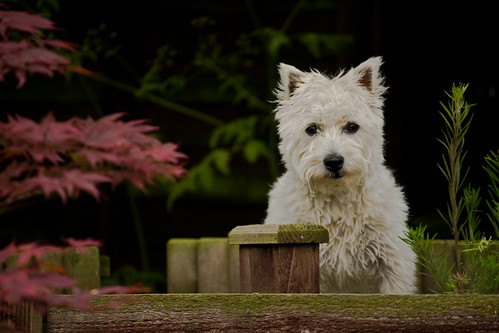
On my screen the dog looks well exposed, nice & white, the bush/foliage in the background is nice & green, the leaves on the left a little pink and the fence brown with a green mossy line along the top.
The images I'm getting off the printer leave the fence looking a muddy brown, the leaves a reddy pink, the bush & foliage a kahki colour, more browny/green, and the dog a little under exposed, and a little off white.
Any thoughts?
I always use LR2 to process my images, so I decided I'd use the print module as well. Selected paper settings, etc in print settings and then selected use printer colour management - printed one off.
It didn't quite represent what I had on the screen, lol!! In general it looked underexposed, and also the white balance looked a way of, with whites looking a little brown, and greens coming out kahki.
I decided to try using the Canon print software, and although a little better as far as exposure, it still looks a touch underexposed, and again the white balance looks different.
I'm using Canon paper so the printer knows what it's printing on.
I can't believe my monitor would be that far out, although I've never calibrated it. Are there any basic free calibrations to see how far out it is?
What else should I try, letting Lightroom handle the colour management rather than the Canon?
I'll upload the image I'm playing with so maybe others could comment on the original sources exposure, colour, etc?
EDIT: here's the image:
On my screen the dog looks well exposed, nice & white, the bush/foliage in the background is nice & green, the leaves on the left a little pink and the fence brown with a green mossy line along the top.
The images I'm getting off the printer leave the fence looking a muddy brown, the leaves a reddy pink, the bush & foliage a kahki colour, more browny/green, and the dog a little under exposed, and a little off white.
Any thoughts?