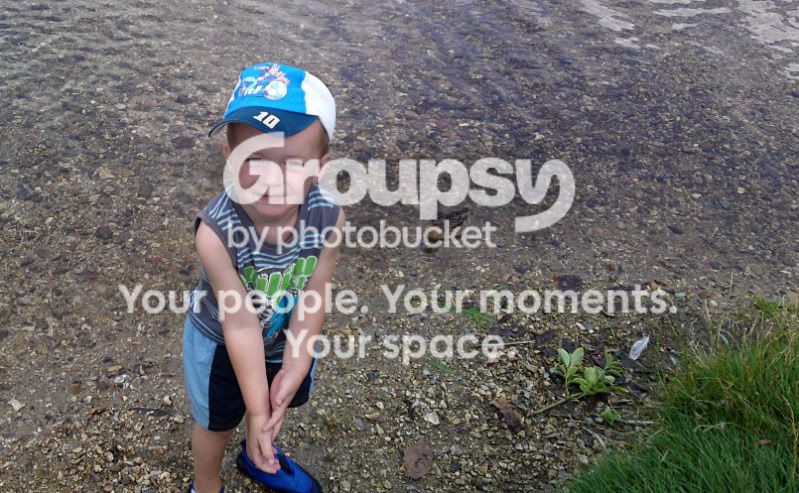
probally make you guys laugh

Messages
701
Name
mat
Edit My Images
Yes
well i down loaded editing software and thought id start having a practice, well i cant beleive how tricky it is there are so many options and i dont have a clue what they mean lol.

anyway here is 1 i messed about with

before
004-1.jpg


after

004-1.gif


what should i have done to make it better, i think i should have had me lad abit more to the right, but i guess with practice ect

mat
 
You shouldn't have chopped his feet off ;)

i didnt, well i guess i did but it was taken by me like that about 8 months ago

i knew someone would say that though lol

dont mean how to take the pic better i meant how to ps it better


mat
 
Well the image looks 100% worse IMO. Its gone some weird red grain going on and the crop is too tight.

I know you want to practice, but I'd wait until you have got your DSLR, as image files from phones are already highly compressed and do not handle editing very well.

But for the sake of it, recrop it, but a bigger area and give the lad some space on the left but more space on the right. If you wanna go all out, cut the duck out and stick it next to him.
 
Ill remove if you want, but a very quick edit on my laptop.

004-1edit.jpg
 
Well the image looks 100% worse IMO. Its gone some weird red grain going on and the crop is too tight.

I know you want to practice, but I'd wait until you have got your DSLR, as image files from phones are already highly compressed and do not handle editing very well.

But for the sake of it, recrop it, but a bigger area and give the lad some space on the left but more space on the right. If you wanna go all out, cut the duck out and stick it next to him.

yeah i did think about tying to cut the duck and moving it but i aint got a clue how to

tbh im not trying to get a good result with it im just trying to find out what the tools ect on the editing site do

thanks for advice i am now gonna try to cut a duck lol
 
Photoshop CS5.
Just a quick crop, moved the duck, boosted the contrast and a bit of unsharp mask.
 
Not sure what software your using but have a look over on YouTube for tutorials theres often loads pf useful advise there.
 
Back
Top