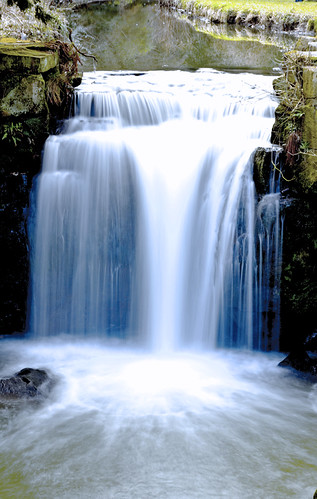
Running Water Effect? Canon 350D

This was shot on a bright sunny day, 400D tripod mounted with a Sigma 17-70. 0.8 sec exposure at f22. ISO 100.

The exposure time is very dependant on the ambient light at the time of shooting. Trial and error is often the best way to get the effect you're after. The longer the exposure, the silkier the water :)

Waterfall%201.jpg
 
I tried setting it to 'bulb' on the manual setting, but all the images just seem to be white?

Any ideas how to set it correctly? - with shutter speed and ISO etc, for an image like this? without nd filters.
 
See my post above, post 5 ;)

Bulb will keep the shutter open all the time you have your finger on the shutter release.
 
remember that without an ND filter if you slow your shutter you will need a smaller apeture (higher F number) to let less light in
 
I remember this very same problem, trying to get silky waves in cyprus at midday never going to happen lol, try and understand the amount of light going into the camera eg aperture, and shutterspeed, this was my break through moment.
 
Rather than bulb, I would use shutter priority mode and experiment with exposures. It will try and sort out aperture. Use lowest ISO possible. ND filters may become important depending on light. The brighter the light, the sooner you'll need filters.
 
Try for an exposure between 1/15-about 1/4 second. The exact effect will depend on a number of factors not least the rate of flow of the water. I've found that around 1/10 work reasonably well. But try others. An ND filter will help on bright days when reducing the ISO doesn't give you the range you need. Alternatively if you have a Polarising filter that can knock the exposure back a couple or three stops.

Experiment and see what works for you.
 
This one whilst not a great picture this one was shot with a 50mm at F20 on a 1.6 sec exposure.

It's all trial and error.

4448531809_4f9c7ac552.jpg
 
Sounds like you need to do some reading about how aperture, shutter speed & ISO work together. I can recommend a book called Understanding Exposure by Bryan Peterson, you can get it on Amazon for about £15.

But for now here's a brief summary in simple speak hopefully:
Aperture is the size of the hole that lets in the light, the bigger the hole the more light that gets let in.
Shutter speed is the length of time that the shutter stays open exposing the aperture hole i.e the longer the shutter speed the more light that gets let in.

A note regarding aperture is a small f number like f2.8 represents a big hole (more light) and a big f number like f22 is a very small hole.

So, if you make the aperture hole smaller (i.e. by choosing a bigger f number) then you need to compensate by making the shutter speed slower to allow time for enough light to get through the hole.

The reason you were getting a white picture is because you were probably using a small f number (i.e. a big hole) with a long exposure therefore letting in so much light you just recorded whiteness.

Hopefully this makes some sense.

 
Back
Top