

Silly HDR question

depends on how you use your sliders when tonemapping. You can do a bracket of 3 and still get a toned down HDR effect, it is all in how you process it afterwards
 
It may give you a slightly less dramitic effect but as Joe says it mostly depends on how you process it in your HDR software, I can get a pretty extreme result from a single jpeg if I want.
What software are you using?
 
Shoot Raw, expose to the right at lowest ISO, and you can get a really nice result out of one shot, especially if subtle is what you like.

Bracketing gives those extreme results that so many hate/love. You need it to get a grad-effect with skies that are just too bright to pull into the normal dynamic range any other way.
 
So could you get a normal RAW file in Lightroom, expose it to the right (lighter) then do the one image HDR? I do notice that some images come out a lot lighter after being put through Photomatix. This will make photomatix far more useful!!!

Nice tip, thanks.

Photomatix does seem to be a 2 trick pony! Multi exposures as you say are best for that HDR effect and the single exposure is great for improving images.
 
Extreme or not HDR is about how the sliders are used rather than the number of exposures input, always try and capture the complete dynamic range of the subject.

HDR is only brighter if that is when you set the sliders.

To get a single RAW file to HDR the best was is to do a "File" "Open" in Photomatix and it will generate a Pseudo HDR image for you....
 
There's really no point doing HDR from three images only 1/3rd of a stop different. You might as well produce three JPG files from a single RAW file and then process that in Photomatix for the same result.

The point of HDR tonemapping is that it allows you to contain everything from the highest highlights to the darkest shadows within a single image, all adequately enough exposed.

So basically you take 2 exposures. One being the fastest shutter speed you need to capture the most amount of detail in the highlights (lights in your scene, the sky, whatever), and one being the slowest shutter speed required to bring out the details in the shadows. Then at regular intervals in between. What interval and how many really depends on the contrast range of the scene.

As Gordon and others have said, it's not just about the images you feed into Photomatix, but the settings you use when processing the image, and you are still allowed to bring that image into Photoshop and tweak it further.

One of my favourite HDR tonemapped shots was 7 exposures at 2 stop intervals, and it doesn't have that crappy overprocessed look that most HDR images get.
 
pragmatist, for my money I'd increase the contrast and reduce the saturation a bit (or maybe all the way to black and white). I couldn't help myself from opening your image in photoshop to try this and it looks really 3D with the contrast bumped :)
 
for my money I'd increase the contrast and reduce the saturation a bit

Totally. I just did the same and had a quick play around in Photoshop by reducing the saturation then adding a curves adjustment to bump the contrast. Makes a huge difference, makes it look a lot more "real" and it just pops right out.
 
You'll probably want to resize the original image you posted, or change it to a link (or one of the moderators will probably do it for you). There's an 800 pixel limit on posting images in the forums. :)

This is quick and rough, I don't remember the exact settings I used when I was playing around before, and I'm doing this drugged up (had surgery yesterday) in bed from my laptop (which doesn't have a recently calibrated display). If I had access to my regular PC at the moment, I'd put a bit more effort into it, and create layer masks for the saturation & levels adjustment layers.

But it gives you the general idea. After Photomatix spits out its file, I will pretty much always bring it back into Photoshop for saturation & curves adjustments, occasionally merging in parts of some of the files from the original sequence that contributed to the tonemapped image.

volvoj.jpg
 
<snip>

One of my favourite HDR tonemapped shots was 7 exposures at 2 stop intervals, and it doesn't have that crappy overprocessed look that most HDR images get.

Car to share? Would love to see that! :)

PS That Volvo's got neons! :eek: Gotta be a first!
 
Yup, 7 RAW images in total (processed in ACR, then saved out as JPG) to cover the full tonal range from the brightest lights (although even at 1/250, the light bulb was very slightly blown out still) to the darkest shadows.

I wrote a bit more about this image and the process I used, as it was the first time I'd had a proper go at HDR, on my blog.
 
Was this 7 seperate shots or did you create 7 different exposured shots in PS or whatever? I take it better to actually take many different shots at different exposures? This is not possible with moving subjects however! :D
 
Yup, 7 RAW images in total (processed in ACR, then saved out as JPG) to cover the full tonal range from the brightest lights (although even at 1/250, the light bulb was very slightly blown out still) to the darkest shadows.

I wrote a bit more about this image and the process I used, as it was the first time I'd had a proper go at HDR, on my blog.

Be really interesting to see the seven different images on your blog :)
 
Was this 7 seperate shots or did you create 7 different exposured shots in PS or whatever?

7 separate shots in RAW.

1/250th, 1/60th, 1/15th, 1/4, 1", 4" 15" seconds @ f/8, ISO200.

I shot RAW not for the increased dynamic range of a 12 Bit RAW, but purely so that I could more accurately adjust the white balance in Photoshop before saving out as JPGs to feed into Photomatix. There was so much mixed light at the scene, and the LCD on the back of the camera isn't always so accurate in this respect, I figured it'd be a good safeguard. :)
 
Be really interesting to see the seven different images on your blog :)
I actually meant to do that the other day, but completely forgot about it. I'll have to see if I can get that sorted out for you. :)
 
Of course it's possible to produce subtle effects with several bracketed shots. It's by far the best way to do it.

This one is 5 exposures. (Yes, Andy, five seperate shots)


So was this...


I tend to give myself the option with any shot I'm not sure about by bracketing. Why? sometimes a subtle little HDR brings details out you would miss.
 
This is not possible with moving subjects however! :D
It is and it isn't. It does take a little more work (often requiring shooting of the sequence twice, and plenty of photoshop work after it). There was a video over on DTownTV I saw the other day about this...

In this episode he talks about the actual shooting process, and in this little bonus tutorial he takes it a bit further to show how he put a moving vehicle into his final HDR composite.
 
sometimes a subtle little HDR brings details out you would miss.

Exactly. HDR processing isn't a final visual effect, it's a tool, part of the process just like a curves adjustment or a hue/saturation layer. The most effective uses of HDR are those where you can't even tell it's been used.

But because so many people don't know how to adjust sliders and just go with automatic settings we see a lot of what has now been dubbed "the HDR look".
 
It depends on what sort of look you want.

I personally do not like HDR. I have dabbled with it, we don't get along. I hate looking at new photographers who pick up Photomatix, pump all the sliders to full and give you a nice image of halo's and bizarre looking objects.

4282952126_cda70e96e8.jpg


This was from one single RAW file. I think this is probably the last time I try to come to terms with HDR too.
 
Bad processing and inability to effectively use Photomatix's various settings gives those extreme results. :)

Exactly. HDR processing isn't a final visual effect, it's a tool, part of the process just like a curves adjustment or a hue/saturation layer. The most effective uses of HDR are those where you can't even tell it's been used.

But because so many people don't know how to adjust sliders and just go with automatic settings we see a lot of what has now been dubbed "the HDR look".

Exactly. My standard starting point is the pull all the sliders right down then gradually ease them up until I have a balance that looks better than the original shot without looking like a cartoon...unless a cartoon is the idea...but even then you have to have some skill to avoid halos.
 
I personally do not like HDR.

Again, that's like saying "I personally do not like curves adjustment layers", when what you mean is "I personally do not like badly processed images by people who don't know what they're doing". :)
 
It depends on what sort of look you want.

I personally do not like HDR. I have dabbled with it, we don't get along. I hate looking at new photographers who pick up Photomatix, pump all the sliders to full and give you a nice image of halo's and bizarre looking objects.

4282952126_cda70e96e8.jpg


This was from one single RAW file. I think this is probably the last time I try to come to terms with HDR too.

See, that's quite nice, but still a little cartoonish. Have you tried playing with HDR and mono?
 
Again, that's like saying "I personally do not like curves adjustment layers", when what you mean is "I personally do not like badly processed images by people who don't know what they're doing". :)

No, I don't like HDR. That's what I said.

Most of what you achieve in Photomatix can be done in Photoshop with selective shadow/highlight and the dodge/burn tool. A classic example (which isn't my work, but I admire it):

http://www.flickr.com/photos/mrdayglo/3860839917/sizes/l/

It's a panoramic, so you're best to view the full size.
 
No, I don't like HDR. That's what I said.

Most of what you achieve in Photomatix can be done in Photoshop with selective shadow/highlight and the dodge/burn tool. A classic example (which isn't my work, but I admire it):

http://www.flickr.com/photos/mrdayglo/3860839917/sizes/l/

It's a panoramic, so you're best to view the full size.

I'm afraid that simply is not true. Thepoint of taking several exposures is that each exposure contains information that increases the range of the available light and detail.

Simple dodging and burning cannot increase information.
 
No, I don't like HDR. That's what I said.

I know that's what you said, but HDR Tonemapping is just one step in the process of an image (or should be). It's no different in this respect to a curves adjustment layer or any other modifications done to an image.

Just look at the images Dean posted earlier. If he hadn't told you he'd used HDR techniques to produce those two images you'd never even have known.
 
It's interesting the amount of people who do not like HDR, I think it is a refreshing change but just like any other technique only if used in moderation. I showed an HDR image to a few non photography related friends and they were absolutely amazed, Surely this is what we as photographers strive to do, Please other people with our images. Sure, Photographers who see HDR day in day out will get fed up but what about the non photography related public. Just a thought.
 
Of course it's possible to produce subtle effects with several bracketed shots. It's by far the best way to do it.

This one is 5 exposures. (Yes, Andy, five seperate shots)


So was this...


I tend to give myself the option with any shot I'm not sure about by bracketing. Why? sometimes a subtle little HDR brings details out you would miss.
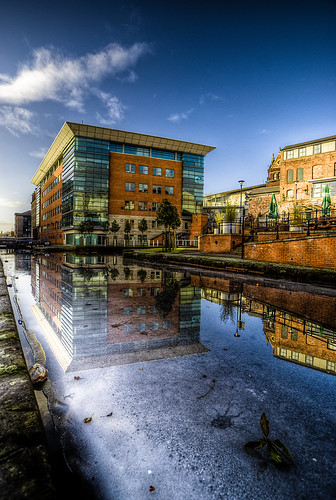
Unfortunately many people seem to think that buying a HDR program is a waste of money unless their shots shout out "HDR"!

I generally much prefer these type of shots where you wouldn't even know it was HDR unless you were told.

Much more subtle and ultimately much better photography.
 
Back
Top