Soft images?? EDIT: Still having probs so Image added for advice

Messages
1,077
Name
Matt
Edit My Images
Yes
Ive been out taking loads of shots over the past few weeks and have hit upon a problem with a large number of my photos which is pretty constent throughout whatever choice of lens I use.

My problem is I seem to be producing alot of soft images, almost slightly out of focus if you zoom in when PP'ing. Not all of my images are soft but id say a good proportion are.

I use a range of different lenses including a Sigma 10-20mm, 50mm f1.8 prime, sigma 24-135mm and a sigma 70-300mm and not forgetting my 18-55mm kit lens. I shoot using a Nikon D90 in either manual or aperture priority and 90% of the time i use autofocus.

Ive googled the problem and read articles but wondered if i could get some first had advice from you guys. Are soft image the result of incorrect setting on my behalf like too slow shutter speeds or high ISO settings? Or do I just had poor quality lenses?

Any help that could be offered would be greatly appreciated.
 
Last edited:
what were your shutter speed, focal length and F stop? give a few examples of the settings you used.

It might just be the shutter speed is to slow and you need to up the iso or lower the F stop.
 
We need samples, cant help otherwise.

I'd be surprised if all your lenses had issues, so more than likely user error, or something along those lines. Do you shoot jpg or RAW?
 
Hi

why don't you post some photos and mention the settings used.It will then give an idea about the problem.

thanks
 
I'll get some images up tomorrow as I'm on my iPhone right now. It just seems to be on a variety of different photos in all conditions so seems to be a generalised issue whenever I go out shooting.

I'm leaning towards incorrect settings as I'm trying to shoot manual wherever possible and I'm still learning. I shoot mainly raw so can usually produce decent end products with a fair bit of PP. I just can't seem to get constant sharpness even when tweaking settings
 
Probably something simple like not enough sharpening or wrong shutter speed. We'll soon figure it out!
 
Have you tried using a tripod? if so were the images much better?

post up your setting info and a pic or two, that will help reslove your problem.
 
Possible causes off the top of my head....

- Shutter speed too slow for focal length of lens;
- Shutter speed too slow for activity level of subject;
- Wrong choice of AF mode, AF point(s) or AF customisation;
- Stopping down (significantly) beyond the diffraction limited aperture;
- AF calibration error;
- Jerky shutter finger;
- Too much caffeine;
- Out of breath;
- Excitement/impatience/rushing;
- Poor AF targeting;
- Forgetting to AF;
- Tricky AF target - poor light, low or no contrast;
- Heavy handed NR (either in camera or out);
- Insufficient sharpening (either in camera or out).

If everything was good, but no more, then maybe the camera has taken a knock and there is damage to the AF system.

To eliminate equipment fault a tripod and well lit, sharp, contrasty, flat test target would probably be a good starting point. If the equipment is performing well without human involvement then you need to look elsewhere for the problem.
 
D90 seems to have quite a few focussing problems eventually

http://www.flickr.com/search/groups/?q=d90%20auto%20focus&m=discuss

I had a similar issue, my images were out of focus when using AF through the viewfinder but focus was spot on using the live view, long story short off to Nikon fixed cleaned and back working perfectly within a week.

Discussion here.
http://www.flickr.com/groups/nikon_d90/discuss/72157624961502131/

Not necessarily your problem but an option...

Thing is, its not a constant thing as I do get well focused shots as well as soft. Ill get some up later this evening to see what people think.

Just checked your flickr out Roger...wow!! Got some awsome shots there mate and can now see what the d90 can produce. Do y6ou mind asking me what lenses you are using?
 
if you're just viewing the RAW files, then remember they are unprocessed. Not like shooting JPEG where the camera will auto sharpen a little here and there.
You'll see on hundreds of threads on here, that most people's processing - regardless of what they've been shooting - will include a sharpen of the RAW files before converting to JPEG.

or.... you might just have a filthy screen? :bonk:
 
or.... you might just have a filthy screen? :bonk:

lol :lol:


Ive just been doing loads of test shots at my desk using flash, getting very crisp shots shootin in full manual and in raw format so can only put it down to poor setting choices on my behalf. I was mainly getting soft images in low light, and can now kind of see where i could have been going wrong.

I really apreciate everyones advioce though and its given me lots to think about
 
Last edited:
Hey Matt still just learning really but Thanks for the compliment!

I would say a big % of the shots are with the Tamron 28-75mm f2.8, as I only have a very small amount of room inside my 'studio'/office so the 50mm is generally too long.

All of the EXIF data should be intact so if it's between 28-75mm then for sure with the Tamron.
 
Thought id revive this thread after todays venture out shooting some landscape shots for my photography course.

I spent some time today at the top of a landmark taking some shots of a monument. I noticed that yet again i was getting soft images, not a great deal was in 100% focus even though i took my time with the exposures and had my camera set up on a tripod. I was using the following set up:

Nikon D90, Sigma 10-20mm, Polorizing filter and camera was set up on a tripod.

I used on-camera metering to set exposure, shot RAW and used a remote release to minimise camera shake.

Some turned out ok, about 70% turned out like this (shot completely un processed).

DSC_0213copy.jpg


Exif data reads:
Exposure: 1/25th
ISO: 200
FNo: F22
Exposure comp: +-0
Exposure Programe: Manual
Focal Length: 17mm

Really struggling to find out what im doing wrong to get good sharpe images. I know I can PP and sharpen my images on the computer but id rather try to get it right in camera first.

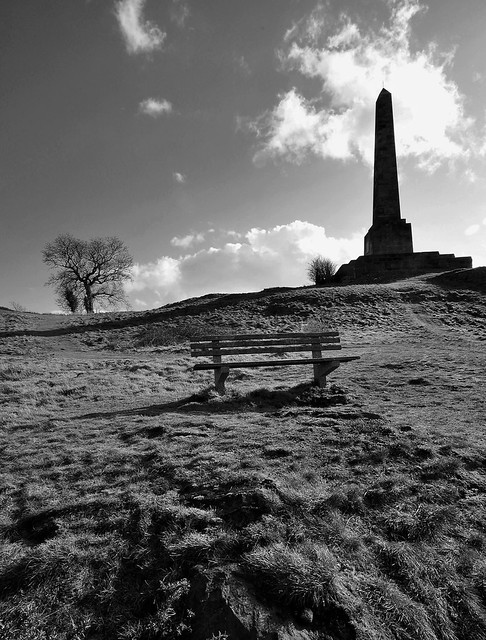
This is a shot from the same day after some PP, mainly on sharpening and noise removal as well as a mono conversion (manily because the colour version wasnt that great)


Lilleshall Monument by Matt_Giles, on Flickr

Hope someone can shed some light on the situation. Thanks
 
Last edited:
Where was the focus point, apart from the foreground being underexposed which makes it a bit difficult to see, also why f22, surely diffraction is going tosrat to degrade the image by then, I'd try f11, certainly with a 17mm focal lengthyou aren't going to be short on DOF. Were you using hyperfocal distance?
 
Why f/22? Diffraction kills sharpness at that high an f/number. It is also pushing your shutter speed dangerously low, for no reason. Try not to go above f/11 if max sharpness is the aim, preferably f/5.6-8.

You also need a graduated ND filter to balance up the foregound and sky exposures, or have a go at HDR technique.
 
If I'm honest I set the high f number to try and keep everything in focus, on reflection I now understand that I can use much lower f numbers and still keep everything in focus for landscape shots.

Focal point was the actual monument and I wasn't using hyperfocal length, still unsure how to do that.

I think from what you guys have said that it's a case of poor setting selections on my behalf which are resulting in poor sharpness in my shots. Am going to get out and try again today and I'll post up some results.

Thanks ;)
 
Last edited:
Have a look at this discussion - http://www.talkphotography.co.uk/forums/showthread.php?t=292833 - and look at the examples in posts #36 and #40. I think for this shot that f/8, or f/11 at most, would have been fine. Also, while a tripod and remote release is a good start, did you use mirror lockup? Was it windy? Just how stable is your tripod? Was it weighted down? 1/25 is certainly slow enough to pick up some mirror slap or wind vibration.

The processing of your files is important too. Sharpening is an expected part of the process. It is not cheating. It is doing things properly for maximum visual appeal.
 
Ditch the polarising filter if its a cheap one. I used to have a cheapy and I could never get pin sharp pics untill I binned it and never looked back.
 
Have a look at this discussion - http://www.talkphotography.co.uk/forums/showthread.php?t=292833 - and look at the examples in posts #36 and #40. I think for this shot that f/8, or f/11 at most, would have been fine. Also, while a tripod and remote release is a good start, did you use mirror lockup? Was it windy? Just how stable is your tripod? Was it weighted down? 1/25 is certainly slow enough to pick up some mirror slap or wind vibration.

The processing of your files is important too. Sharpening is an expected part of the process. It is not cheating. It is doing things properly for maximum visual appeal.

Thats an excvellent read Tim and has definately given me sone much needed teccy info on apertures and diffraction.

Ive been shooting at f16 and above when doing landscapes, alot of the time at f22, as i had been tought that i needed a small aperture to get all the landscape into focus.

Can I ask, if most lenses are at its sharpest mid-aperture (f8-f11) how does that effrect landscape photography, especially when trying to get the whole vista into focus? Is softness at the furthest point more acceptable and am i kidding myself thinking that I can get the whole frame into a nice sharp focus??

Im still learning about hyperfocal distances and have got the DoF chart posted in the thread you highlighted.
 
It's a balancing act. Narrowing the aperture does gain you more DOF, but at the expense of increasing softness at what should be your sharpest point of focus. Basically you should only stop down as much as you need and not more. A useful rule of thumb for shooting landscapes, if you want extensive DOF, is to pick an aperture equal to half focal length. e.g. at 12mm focal length around f/6(.3) should be a good starting point. At 22mm f/11 should be about right. On a crop body going beyond 22mm focal length is beginning to leave the realm of wide angle shooting and gaining big DOF is going to be increasingly difficult. At 35mm you'd want f/16, which is probably a sensible limit. Beyond that you might be better off revising your approach to the shot.

Try using Aperture = FL/2 and plug some numbers in here - http://www.dofmaster.com/dofjs.html - and just see what sort of DOF you can achieve at quite modest apertures when shooting very wide angle.
 
Matt, I think where you are going wrong is that you are doing what you have been told without a full understanding of the meaning and this is leading you a bit astray. Get a handle on depth of field, and it will all drop into place :thumbs:

DoF is controlled by two things - f/number and magnification. You know about f/numbers but magnification means the size of the image, and also embraces some other factors like the format/sensor size which you have to input into a DoF calculator (like www.dofmaster.com - it's all on there).

But don't worry about that now and just remember that in picture taking terms, depth of field is increased when magnification is reduced and the image made smaller, and vice versa of course. You can change the magnification either by changing the focal length, or the shooting distance, or both. However, if for example you fit a longer lens but also move back so that the subject remains the same size in the image, then DoF stays the same too.

In terms of diffraction, it's not normally a problem. For example, if you have a 15mm lens on a crop format camera, and set for hyperfocal distance focusing at f/8, you have depth of field extending from just 75cm to infinity. You don't often need more than that!

If you want to know more about hyperfocal distance technique, then it's actually very easy and there have been some good recent threads on it, like this one http://www.talkphotography.co.uk/forums/showthread.php?t=255258
 
Thanks again, some invaluable info there mate. I've downloaded the DoF master app to my iPhone and am starting to get my head around it.

If I'm getting it right then say I set a focal length of 20mm and an aperture of f8 then my focus distance is 2.52m onto my frame giving me everything from 1.26m to infinity in focus?

However if I'd set f11 then I'd focus at 1.79m into the frame giving everything from 0.89m to infinity in focus?

Hope I'm understanding thus right and if I am it makes so much sense.
 
Thanks again, some invaluable info there mate. I've downloaded the DoF master app to my iPhone and am starting to get my head around it.

If I'm getting it right then say I set a focal length of 20mm and an aperture of f8 then my focus distance is 2.52m onto my frame giving me everything from 1.26m to infinity in focus?

However if I'd set f11 then I'd focus at 1.79m into the frame giving everything from 0.89m to infinity in focus?

Hope I'm understanding thus right and if I am it makes so much sense.

Spot on :thumbs:

Notice that the near point of the hyperfocal range is always exactly half the hyperfocal distance. In the field, that is a vitally useful bit of knowledge ;)
 
Photocalc is another app worth having on the phone. It's got depth of field, flash guide numbers, but I mostly use it for the solar calculator.
 
Thanks again, some invaluable info there mate. I've downloaded the DoF master app to my iPhone and am starting to get my head around it.

If I'm getting it right then say I set a focal length of 20mm and an aperture of f8 then my focus distance is 2.52m onto my frame giving me everything from 1.26m to infinity in focus?

However if I'd set f11 then I'd focus at 1.79m into the frame giving everything from 0.89m to infinity in focus?

Hope I'm understanding thus right and if I am it makes so much sense.

Absolutely spot on....

20110214_090116_.JPG


And note that to get that generous DOF you didn't even stop down to FL/2, which would be f/10. You only went to f/8 and still had lots of DOF.

If you had used f/10 then your hyperfocal distance would be 2m exactly and your nearest sharp point would become 1m dead. Of course, your far distance of infinity would still be infinity, so no change there. In other words, you may need to stop down more if there is something really quite close to the camera that you do want to appear sharp, but if you were looking across a valley to a mountain range far away, and had no foreground interest in the scene, you would not need to stop down very much at all.

At f/11 you've also interpreted the calculation correctly....

20110214_091353_.JPG


It looks like you've got the hang of this. :)
 
This is all I need for setting DoF. Anything else, I use either the ever popular guessmatic mode* or zoom in on the LCD and take a peek. (Note that those figures refer to full frame.)

IMG_4014-1.jpg


Also check the 'focus one-third in' rule. There's more on that in the thread link in post #25 above. It is far from an absolute, but handy for closer distance shooting when infinity sharpness isn't required, like groups and similar.

* Guessmatic DoF setting is usually okay when you know a bit about what's going on through experience. In practise, DoF is usually not the exact science that some of the very precise numbers in those calculations suggest. DoF fades gradually from sharp to unsharp and if in doubt, just select a slightly higher f/number to make sure ;)
 
Thought id revive this thread after todays venture out shooting some landscape shots for my photography course.

I spent some time today at the top of a landmark taking some shots of a monument. I noticed that yet again i was getting soft images, not a great deal was in 100% focus even though i took my time with the exposures and had my camera set up on a tripod. I was using the following set up:

Nikon D90, Sigma 10-20mm, Polorizing filter and camera was set up on a tripod.

I used on-camera metering to set exposure, shot RAW and used a remote release to minimise camera shake.

Some turned out ok, about 70% turned out like this (shot completely un processed).

DSC_0213copy.jpg


Exif data reads:
Exposure: 1/25th
ISO: 200
FNo: F22
Exposure comp: +-0
Exposure Programe: Manual
Focal Length: 17mm

Really struggling to find out what im doing wrong to get good sharpe images. I know I can PP and sharpen my images on the computer but id rather try to get it right in camera first.

This is a shot from the same day after some PP, mainly on sharpening and noise removal as well as a mono conversion (manily because the colour version wasnt that great)


Lilleshall Monument by Matt_Giles, on Flickr

Hope someone can shed some light on the situation. Thanks

To be quite frank the colour shot doesn't seem particularly soft since I can easily distinguish the tiny spire on the very top.

That would be the first thing to go if the shot was really OOF.

And as for getting it right in camera - well I think you have.

Personally I think you're going for a standard of excellence directly from the camera which simply isn't there.

Which is why PP in most cases is almost as essential as the camera.

.
 
Back
Top