


- Messages
- 1,161
- Name
- James
- Edit My Images
- Yes
Hey guys, I'm having a real issue at the minute with an image I took today.
The image is of a swan on a pond at sunset. In photoshop the image looks just as I want it. I exported to jpeg and then had a look at it with the "windows picture and fax viewer". The image was noticably bluer. Thinking this might be a problem with the viewer rather than the image I opened the jpeg in my web browser and it looked fine, I reopened it in photoshop, again it looked fine.
Next, I saved a smaller jpeg for upload to the web. I checked it by opening the image in my web browser on my computer, all looked fine. Uploaded to my website and something really strange. I have put the image in a blog post. In the post itself the image has gone blue again, but, if you click the image, it looks how it is supposed to.
I've uploaded the image to redbubble, it looks just fine on redbubble.
The post on the blog is
http://beginningphotography.wordpress.com/2010/01/08/sun-snow-and-good-timing/
The image is clickable, but is a direct link to the same image, not a resize or anything. If you click the link the image gets noticable warmer.
So, I really need a couple of things if someone would be so kind. The first is for someone to confirm that they too experience the same thing when they look at the image on my blog. The second is for any explanation as to what might be happening.
You can imagine my concern here, are any of my images actually what I think they are?
The image in question is
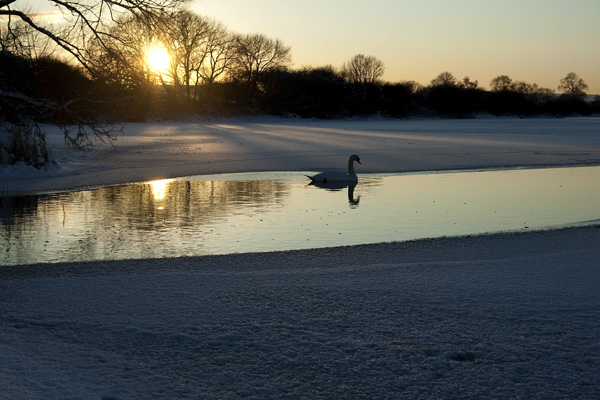
which on my browser here looks just right when displayed on this forum.
I haven't experienced this with any other pics on my blog, so wondering if it is something funky with jpeg.
Only guess I've come up with is that I've saved the web version at 144ppi at 600*400, the original is 3888*2592 at 300ppi, but that fails to explain windows picture and fax viewer getting it wrong.
I'm at a complete loss, pls help.
The image is of a swan on a pond at sunset. In photoshop the image looks just as I want it. I exported to jpeg and then had a look at it with the "windows picture and fax viewer". The image was noticably bluer. Thinking this might be a problem with the viewer rather than the image I opened the jpeg in my web browser and it looked fine, I reopened it in photoshop, again it looked fine.
Next, I saved a smaller jpeg for upload to the web. I checked it by opening the image in my web browser on my computer, all looked fine. Uploaded to my website and something really strange. I have put the image in a blog post. In the post itself the image has gone blue again, but, if you click the image, it looks how it is supposed to.
I've uploaded the image to redbubble, it looks just fine on redbubble.
The post on the blog is
http://beginningphotography.wordpress.com/2010/01/08/sun-snow-and-good-timing/
The image is clickable, but is a direct link to the same image, not a resize or anything. If you click the link the image gets noticable warmer.
So, I really need a couple of things if someone would be so kind. The first is for someone to confirm that they too experience the same thing when they look at the image on my blog. The second is for any explanation as to what might be happening.
You can imagine my concern here, are any of my images actually what I think they are?
The image in question is
which on my browser here looks just right when displayed on this forum.
I haven't experienced this with any other pics on my blog, so wondering if it is something funky with jpeg.
Only guess I've come up with is that I've saved the web version at 144ppi at 600*400, the original is 3888*2592 at 300ppi, but that fails to explain windows picture and fax viewer getting it wrong.
I'm at a complete loss, pls help.


 )


