The Amazing Sony A1/A7/A9/APS-C & Anything else welcome Mega Thread!

There are solutions to his import woes but that doesn't really matter - the camera should work as he wants!

Can you post pictures of your settings and a screenshot of how the directory structure on the card ends up? It would make it very clear (for us to help test, and for you to share with Wex). As an aside, if the camera came from Wex and isn't working right it's on them to fix not Sony (with regards to consumer law etc). This is a grey area of "not working" mind. Also what version of firmware are you on?
 
Alan's issue is that it's saving photos taken on different days into different folders so whilst he has no issue accessing them he has to go into each individual folder to retreive them (y)

That what mine seems to do "in camera". I used to delete in camera and it was either "single" or "all". All of a sudden it started giving me the choice of "single" or "by day" rather than all. That was ages ago now and I never got to the bottom of it.
 
That what mine seems to do "in camera". I used to delete in camera and it was either "single" or "all". All of a sudden it started giving me the choice of "single" or "by day" rather than all. That was ages ago now and I never got to the bottom of it.
Ahh I see. I've never deleted in camera so no idea how mine 'works' :lol:
 
Out of interest Alan, have you popped out the memory card to download load to the computer?
 
That what mine seems to do "in camera". I used to delete in camera and it was either "single" or "all". All of a sudden it started giving me the choice of "single" or "by day" rather than all. That was ages ago now and I never got to the bottom of it.

I plug the camera into my pc and copy the files across and then turn the camera off leaving it plugged in. Very often by the time I've finished processing the pictures the camera is fully charged. It's only once I'm happy that all the pictures are copied across that I then format the card in the camera.

I could live with this, it's just an irritation. I can't see how it's normal as my A7 works as per the menu and saves in one folder or multiple ones as per the settings in the menu but the A7III doesn't and remains in date form no matter what the menu says. If it's a fault I can only assume that the menu option has become corrupted somehow, if it's "normal" then I really don't understand how or why.
 
There are solutions to his import woes but that doesn't really matter - the camera should work as he wants!

Can you post pictures of your settings and a screenshot of how the directory structure on the card ends up? It would make it very clear (for us to help test, and for you to share with Wex). As an aside, if the camera came from Wex and isn't working right it's on them to fix not Sony (with regards to consumer law etc). This is a grey area of "not working" mind. Also what version of firmware are you on?

Toolbox, setup page 6, option 4 from the top is "Folder Name." In this there are two options, "Standard Form" and "Date Form." Standard Form saves files in one folder until the max number is reached (this may be 4,000, I can't remember) and once this number is reached another folder is created and so on. Date Form creates a new folder for each day. So, in date form if I take one picture on Monday and one picture on Tuesday etc these pictures appear in separate folders. One in Mondays folder and one in Tuesdays folder etc. The problem is that the A7III does this in "Standard Form". That's not too bad for three days but two weeks in Thailand could irritate me more especially as the camera doesn't seem to want to copy more than one folder at a time. It's just an irritant and I really would like an answer even if I end up living with this.

I only noticed this when we went to Holland and I took pictures on three days and thus ended up with three folders. Normally I'd copy the pictures across on the same day I took them and the "problem" would therefore never show up.
 
Last edited:
Can anyone with an A7III please check something for me????

Mine is saving pictures taken over a period of days in separate folders even if I change the menu option to "standard" rather than date. Can someone with an A7III please give this a go and let me know what happens. You obviously don't have to take a picture today and then wait until tomorrow to take another, all you need to do is take a picture and then go into the menu and advance the date and then take another picture.

I wrote to Sony and they gave me a list of things to try, none of which worked. So, I wrote to them again and I've just received the following reply...

"Thank you for your patience.

With reference to your enquiry regarding your Sony ILCE-7M3, after reviewing the case with our relevant team, we can confirm that this is within specifications and it is not an issue.

Should you have any further questions, please feel free to reply to this email.
Thank you for your enquiry.
Yours sincerely,
Dina"

I don't believe them but if anyone can check this before I write back I'd appreciate it.

PS.
I've just tried my old A7 and it behaves as expected. In "date form" it saves each days pictures in separate folders and in "standard" it just saves everything into one folder, until it reaches the limit. A7III is stuck in "date form" no matter what option is set in the menu.
I don't have a A7III anymore (have the A7IV now) but when I did have an A7III mine definitely never did this. It did what you expect it to i.e. saves everything in one folder until it reaches the limit and then creates a new folder.
 
I don't have a A7III anymore (have the A7IV now) but when I did have an A7III mine definitely never did this. It did what you expect it to i.e. saves everything in one folder until it reaches the limit and then creates a new folder.

Just as per the question above, did you plug the camera into a pc or remove the card and either plug it into the pc directly or via a card reader?
 
Unfortunately my laptop hasn't got an input and I don't have a card reader anymore.

Possible clue here if you're directly connecting the camera- what USB mode do you have the camera in? If it's in PTP vs mass transfer it could be changing how it presents the files to the computer.
 
Hang on, another clue in the manual when I was checking that out:
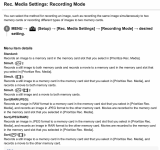
  • If [Recording Mode] is set to other than [Standard], a new folder is created with a folder number one greater than the largest folder number currently used on both memory cards inserted in the memory card slots.
  • If [Recording Mode] is set to other than [Standard] and an image is shot, a new folder may be automatically created.
What do you have set in:
  1. MENU →
    s_menu_setup.png
    (Setup) → [Rec. Media Settings] → [Recording Mode] → desired setting.
Is it standard or something else? Try standard if it's not.
 
Hang on, another clue in the manual when I was checking that out:
  • If [Recording Mode] is set to other than [Standard], a new folder is created with a folder number one greater than the largest folder number currently used on both memory cards inserted in the memory card slots.
  • If [Recording Mode] is set to other than [Standard] and an image is shot, a new folder may be automatically created.
What do you have set in:
  1. MENU →
    s_menu_setup.png
    (Setup) → [Rec. Media Settings] → [Recording Mode] → desired setting.
Is it standard or something else? Try standard if it's not.
See above ;)
 
See above

Where?

This hasn't been covered I think? I'm _not_ talking about the "folder name" setting that is mentioned above. I'm talking about the notes on that setting that say to check the recording mode also.

1744748682477.png

This setting affects the date/folder setting AFAIK.

Apologies if this was covered though.
 
Last edited:
I plug the camera into my pc and copy the files across and then turn the camera off leaving it plugged in. Very often by the time I've finished processing the pictures the camera is fully charged. It's only once I'm happy that all the pictures are copied across that I then format the card in the camera.

I could live with this, it's just an irritation. I can't see how it's normal as my A7 works as per the menu and saves in one folder or multiple ones as per the settings in the menu but the A7III doesn't and remains in date form no matter what the menu says. If it's a fault I can only assume that the menu option has become corrupted somehow, if it's "normal" then I really don't understand how or why.

I've just checked mine. It 'deletes' in camera, per day rather than all.

I checked in the menus & I have it set to 'standard'. In the menu's I checked the option for 'select recording folder' (it was a vertical scroll type selection) and I only have one folder there which is the DSC1000 or whatever it is.

So it appears although mine deletes by the day from the menu, the images aren't in folders per day.

When I plug in to the PC & switch the camera on, Lightroom automatically opens and all photos on the card are on the import screen (after I've selected the camera as source)

Mine is obviously the Riii but I can't see it being any different to the iii
 
Where?

This hasn't been covered I think? I'm _not_ talking about the "folder name" setting that is mentioned above. I'm talking about the notes on that setting that say to check the recording mode also.

View attachment 450814

This setting affects the date/folder setting AFAIK.

Apologies if this was covered though.
Ahh apologies. AFAIK this doesn’t create folders per day, it just creates a folder per file type (raw, jpeg etc) if you have it set that way.
 
New firmware for the A1II, A1 and A9III

 
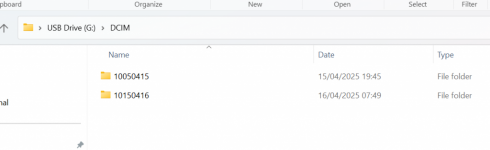
This is what my sd card looks like when plugged into a reader, i had set the folders to date as earlier post.
 

Attachments

  • Screenshot 2025-04-16 075621.png
    Screenshot 2025-04-16 075621.png
    89 KB · Views: 14
New firmware for the A1II, A1 and A9III

Looks like it's just a big fix update rather than adding anything (y)
 
You should have Auto, Mass storage or MTP on a A7ii - set it to "mass storage" if you haven't.

Tried auto and mass.

I was a bit confused after Sony told me to check this as the camera doesn't give an option for this when you plug it in whereas my Panasonic cameras come up with this every time I plug them in to the pc, I then found that with the Sony it's just in the menu and you don't get a prompt when connecting it to the pc but it made no difference. I don't use a lot of the menu options so I think I'll have a mooch around and see if anything else doesn't look right or if there are any other settings in the chain, I might also try updating the firmware even though it's at the version Sony linked.

I'm busy for the next 4 days, going away again, so I'll have another look on Monday. Thanks all for the pointers.
 
Last edited:
This is what my sd card looks like when plugged into a reader, i had set the folders to date as earlier post.
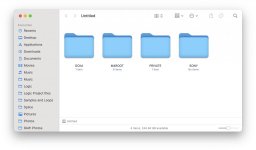
This is what mine looks like, I've just tried it connecting directly to the computer, and using a card reader and it comes up the same for both

Screenshot 2025-04-16 at 12.03.44.jpg
 
With the camera plugged into the pc when I go into dcim (I think that's what it's called) I see the folders, there should be one but in the case of my III there's one for each day.

I think I gave my old card reader away in a box of bits and pieces I thought I didn't need any more but I'd rather solve this than work around it. I did email Wex but they weren't any help. I'll have a look next week and more than likely update the firmware if it will overwrite an existing same version. If this or something else works I might solve this but never know exactly what the cause was.

Thanks again all. I'll report back but as when I "fixed" my A7 I might not be able to say exactly how :D
 
There are several reviews on this page...

 
There are several reviews on this page...

I'm sure it'll be lovely, but at 910g I'll give it a miss.
 
I'm sure it'll be lovely, but at 910g I'll give it a miss.

Someone commented on the rumor site that they don't see f1.2 being worth the additional weight over the Sony f1.4 and whilst that might be true others might be swayed by the price. I keep think that an AF f1.2 or f1.4 would be nice but I know I wouldn't be happy with the bulk and weight and I do have the Voigtlander f1.2 35 and 50mm and the even smaller 35mm f1.4 for when MF is ok and I do have my Sony f1.8's which if I'm being honest are enough for me.
 
Last edited:
Someone commented on the rumor site that they don't see f1.2 being worth the additional weight over the Sony f1.4 and whilst that might be true others might be swayed by the price. I keep think that an AF f1.2 or f1.4 would be nice but I know I wouldn't be happy with the bulk and weight and I do have the Voigtlander f1.2 35 and 50mm and the even smaller 35mm f1.4 for when MF is ok and I do have my Sony f1.8's which if I'm being honest are enough for me.
I was swayed on the f1.2 50mm GM over the f1.4, but I do much prefer the size and weight of the f1.4, and I do keep considering ‘downgrading’. I think the Viltrox is just that bit too big and heavy over the GM to justify it for me.
 
I think the "once seen never unseen" labcoat might come into play here :ROFLMAO:

Best way of saving weight is to go out with less gear, obviously that has its compromises (FOMO anxiety!!)
I often go out with just one lens (y)
 
I'll be taking just one lens on our break tomorrow, maybe Sony 24mm f2.8 G or 28mm f2 for a wider than 35mm fov as we're staying in a pod.
 

Are you brave enough to update? Lol
 

Are you brave enough to update? Lol
It's just big fixes so I'm in no rush to update (y)
 
Milky Way at that Engine House on Exmoor.


*** by Lee, on Flickr

I took single frames with the X100f too. I know they won't compare, but it'll be interesting to see how they compare.
Lovely shot, nice how you got the trees sloping towards the engine house :) , F2 just to get a bit more DOF and did you put a light in the house or PP?
Cheers
 
I think I'm going to give up, I've just created this on chatGPT and it's better than anything I've shot :eek: :ROFLMAO:

(looks soft on here but it's not on my computer)


AI Landscape by Toby Gunnee, on Flickr
 
Last edited:
It is getting scarily good this Ai s***

It really is. Not just in terms of generating images either. Pretty much every wedding photographer now uses A.I for:

Creating posts on social media, Instagram captions etc.
Writing blog posts
Creating copy for paid adverts
Email responses
Responses to social media messages
Culling images
Editing images and re-touching

My youngest was recently doing some work experience in the marketing department for a company that makes make-up and all the stuff that goes along with all of that. They use A.I for pretty much everything, they aren't allowed to reply to customer emails without using A.I, this company is well known for videos on TikTok etc. Every single video including the live videos have a script generated by A.I that they have to stick too, they even have someone of the live videos whose job it is to copy and paste questions on the lives into Chat GPT to generate responses.

Would imagine it's heavily embedded into most businesses now.

Although it is still only as good as the questions you ask it to do. See a lot with wedding photographers were they haven't provided enough detail and just asked to generate a caption or an advert and it spits out the same answer so multiple photographers are using the same thing.
 
Has anyone come across a good comparison blog or video between the 85mm GM2 and Siggy DG DN? I’ve only found the Dustin Abbott one but it’s a bit flawed when it comes to bokeh as he doesn’t take into account the difference in FOV.
 
Back
Top