- Messages
- 26,971
- Name
- Toby
- Edit My Images
- No
I don’t think so as you can have it in other cameras such as the A1As for why you can't have a noise, I suspect they think it defeats the objective of having electronic shutter.



I don’t think so as you can have it in other cameras such as the A1As for why you can't have a noise, I suspect they think it defeats the objective of having electronic shutter.

Yet Nikon, with the Z8 at least, gives you the option of shutter sound with adjustable volume and it doesn't even have a mechanical shutterUp skirting was a big deal in South Korea as well as Japan. As for why you can't have a noise, I suspect they think it defeats the objective of having electronic shutter.


Is that the A1 if so you can have shutter sound when using electronic shutterFrom another post someone posted that they can't get a shutter sound when using the electronic shutter, however when you read the manual it reads (to me at least) that you should be able to turn the e-shutter sound on/off. I've just tried mine and despite turning silent off there's still no shutter sound in e-shutter, can anyone confirm this? I can't help but think it's a glitch, unless they've changed it since the manual was printed
View attachment 459378

No raw files are also reduced so using the APS-C mode on the A7RIII will give you an 18.6 megapixel image for both raw and jpeg. You get this icon on the monitor (depending on view mode) when using APS-C mode (note it doesn't say APS-C/Supre 35mm it's just the box with the dashes around it)
View attachment 459396
This is incorrect you don't get the normal size raw, it's an 18.6 megapixel raw rather than 42 megapixel raw

From everything I’ve seen the files are great on the RV.The RX1r videos had a lot of talk about how nice the files are from the r bodies and this got me thinking. What do people think. Is the latest r sensor very good and are the files very nice? And also, if the r files were downsized to something near the 24 MP files at 6k or so on the longest edge would they be any better than files from my A7iii?
I have the A7RV and it has the best image quality of any camera I’ve used, not only in detail but also colours and skin tones. That being said I’m still not a huge fan of Sony colour profiles so use Adobe and/or Color Fidelity ones.From everything I’ve seen the files are great on the RV.
Not tried the Sony but when I went from the d700 to d800 the files were great and even though the d700 was hailed as a great lowlight camera I found the d800 as good or better when downsized.
It may have had more noise but the extra detail and smaller noise pattern did make a difference.
To be honest that was the only thing I liked about the d800
I’m holding to see what the standard V is like then will decided on that or RV as my next camera

From everything I’ve seen the files are great on the RV.
Not tried the Sony but when I went from the d700 to d800 the files were great and even though the d700 was hailed as a great lowlight camera I found the d800 as good or better when downsized.
It may have had more noise but the extra detail and smaller noise pattern did make a difference.
To be honest that was the only thing I liked about the d800
I’m holding to see what the standard V is like then will decided on that or RV as my next camera
I have the A7RV and it has the best image quality of any camera I’ve used, not only in detail but also colours and skin tones. That being said I’m still not a huge fan of Sony colour profiles so use Adobe and/or Color Fidelity ones.
Overall I still prefer the A1, image quality and colours are only a gnats behind the A7RV and it has much more going for it for my uses.
The RX1r videos had a lot of talk about how nice the files are from the r bodies and this got me thinking. What do people think. Is the latest r sensor very good and are the files very nice? And also, if the r files were downsized to something near the 24 MP files at 6k or so on the longest edge would they be any better than files from my A7iii?
Yes I save at full res, I see no point in buying a hi res camera and then downsizing, if you're going to do this you'd be much better off saving yourself a load of money and storage space and getting a lower res camera.Do you save your files at full resolution? I do but of course I only have 24mp cameras which end up as jpegs 6k along the longest edge.
I just wondered if there'd be any reason to go for an A7crII rather than the lower res one if I reduced the file size either in camera or post capture as the r files do seem a bit big.
I have instant access to my jpegs, it’s the raws I don’t keep on the main hard drive for obvious reasons.I suppose there wouldn't be any real point other than saving storage space with smaller downsized jpegs whilst having a full resolution raw available for the shots I want to crop. It was just a thought. The point about better colour science is interesting though.
I have backup drives but tbh I'd much rather have instant access. I'll get a new laptop when I get around to it and hopefully get more in machine storage.
24mp is 24mp, just because it's come from a 61mp file it can't show any more detail than 24mp
I don’t believe this is true. The original 61mp has more colour information but during the down sampling process the colour information is averaged out and so the down sampled 24mp image can show less colour detail than a 24mp sensor, however whether you can actually see it is a different matter.That’s only correct if you ignore colour.
Because there’s a colour filter array (which may or may not be Bayer pattern) each pixel only samples one colour. If you down sample you get to sample each colour for each pixel, and this makes a difference. This is why many high end cameras do pixel shift, for colour resolution not spatial resolution.

The main reason to downsample is normally noise/low light performance ( was the primary reason I was doing it)
I’m not aware of any software that doesn’t average out when downsampling, I’m not sure how else you’d do it.Depends how you downsample I guess, but if you’re starting with the raw or doing it in camera I’d expect colour improvements. It would be possible to do it badly/wrong. Even the naive averaging I’d expect to be better though.
I’m not aware of any software that doesn’t average out when downsampling, I’m not sure how else you’d do it.
What's the tagging you're referring to?Used my 50-150mm F2 for the first time at the weekend. What a stunning lens it is and perfect with the 28-70 for Concert , indoor sport and event photography. I don't think I can justify keeping the Tamron 35-150 or the Sony 135mm so they will be off to ebay in the near future along with a gripped A1 as I will definitely get one of those now as earnings from the cameras justify the purchase. I'm hoping they add the feature of tagging both slots simultaneously. A complete pain having to upload all the jpegs so I can see what ones were tagged. I have to shoot jpeg for instant delivery on quite a few of my regular events so that will be a big plus. I'll likely end up with two as I always shoot two bodies and like them paired

When I send an image to a client I mark it. Some cameras call it protect/locked. Tagging is what I think most sports photographers call it as that is what you filter in Photomechanic to only upload those images. It is basically a way of culling as you go. On all the cameras I have used you direct that tag to one of the card slots. The A1 ii now does it on both slots, at lastWhat's the tagging you're referring to?
The 50-150mm does look a stellar lens, but then it needs to be given the price. I did wonder whether it would be worth looking into swapping my 70-200mm for it but I think I'd miss the reach, which is probably a good thing as I can't really afford to swap anyway

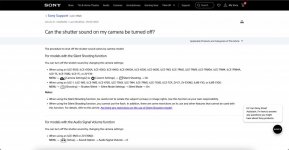
Works fine, and as the manual details, on the A1 and A9iii and previously on A9, A9ii and A7R IV for me.@nog and others, I've heard back from Sony and they say that you should be able to have a shutter sound with the electronic shutter
View attachment 459705
They also linked me to this
View attachment 459704
I've gone back to them to ask if this is region specific and await their response. I've also told them that I've spoken to others and they cannot get shutter sound with the electronic shutter just in case it's a bug they're not aware of.
I know the A9's and A1's have always been able to have a shutter sound with the electronic shutter but it appears several people including myself can't get it to work on the A7RV, and also 'the internet' don't seem to be able to get the sound with the A7RV. However, if you can with the A7RIV it would suggest that it should be possible with the A7RVWorks fine, and as the manual details, on the A1 and A9iii and previously on A9, A9ii and A7R IV for me.
Is yours grey or a UK model?
Thanks for contacting Sony, surprised the a7R iv has shutter sound with the e shutter. Perhaps you might be onto something with the grey/uk thought.(My A7R V is grey)@nog and others, I've heard back from Sony and they say that you should be able to have a shutter sound with the electronic shutter
View attachment 459705
They also linked me to this
View attachment 459704
I've gone back to them to ask if this is region specific and await their response. I've also told them that I've spoken to others and they cannot get shutter sound with the electronic shutter just in case it's a bug they're not aware of.
Mine’s grey, I don’t know what Simon’s A7RIV is though. I think it’s totally justified getting an A1 Mark II just for the shutter soundThanks for contacting Sony, surprised the a7R iv has shutter sound with the e shutter. Perhaps you might be onto something with the grey/uk thought.(My A7R V is grey)
Wonder if my Mrs would be happy with me getting an A1 2 in order to get that shutter sound. Think I know the answer to that unfortunately.

I don’t like shutter sounds either, it’s just it was brought up on another thread and I checked mine and found the e-shutter sound doesn’t work. What I’ve also noticed is that even if you turn silent OFF it still shows the silent icon on the LCD display so I’m guessing it’s a software glitch.I've got used to shooting silently these days. I can't say I miss the sound and when sitting next to Canon and Nikon DSLRs users at Rugby and Football games it is a distraction. It does make me wonder when I hear them rattling away and I am not shooting what I am missing
Yeah I got the same offer but I think they’ll need to offer at least 50% off before I’m even remotely interestedJust been sent an email from WEX offering £500 trade in bonus and 12 months interest free credit on an RX1Riii - surprised to see an offer this early into a product cycle.

Yeah I got the same offer but I think they’ll need to offer at least 50% off before I’m even remotely interested
Just been sent an email from WEX offering £500 trade in bonus and 12 months interest free credit on an RX1Riii - surprised to see an offer this early into a product cycle.
I deleted it, I just assumed it was to anyone subscribed to the newsletterNo email for me and I feel a bit miffed as I've bought a lot from them over the years.
Alan, I wouldn’t worry (they do seem to send targeted email promotions out), but now you know the deal, I’m sure you can ring up and negotiate if it’s something you want to doNo email for me and I feel a bit miffed as I've bought a lot from them over the years.
I deleted it, I just assumed it was to anyone subscribed to the newsletter

Alan, I wouldn’t worry (they do seem to send targeted email promotions out), but now you know the deal, I’m sure you can ring up and negotiate if it’s something you want to do




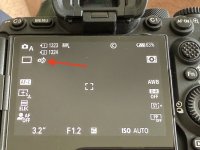
I only get that icon when silent is ON@nog I'm still trying to problem solve the electronic shutter, Sony are beyond useless as they keep coming back with things that aren't relevant so I've asked for it to be escalated. In the meantime, does this icon show regardless of whether silent is on/off?
View attachment 459823