

You are using an out of date browser. It may not display this or other websites correctly.
You should upgrade or use an alternative browser.
You should upgrade or use an alternative browser.
to photograph moon
- Thread starter renu
- Start date


gazedd
Ding Dong
- Messages
- 2,068
- Name
- Gary Eddleston
- Edit My Images
- Yes
I shot http://www.flickr.com/photos/gazedd/4158250629/ with the following settings:
Camera Canon EOS 400D Digital
Exposure 0.001 sec (1/800)
Aperture f/5.6
Focal Length 250 mm
ISO Speed 100
So you could use this as your base and tweet it depending on your light when you shoot. Also note I have thrown it through Photoshop also to tweak it.
Camera Canon EOS 400D Digital
Exposure 0.001 sec (1/800)
Aperture f/5.6
Focal Length 250 mm
ISO Speed 100
So you could use this as your base and tweet it depending on your light when you shoot. Also note I have thrown it through Photoshop also to tweak it.
I shot http://www.flickr.com/photos/gazedd/4158250629/ with the following settings:
Camera Canon EOS 400D Digital
Exposure 0.001 sec (1/800)
Aperture f/5.6
Focal Length 250 mm
ISO Speed 100
So you could use this as your base and tweet it depending on your light when you shoot. Also note I have thrown it through Photoshop also to tweak it.
Hi
did you crop the photo or is it unedited.The reason i am asking is, that i cant see any details at all in any of the photos i have taken tonight..Yours look good.
I have cropped the image but not heavily. what were your settings you used?
Hi
i used tripod with iso 100, diff apertures starting f8,11,f16 and used aperture priority which showed a shutter speed ranging from 1/60 to 1/30s.I used spot metering and centre weighted as well.
thanks
gazedd
Ding Dong
- Messages
- 2,068
- Name
- Gary Eddleston
- Edit My Images
- Yes
The detail is lost in your shutter speed. you need a fast shutter speed because its a bright object. basically your camera is capturing to much light from the moon and creating a bright white ball.
Knock your camera into manual and use my settings above... you should see a deference
Knock your camera into manual and use my settings above... you should see a deference
The detail is lost in your shutter speed. you need a fast shutter speed because its a bright object. basically your camera is capturing to much light from the moon and creating a bright white ball.
Knock your camera into manual and use my settings above... you should see a deference
Hi
I will try that.It looks like that is the only parameter i have used differently and will manual setting.Thank you very much for the info and patience
thanks

gazedd
Ding Dong
- Messages
- 2,068
- Name
- Gary Eddleston
- Edit My Images
- Yes
Enjoy shooting!
If I remember correctly, when editing boost the clarity tool up so you draw out the detail of the moon (craters)
I would also suggest that at 300mm, you shouldn't have to crop in to much but I would view your image at 100%, then crop in only too about 1000px or 800px.
If I remember correctly, when editing boost the clarity tool up so you draw out the detail of the moon (craters)
I would also suggest that at 300mm, you shouldn't have to crop in to much but I would view your image at 100%, then crop in only too about 1000px or 800px.

- Messages
- 21,339
- Edit My Images
- Yes
amnesia said:If you have live view (the D300 does) then the zoom function is VERY useful when manually focusing.
It's quite good fun sticking the camera onto live view, 10x zoom, with a 400mm lens plus 2x tc then watch how fast the moon moves across the screen.

Redpaul
Suspended / Banned
- Messages
- 623
- Name
- Paul
- Edit My Images
- Yes
Most of the details will be lost in a full moon as there are no shadows.
The crescent moon is the best time to shoot as there will be loads of detail and shadows.
One of mine at F/8, 1/200sec, 400mm and handheld.
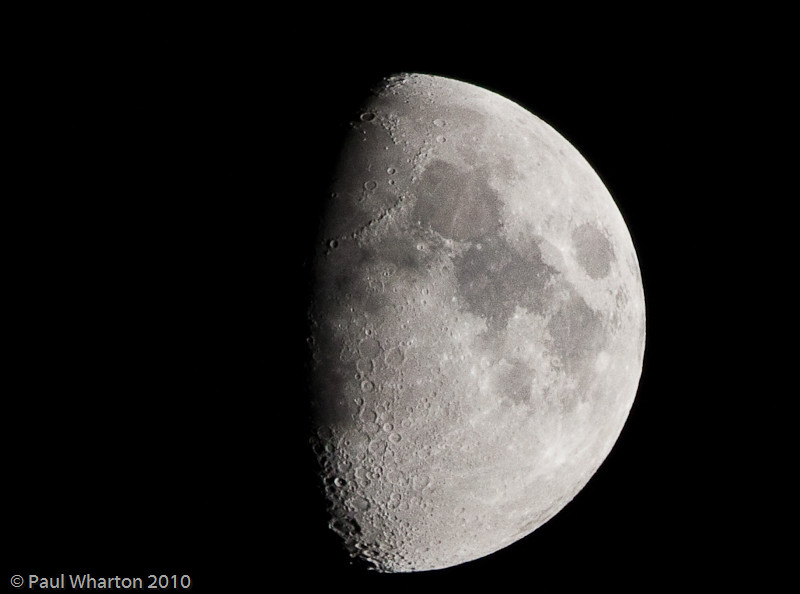
The Moon by Paul S Wharton, on Flickr
Paul
The crescent moon is the best time to shoot as there will be loads of detail and shadows.
One of mine at F/8, 1/200sec, 400mm and handheld.
The Moon by Paul S Wharton, on Flickr
Paul

- Messages
- 566
- Name
- Ben
- Edit My Images
- Yes
I'm just trying this out as we speak, full moon though so it's proving difficult to get the texture of the craters on the surface.
EDIT:
This is my outcome, taken with 70-300 APO DG Sigma. Not happy with it
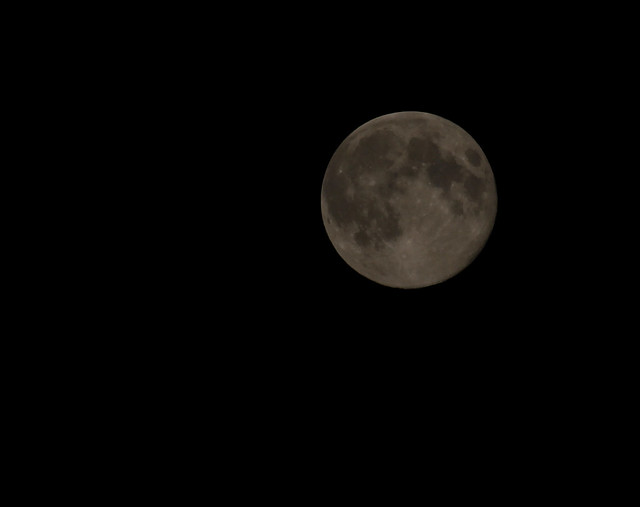
The Moon by bensambrook, on Flickr
EDIT:
This is my outcome, taken with 70-300 APO DG Sigma. Not happy with it
The Moon by bensambrook, on Flickr
Last edited:
I'm just trying this out as we speak, full moon though so it's proving difficult to get the texture of the craters on the surface.
EDIT:
This is my outcome, taken with 70-300 APO DG Sigma. Not happy with it
The Moon by bensambrook, on Flickr
Mine is similar to that with 70-300 lens.

- Messages
- 7,415
- Edit My Images
- Yes
I'm just trying this out as we speak, full moon though so it's proving difficult to get the texture of the craters on the surface.
EDIT:
This is my outcome, taken with 70-300 APO DG Sigma. Not happy with it
It looks like the image was under exposed, though the settings are not in the EXIF data, so I can't say what you should change to improve it. :shrug:
Saying that, just brightening the image and upping the contrast makes a big difference. It's a bit noisy, but that could be a consequence of the under exposure and/or ISO used.