What White Balance For Low Light Photography

Messages
145
Name
Glenn
Edit My Images
Yes
Ive just purchased the 50mm canon lens. I quite like the idea of being able to shoot images of people both outside and inside on an evening at dusk and also in the dark.

Ive been using the presets for portraits. Ive also experimented with the camera on aperture setting, shooting at f1.8. Ive been using the shade white balance. Ive noticed the pictures have a slight sepia look to them.

Could you advise on best white balance for this type of photography when shooting in jpeg.

291.jpg


246.jpg


322.jpg


war-weekend-379.jpg


Also, any other tips on this type of photography would be appreciated.
 
I can't advise for jpg white balance as I would always shoot in raw under those circumstances - AWB auto-white balance would probably be your best bet.

The problem is that you often get multiple light sources with different colour temperatures in the same scene and there's a bit of a balance as to which you favour or the compromise you choose. You can see a very mixed selection of light temperature in the second to last shot, the boat peeking through the centre of the image is under a very nicely balanced light.

You may still be able to correct these JPGs. You don't mention which software you're using, but with something like GIMP you should be able to sample with the eyedropper tool in Levels an area of white - gloss paint around windows is a good starting point, the white boats in the second to last image would be another. You can then adjust the colours of the image based on this.

If you were shooting RAW, these are the same areas I would use to sample for the white balance with the dropper tool in Lightroom/DPP or your software of choice.
 
I can't advise for jpg white balance as I would always shoot in raw under those circumstances - AWB auto-white balance would probably be your best bet.

The problem is that you often get multiple light sources with different colour temperatures in the same scene and there's a bit of a balance as to which you favour or the compromise you choose. You can see a very mixed selection of light temperature in the second to last shot, the boat peeking through the centre of the image is under a very nicely balanced light.

You may still be able to correct these JPGs. You don't mention which software you're using, but with something like GIMP you should be able to sample with the eyedropper tool in Levels an area of white - gloss paint around windows is a good starting point, the white boats in the second to last image would be another. You can then adjust the colours of the image based on this.

If you were shooting RAW, these are the same areas I would use to sample for the white balance with the dropper tool in Lightroom/DPP or your software of choice.

Hmmm Food for thought PP wise. I have no real input except to say that there are different white balance settings in most cameras and that some of them can be used for different lighting etc.

Really replying to tag this very good reply by Alastair for later reading as I'm doing some night photography this thursday in the course I'm doing at a local collage.....

Dean
 
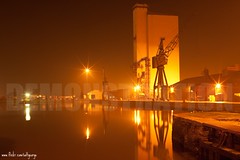
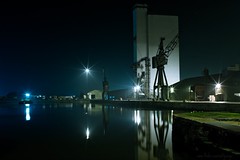
By way of illustration..

Shot raw, straight out of camera with only a jpg conversion..


Same shot, using the eyedropper to sample an area of the white building to correct the white balance on the raw image in Lightroom. Note the light on the left, it's a different colour temperature to the main sodium yellow lighting and now shows a shift towards blue (I haven't done a localised correction)..


Unless you really have no choice, shoot raw when out and about at night under these really nasty artificial lights..
 
Note the light on the left, it's a different colour temperature to the main sodium yellow lighting and now shows a shift towards blue (I haven't done a localised correction)..

Can that be done in lightroom or would you have to load photoshop up?
 
Can that be done in lightroom or would you have to load photoshop up?

I'd use both.. produce a version corrected for each light source and then bring these together as layers in PSE (or GIMP) and chop them through. It's only really practical where light sources and their reflections are discreet in the scene.
 
Agree with all the above. I have a very lazy approach to white balance. I shoot auto-wb and then correct in aperture using neutral picker or grey square or whatever its called. The auto-wb is normally pretty good though. It just means one less thing to think about/get wrong at the time of shooting which you may or may not think is a good thing.
 
Thanks for the replies guys. Raw is something I must investigate soon. Ive had my camera a year and have been trying to work out what everything does prior to looking at image manipulation on the pc.

At present I am using a free program called photoscape. I have photoshop on my other pc but the screen is currently out of actions.

Is it possible to process raw files in photoshop cs
 
as said best way is to shot raw, you can make your photos look better in p&p heres just a very quick go, but if you had shoot raw ift would be spot on.

That Whitby boat in the middle is awkward for having such a good white balance originally..

Glenn, you should be able to process the raw using Bridge as it's brought into PS CS.
 
^what he said, that's the beauty of RAW, you can change white balance later and still have plenty of range to play with.
 
Back
Top