


- Messages
- 44
- Name
- John
- Edit My Images
- Yes
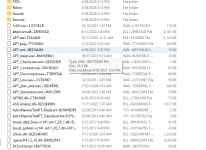
I recently had a massive hard drive failure resulting in having to do a clean install of windows. This initially did not concern me too much as I regularly backed up my C:drive with Acronis True Image. After using the rescue disk to restart my PC I used Acronis to recover my C:drive. Unfortunately, although Acronis restored all my directories, ALL the file extensions were corrupted (as shown in the picture below). My only option was to reinstall all my programs from scratch, this meant all my custom settings to many programs were lost.
I am now reassessing how I back up my C: Drive. My initial thought was to buy and identical SSD and do a clone whenever I installed a new program.
How do others back up their system so that they can recover from such an event as this?
Screenshot showing corrupted files.
I am now reassessing how I back up my C: Drive. My initial thought was to buy and identical SSD and do a clone whenever I installed a new program.
How do others back up their system so that they can recover from such an event as this?
Screenshot showing corrupted files.

