

Whay do you think?

Messages
200
Name
Steven
Edit My Images
Yes
This is the forst picture I have posted on here. Now, I'm doing this from my laptop and the screen is really poor, I can't tell how well exposed the picture is. It looked a little over exposed on my desktop but I'd like your thoughts.
I'd also like somone maybe to alter it, that way I can see what I'm looking to achieve.:thinking:
Thoughts on the picture itself? The sky was very white on the day and I think it looks just as poor in the picture but is there anything I could do to improve the look?
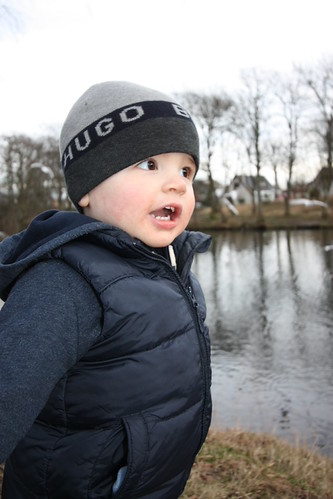

IMG_4774 by steve burnett, on Flickr
http://flic.kr/p/bA57GH
 
Last edited:
Nicely exposed but why have you chopped the poor kids arms off? :shrug: What exactly is it you want somebody else to alter? :shrug: It would be a bit pointless if somebody transformed it in Photoshop and you do not have the programme yourself.
 
I had to chop the arms off as his mum had a hold of his arm. We couldn't leave him himself.
I have elements 8 but I'm completely new to it. I suppose I just thought someone could make it look better and it would give me something to aim for.
 
Do you just want it enhanced in PS or do you want to create arms haha, I often end up with nice photos with one little thing I don't like about it, sometimes is better just to let go of it than spend hours messing around in post.

What do you want the photo for? Memory's? Or just a nice photo. You could put a simple blue grad filter in to add some life to the sky.
 
Do you just want it enhanced in PS or do you want to create arms haha, I often end up with nice photos with one little thing I don't like about it, sometimes is better just to let go of it than spend hours messing around in post.

What do you want the photo for? Memory's? Or just a nice photo. You could put a simple blue grad filter in to add some life to the sky.

PS Elements enhancement would be good.

I suppose I'm mainly asking what can be done with the sky post production in elements.
 
The sky is irrelevant in this photo because it is about your boy. Flash has put a nice light in his eyes and it seems well exposed on my phone.
It is a nice memory shot and the arms are not important because you have his expression and the fact that he is having fun. Do not mess about with a photo just because you think you should, if the sky was white that day then so be it. :)
 
Well, thanks for your feedback. Glad the picture is decent.
I think all the pictures of my son are great but I want to be able to produce really great pictures so I just want to start off well.
 
One of the tips I saw when watching a video the other day came to mind when looking at the photo. You should always make sure the eyes are in focus. If the subject has their head angled away from you make sure your depth of field keeps both eyes in good focus.
It looks like you have managed this well as is left coat collar looks a little soft but the eyes are fine.
 
It looks good enough to me. It looks well exposed and sharp, but white sky is always a problem. However as your son is so prominent in the photo the sky doesn't distract the eye and take it from the main subject.
I'm having the same problem with some bird photos as the sky is overpowering the subject and it looks like a silhouette. I've tried all the metering modes and next up is a CPL filter or trying to do some more PP in photoshop (which I don't like doing). Some fill in flash helps in close subjects but at 80-100 feet it wouldn't do anything even with my 580EX II.
 
Back
Top