Why am I STILL seeing email from blocked senders? (Mac Mail)

ChrisR

I'm a well known grump...
Messages
11,775
Name
Chris
Edit My Images
Yes
There's a very annoying jobs email that comes through multiple times a day. I tried blocking the sender on Mac Mail, but it still turns up. Strangely, not straight away, but after a while. It tells me it's a blocked sender and includes a link to Setttings, where as this screen grab shows I have asked for it to go to the Bin!
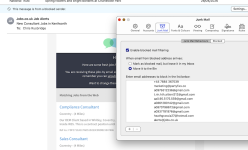
Blocked sender Screenshot 2026-05-01 at 12.26.15.png

Any ideas? I'm pretty sure I've tried turning it off and on again (that button, rather than the Mac, but probably that too). Thanks
 
There are a few reasons this can happen:
  • The sender is also on your allow list. The allow list takes precedence over the block list to ensure no desired mail is lost. Check your allow list to make sure the sender is not on it.
  • Your automatic junk mail filtering is turned off. Block/Allow list capabilities require Automatic Junk Mail Filtering to be enabled.
  • The servers take up to an hour to sync changes made to your Allow and Block lists. If you very recently added somebody to your list, they may still be able to send you messages for up to an hour.
  • The person you tried to block is in your Contacts list. There is a setting in OWA > Options > block or allow to "Trust email from my contacts." Having this enabled will override any additions you may make to your blocked senders list. Uncheck this option to resolve.
 
I've had a few frustrations with Apple Mail, on desktop and my phone. I've just switched to Spark, and so far I'm really enjoying it. I used it before, and it was brilliant, then after an update that ruined it I went back to the native apps. It seems to be back now to being as good as it was before though.
 
I'll reply here, as it also covers @Brentor 's point...
There are a few reasons this can happen:
  • The sender is also on your allow list. The allow list takes precedence over the block list to ensure no desired mail is lost. Check your allow list to make sure the sender is not on it.
A far as I can see I do not have any allow (or safe sender) lists.
  • Your automatic junk mail filtering is turned off. Block/Allow list capabilities require Automatic Junk Mail Filtering to be enabled.
The overlay in my screen capture was from pressing settings, and, as far as I can see, shows that junk mail filtering is on. It also shows that the email is from a blocked sender.
  • The servers take up to an hour to sync changes made to your Allow and Block lists. If you very recently added somebody to your list, they may still be able to send you messages for up to an hour.
It's been happening since early April.
  • The person you tried to block is in your Contacts list. There is a setting in OWA > Options > block or allow to "Trust email from my contacts." Having this enabled will override any additions you may make to your blocked senders list. Uncheck this option to resolve.
Definitely not in Contacts.

I am mystified!
 
Is the email sent from an alias email address, in which case you need the alias address blocked, not the address that you can see. It should be in the source of the email somewhere.
 
Is the email sent from an alias email address, in which case you need the alias address blocked, not the address that you can see. It should be in the source of the email somewhere.
The screen grab above shows the Mac recognises the mail as from a blocked sender, so I think that part's worked. It's just, why desn't it stay in the Bin, but instead (sometimes?) pops back into the Inbox?
 
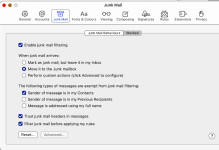
What are your settings under Junk Mail Behaviours?
Simplest to show with a screen grab:

Junk Mail settings Screenshot 2026-05-02 at 17.00.48.png
Note I have today made a change to these settings: I unset "Sender of message is in my previous recipients". It shouldn't apply, because this is a blocked sender, but I thought I'd try it. Not sure when I did it, but I've just found another Job Alerts email in my Inbox, from 10:39 this morning!
 
Simplest to show with a screen grab:

View attachment 481078
Note I have today made a change to these settings: I unset "Sender of message is in my previous recipients". It shouldn't apply, because this is a blocked sender, but I thought I'd try it. Not sure when I did it, but I've just found another Job Alerts email in my Inbox, from 10:39 this morning!

That is very similar to mine and I get very little spam.

Google suggests that their job address is alerts@jobs.ac.uk rather than alerts@jobs.co.uk as shown in your initial post. Can you check if you have the correct address? You probably have as it is in your blocked contacts list.

Can you unsubscribe?
 
Google suggests that their job address is alerts@jobs.ac.uk rather than alerts@jobs.co.uk as shown in your initial post. Can you check if you have the correct address? You probably have as it is in your blocked contacts list.

Can you unsubscribe?
I'd guess this is a non-academic (medical) variant of the jobs.ac.uk site, and maybe explains where they got my address (I worked in Universities for most of my life).

I'm generally reluctant to unsubscribe from dodgy sites, as they often want you to do it by... drumroll... visiting their dodgy site! But this mob may not be that dodgy I guess. But I'm mostly puzzled by the bizarre behaviour of Mac Mail, which is not following its own instructions. I've posted on the Mac Community site now, but no replies.
 
Back
Top