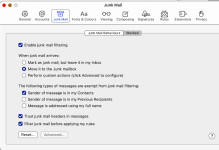
Why am I STILL seeing email from blocked senders? (Mac Mail)

ChrisR

I'm a well known grump...
Messages
11,755
Name
Chris
Edit My Images
Yes
There's a very annoying jobs email that comes through multiple times a day. I tried blocking the sender on Mac Mail, but it still turns up. Strangely, not straight away, but after a while. It tells me it's a blocked sender and includes a link to Setttings, where as this screen grab shows I have asked for it to go to the Bin!
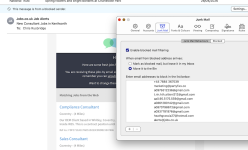
Blocked sender Screenshot 2026-05-01 at 12.26.15.png

Any ideas? I'm pretty sure I've tried turning it off and on again (that button, rather than the Mac, but probably that too). Thanks
 
There are a few reasons this can happen:
  • The sender is also on your allow list. The allow list takes precedence over the block list to ensure no desired mail is lost. Check your allow list to make sure the sender is not on it.
  • Your automatic junk mail filtering is turned off. Block/Allow list capabilities require Automatic Junk Mail Filtering to be enabled.
  • The servers take up to an hour to sync changes made to your Allow and Block lists. If you very recently added somebody to your list, they may still be able to send you messages for up to an hour.
  • The person you tried to block is in your Contacts list. There is a setting in OWA > Options > block or allow to "Trust email from my contacts." Having this enabled will override any additions you may make to your blocked senders list. Uncheck this option to resolve.
 
I've had a few frustrations with Apple Mail, on desktop and my phone. I've just switched to Spark, and so far I'm really enjoying it. I used it before, and it was brilliant, then after an update that ruined it I went back to the native apps. It seems to be back now to being as good as it was before though.
 
I'll reply here, as it also covers @Brentor 's point...
There are a few reasons this can happen:
  • The sender is also on your allow list. The allow list takes precedence over the block list to ensure no desired mail is lost. Check your allow list to make sure the sender is not on it.
A far as I can see I do not have any allow (or safe sender) lists.
  • Your automatic junk mail filtering is turned off. Block/Allow list capabilities require Automatic Junk Mail Filtering to be enabled.
The overlay in my screen capture was from pressing settings, and, as far as I can see, shows that junk mail filtering is on. It also shows that the email is from a blocked sender.
  • The servers take up to an hour to sync changes made to your Allow and Block lists. If you very recently added somebody to your list, they may still be able to send you messages for up to an hour.
It's been happening since early April.
  • The person you tried to block is in your Contacts list. There is a setting in OWA > Options > block or allow to "Trust email from my contacts." Having this enabled will override any additions you may make to your blocked senders list. Uncheck this option to resolve.
Definitely not in Contacts.

I am mystified!
 
Is the email sent from an alias email address, in which case you need the alias address blocked, not the address that you can see. It should be in the source of the email somewhere.
 
Back
Top