Why are some applications displaying better version of the same picture

Messages
1,940
Name
Dini
Edit My Images
Yes
I am using Lightroom and Zoombrowser. I was pulling my hair out when i looked at the images on Lightroom because they all looked very soft.

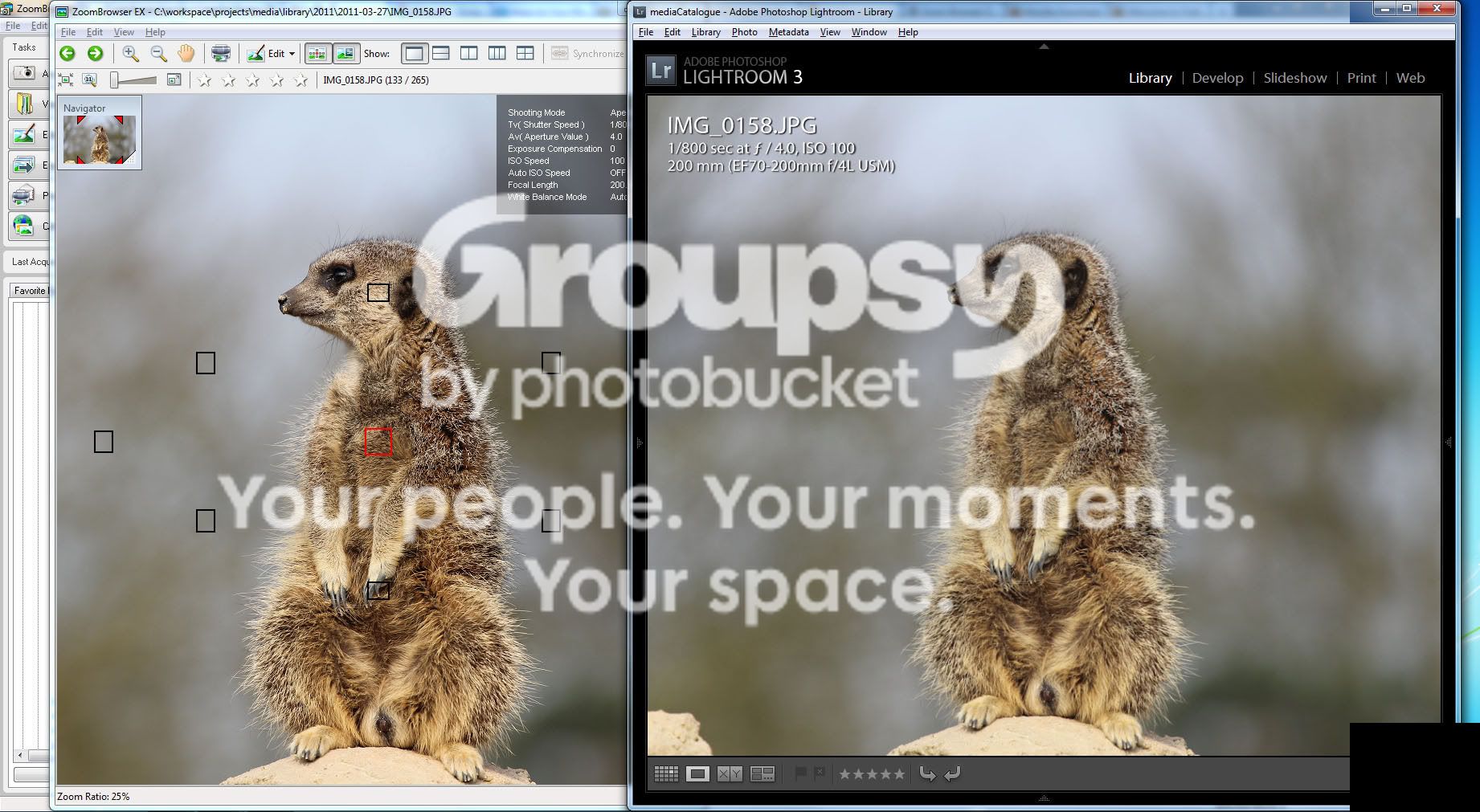
I usually use zoombrowser to try and see the focus point used when i took the picture. When i opened one of the images i noticed that the quality of the picture is much better in zoombrowser than in Lightroom.

Here is an example of the same picture opened in both lightroom and zoombrowser.

Why does it look more sharpened and it even has more pop in the zoombrowser version. (Click on the yellow bar on top of the image to see the difference in a larger view)

The image shown is straight out of the camera. I haven't done any processing.
meerkat.jpg
 
Last edited:
Probably the way the images are processed on import. Have you tried increasing the sharpening on LR to get it more like zoom browser?
 
Yes i can sharpen it in Lightroom to look like the zoom browser version but i am wondering why this is happening. I just tried to load the image directly from the folder and it loaded into my firefox browser and it is showing exactly is in Zoombrowser.

It must be some setting in Lightroom. I know ligthroom has a setting to apply some processing during an import but i have never used that option.
 
You might have not used that option but it is set to use the process during import
 
@blade_922 - Which process are you referring to please? The option i was referring to was the "Developer Settings" during import which i just checked now and the default setting is "None". I just tried re-importing another image just to be sure and it still has the same issue.
 
There are lots of possible reasons for this, but in this case it might well be a pixel interpolation issue.

In some way the software application has to cram the 12mp image from your camera (4000px by 3000px) onto your computer monitor (maybe 1680 x 1050).

Assuming that you are using the whole screen, and just looking at the width, that means that somehow the application has to "squash" 4000 camera pixels into 1680 display pixels - which means cramming 2.38 pixels into 1.

There are lots of algorithms for doing this, some create more blurred results than others.

If you are using Windows 7, you can see the effect quite clearly by viewing your picture in windows gallery manager. Press ctrl+alt+0 to get a 1:1 pixel mapping, then use the zoom slider to slightly change the viewed size of your picture. Everything will become more blurry as the interpolation tries to make things fit.
 
Last edited:
At 1:1 or 100% the image does look better but i only look at an image at 1:1 when i am sharpening it.
This could be that pixel interpolation thing that Dave mentioned above but how do i avoid it? I would expected Lightroom to be using a better algorithm for displaying the image than Firefox :)

100.jpg
 
Last edited:
I've noticed this in Lightroom on my last set. I think it's got something to do with the file being a jpg as I normally shoot in RAW.
 
I've noticed this in Lightroom on my last set. I think it's got something to do with the file being a jpg as I normally shoot in RAW.

I usually shoot both RAW & JPG but when i visited the Zoo on Sunday for these pictures i stupidly left my memory card at home. I had to buy a new memory card from the gift shop and they only had 4GB and they sold them at 16 pounds each! I decided ill just get one and shoot jpg :lol:
 
Last edited:
Lightroom only applies a small amount of sharpening by default so I suspect this is what you're seeing.

You can change the default in the develop menu based on the current develop settings if you want more by default.
 
Lightroom only applies a small amount of sharpening by default so I suspect this is what you're seeing.

You can change the default in the develop menu based on the current develop settings if you want more by default.

I just checked the sharpening options under the "Develop" tab for this image. Here are the setting

Amount = 0
Radius 1.0 (disabled)
Detail 25 (disabled)
Masking = 0 (disabled)

The last 3 are disabled and i think they are enabled once you change the "Amount"

Do these really affect how the image is displayed when in "Library" mode? (And it doesnt seem to be the case when the image is viewed at 1:1) I thought the develop options are only activated when you are processing the image. Because if that is the case the above setting would be applied to every image you look at in Library mode.

Of the three i have looked at (Zoombrowser, Firefox and Ligthroom) which is showing the actual image without any processing?
 
Last edited:
Lightroom only applies a small amount of sharpening by default so I suspect this is what you're seeing.

You can change the default in the develop menu based on the current develop settings if you want more by default.

I just tried changing the sharpening setting for that image. I then selected another image and its sharpening settings default back to 0 for the next image. These settings are not applied globally. (Unless you were referring to a different menu option for setting sharpening defaults)
 
ziggy©;3544023 said:
I just tried changing the sharpening setting for that image. I then selected another image and its sharpening settings default back to 0 for the next image. These settings are not applied globally. (Unless you were referring to a different menu option for setting sharpening defaults)

To change the default:
  1. Open an image in develop
  2. Set the various sliders as you want all images to start processing wise.
  3. In the develop menu there's a item called something like "Save default settings", pick this
  4. Choose which settings you want to save to the default.
This will fix the default develop settings, not sure if this is then global or for images going forward though, but I'd assume the former.

edit; It's probably wise to press the reset button first if your not sure what state the image is in edit wise.

If you want you can make this a default for everything, per camera or per camera per ISO. This is in the general options somewhere (cmd + , on a mac so ctrl +, on win?). If you go per camera or per camera per ISO you will have to set the defaults for every camera or camera/ISO combo or they will use the standard default. I use per camera as I apply a colour calibration to my d50 but not the wifes d40x.
 
Last edited:
Lightroom won't sharpen a JPEG unless you tell it to. It isn't supposed to. A JPEG is assumed to be the finished article. It is not for Lightroom to change it. For best IQ in Lightroom view the image in the Develop module and make sure your zoom ratio is 1:1, 1:2, 1:3 or 1:4. Fit and Fill are terrible options if you wish to study sharpness. I notice that in the Zoombrowser window you are at 25%, i.e. 1:4. Make sure Lightroom is asked to do the same.
 
Back
Top