

zoom blur

Messages
2,908
Name
Summer
Edit My Images
Yes
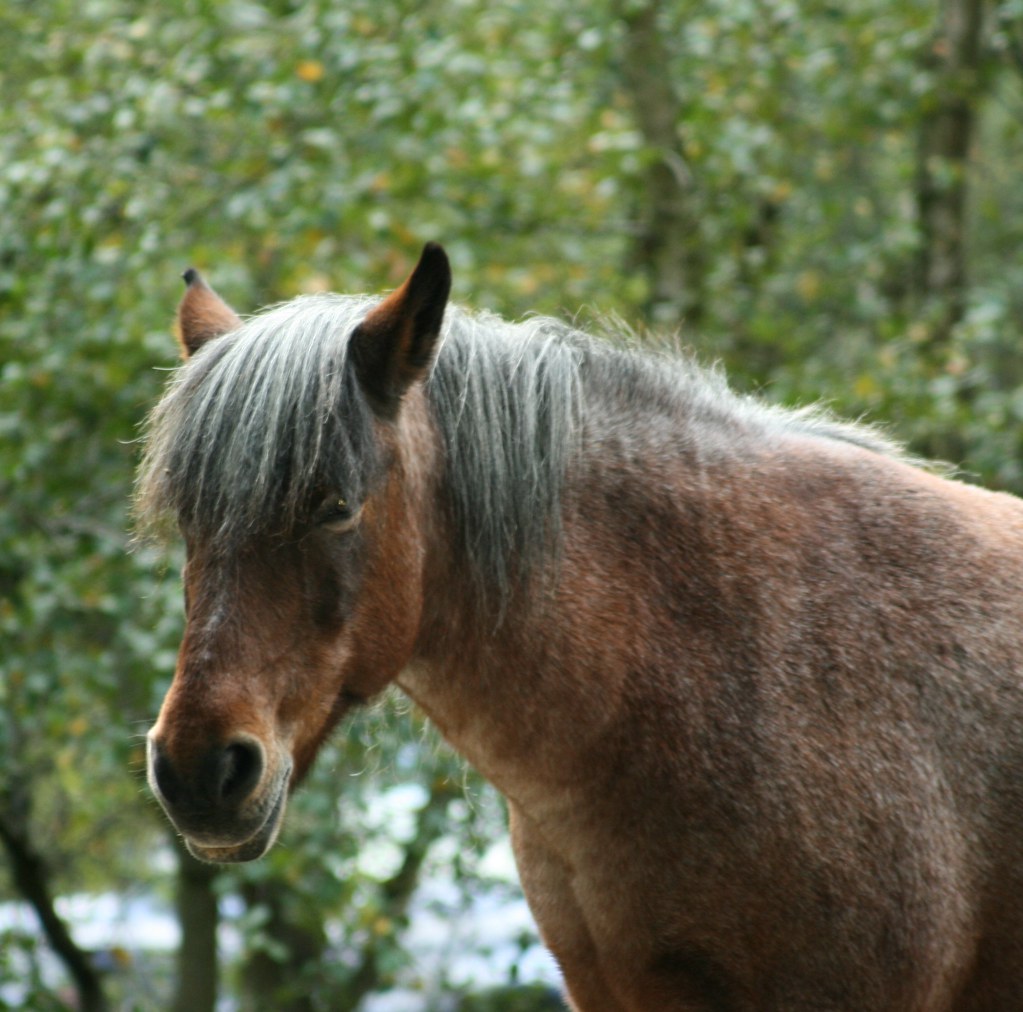
hi guys, there are many things wrong with this photo, but the one I'd like advice about is the blurring on the pony's coat. I've also had this with bird photos. I was using a canon 400D on the auto setting with an 80 - 200mm (canon) telephoto lens.

thanks in advance
6254204800_887d0a3417_b.jpg
 
auto focus
 
What did you focus on, which AF point/s, how much of the image has been cropped, and what was the focal length, shutter speed and aperture?

But I'd guess it was just incorrectly focused ;)
 
well, I thought I'd focused the points on its head, and indeed its nose looks quite focused albeit rather 'soft'. But the coat seems more of a contrast problem... I think. Is it because of the zoom? My camera and lens are 2nd hand so I'm not sure whether I need to get them serviced or not.
 
I've managed to find your Flickrstream, and find your image in it.. this would be so much easier with a link.

Unfortunately the exif isn't available (have you disabled viewing of exif in your Flickr settings?) so it's very hard to be sure, but I suspect that because the blur is reasonably even across the image it's due to camera shake. If the shutter speed is longer than the reciprocal of the focal length this is almost certainly the case.
 
Last edited:
ok - questions - what is exif? :)

I think shake might be the cause - are you saying that telephoto will increase errors due to camera movements? that would make sense. Some of the pics are better because I rested my arms on a fence.

shall now try to make a link :)

many thanks
 
ok all done, I could see exif but no-one else could so I have now fixed it (flickr help is very good)

link now in my sig :)
 
oh my, that exif thing is very detailed - I have no idea what 90% of it means :o
 
Thanks for letting us see the exif.. yup, the problem is almost certainly camera shake.

At 200mm you need to be at least 1/200 or faster (at 100mm it would be 1/100 or faster), your shot was at 1/60. With a longer lens the smallest movements are magnified. If you can't increase the aperture to let more light in the only possibility is to increase the ISO.. or use a tripod or other support.
 
so no more auto settings lol. Just glad it's not the camera. Sometimes it won't take a shot and shows 'busy' in the viewfinder. I have no idea what it's doing but I lose some good shots that way, like today the horses had reared up but my camera refused to take the shot :(

thanks for your help tho'
 
so no more auto settings lol. Just glad it's not the camera. Sometimes it won't take a shot and shows 'busy' in the viewfinder. I have no idea what it's doing but I lose some good shots that way, like today the horses had reared up but my camera refused to take the shot :(

thanks for your help tho'

Are you shooting in continuous mode? In which case, it probably means the buffer is full.
 
Are you shooting in continuous mode? In which case, it probably means the buffer is full.

Or it's not achieving focus.. in some modes Canon will lock the shutter unless focus has been achieved. I think that's the more likely scenario.
 
Back
Top