- Messages
- 710
- Name
- Fraser
- Edit My Images
- Yes

4.8 FilmLab
A twitter contact reminded me about FilmLab, a stand-alone app for colour and black and white negative inversion, versions available for smart phones but also Mac and Windows. See https://www.filmlabapp.com. Recently upgraded to version 2.5.
Has anyone tried this? I can't see any sign of a free trial option.
The Mac/Windows versions are priced atUS$6US$8 per month,$50$60 per year, or $200 for a lifetime license, presumably plus VAT.
All prices quoted for FilmLab were found inMarch 2022April 2023.
I was initially VERY sceptical about this, but that was based on the capabilities of my 2016 iPhone SE. With modern (2023) high-end smart phones, this would be a much more viable option.

Interesting YT video on using FilmoMat SmartConvert atView: https://www.youtube.com/watch?v=d4fc1GJXQXc
Interesting snippet, not directly relevant, it still apparently took him 50 minutes to scan his roll of film (uncut!) with his camera scanning setup. That seemed quite slow to me.
TLDR: you can setup a watch folder for SmartConvert, and as images (including RAW, I wonder how many formats?) drop in there they are picked up and converted. There is an auto-crop capability, but manual cropping as well. You can individually adjust cyan, magenta and yellow channels, rotate etc.
Desktop versions appear to be €125 on their store.


Apples withdrawel of support for firewire is frustrating, to avoid this i picked up a old but cheap MacBook Pro, which is now my designated scanning machine. Its 2010 so I can also run NikonScan software for my Coolscan 9000. Its not an ideal setup but it works without having to spend too much money to keep my scanning setup operational.I have inherited a large number of slides (well into the 1,000s) from my father and I’ve recently started scanning them.
My standard way of doing this for the last ten years or so for my own photos has been to use a Sony A7x body with a Canon FD slide copier / bellows and an FD 50mm f/3.5 Macro lens and a CRI 98+ LED light panel by Smallrig, which works brilliantly for 35mm slides.
However, dad’s also include a fair number of 127 Super Slides and 6x6 transparencies, many of them (mostly my grandfather's photos) mounted in glass, so I’m having to look at alternatives, preferably one system that covers multiple formats. Unfortunately, the clock is ticking for the end of the of macOs support for Firewire for my V700 and I have got rather used to the improved convenience and quality of using a mirrorless camera as a scanner anyhow.
Does anyone have hints/tips/recommendations after experience with less common formats like this?

I run my V700 as a USB devise on a 2015 Mac book with Vuescan , given the general slow workflow on the V700 I can't see the lack of Firewire as been a problem.Unfortunately, the clock is ticking for the end of the of macOs support for Firewire for my V700 and I have got rather used to the improved convenience and quality of using a mirrorless camera as a scanner anyhow.
I run my V700 as a USB devise on a 2015 Mac book with Vuescan , given the general slow workflow on the V700 I can't see the lack of Firewire as been a problem.

I've just converted an old Meopta enlarger into a copy stand much more cheaply than buying a similar copy stand outright. The only trick was engineering the camera connection, which involved a bit of metalwork.Essential Film Holder + à copy stand looks like my best bet at the moment, but I am wondering if I have missed anything else.
Yes, I’ve been investigating homemade rigs, particularly ones that are easily demountable for storage; everything will have to be used on the dining room table.I've just converted an old Meopta enlarger into a copy stand much more cheaply than buying a similar copy stand outright. The only trick was engineering the camera connection, which involved a bit of metalwork.
It seems to me there are a lot of home made rigs about. The pro versions from Valoi etc are incredibly expensive. Valoi does have the Easy135 and Easy120 IIRC which do away with the faff of copy stands and tripods etc. Might be worth a look?Yes, I’ve been investigating homemade rigs, particularly ones that are easily demountable for storage; everything will have to be used on the dining room table.
I already have a suitable clamp that will do nicely for mounting the camera, so that’s a start.

Nick,Apples withdrawel of support for firewire is frustrating, to avoid this i picked up a old but cheap MacBook Pro, which is now my designated scanning machine. Its 2010 so I can also run NikonScan software for my Coolscan 9000. Its not an ideal setup but it works without having to spend too much money to keep my scanning setup operational.
Looks goodWhoops I forgot to add text! Here’s my Primefilm 7600pro munching through a roll. It takes 1.5hrs for a 24exp roll at full resolution with a pre scan and autofocus for each frame. Really not bad especially as it does it all itself. No alignment issues at all, it just works.
Typical result:
View attachment 467400

 )
)
 www.facebook.com
Looks good
It currently takes me circa 2 mins for a 36 exposure roll! (Smug Git
Filmomat SmartConvert Users | This thing is incredible | Facebook
This thing is incredible! I have had my Autocarrier 135 for a week now and it is incredibly impressive! Let me go through my history of film scanning so you can see what I'm judging it against: I...


Epson V600 v V850-Pro
I have a V600 but the opportunity to upgrade to an V850-Pro has come up. Is it worth it??
Main use scanning medium format negatives (mono and colour)
I currently use SilverFast and NLP
Thoughts?
I think the main differences will be the ability to scan twice as many medium format negatives at once, a higher DMAX rating, so you'll get more detail out of the shadows, plus maybe some extra speed.
It'll also scan large format should you ever decide to take that up.

How much is the DMAX improvement?? Is it noticable??
Don't put those thoughts in my head, the fcat that a 5x4 weighs less than my GX680 is making me wonder about exploring another rabbit hole

I think the V850 is a lot better, but a lot bigger...Epson V600 v V850-Pro
I have a V600 but the opportunity to upgrade to an V850-Pro has come up. Is it worth it??
Main use scanning medium format negatives (mono and colour)
I currently use SilverFast and NLP

My epson 4180 runs perfect on win 11, can't see why even the epson 1000 series wouldn't work on win 8.1 (or win 11). Pentax pete was using a 1000 series maybe if he noticed this thread he would chip in.I'm looking to do some 35mm neg scanning over a week when I'm away from home. I'm guessing I won't be doing more than 24 frames a day.
My only scanner is a V500 and I'm reluctant to take that with me due to size. Arethere any smaller scanners that will give me a reasonable scan (superb results not required) preferably sub £100 second hand?
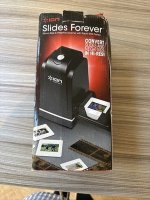
Years ago I bought something like this second hand
View attachment 482612
as a quick way to get some Kodachrome scans to a relative but the results were disappointing to say the least.
Is something like an Epson 4490 a possibility? I've got a laptop on Win 8.1 that isn't internet connected that runs the V500 on EpsonScan no bother but will i run into driver issues for something as old as a 4490? Any other scanner suggestions gratefully received.

Epson scan 3 from the Epson web sites runs on windows 11 and connected seamlessly to the cheap as chips 4990.I'm looking to do some 35mm neg scanning over a week when I'm away from home. I'm guessing I won't be doing more than 24 frames a day.
My only scanner is a V500 and I'm reluctant to take that with me due to size. Arethere any smaller scanners that will give me a reasonable scan (superb results not required) preferably sub £100 second hand?
Years ago I bought something like this second hand
View attachment 482612
as a quick way to get some Kodachrome scans to a relative but the results were disappointing to say the least.
Is something like an Epson 4490 a possibility? I've got a laptop on Win 8.1 that isn't internet connected that runs the V500 on EpsonScan no bother but will i run into driver issues for something as old as a 4490? Any other scanner suggestions gratefully received.
Thanks, cheapest 7xxx so far is £125.You should be able to find an older Plustek 7200i or similar in budget, we have one here which can outperform the Epson V700 but is rarely used as you can not load it with four strips of negatives and wander off as it does it's thing.
Thanks. I've been looking at a number of 4990's but a lot of them don't have the scanning masks/missing PSU etc. Will keep looking.Epson scan 3 from the Epson web sites runs on windows 11 and connected seamlessly to the cheap as chips 4990.
I wanted it for the 4x5 and 8x10 capabilities but found it more than adequate, for me, in 35mm.
Plug is a regular kettle lead, triangular 3 pin type.Thanks. I've been looking at a number of 4990's but a lot of them don't have the scanning masks/missing PSU etc. Will keep looking.
you would be silly not to, if you dont like it you could move it on for 350 - 400 quidI've got the opportunity of a Plustek 8200i SE at £115. Currently weighing up whether I go for it or not.
The only issue that I know of with some versions of the 8200i SE is that there was a problem with Vuescan. I bought a 8200i 18 months ago; Silverfast SE worked fine, but I'd get weird positioning errors one some frames with Vuescan. Ed Hamrick wrote back to my report, after an exchange: "It’s a problem with the interface I’m using with this scanner (ScanDrv) – it has a bug. SilverFast uses the ScanApi interface, but I can’t get it working because Plustek won’t send me the .h interface file – I really dislike Plustek and their products. Epson is so much better." Elsewhere on the Vuescan website it said that Plustek made a silent model change in the 8200i which resulted in this problem (see around halfway down https://www.hamrick.com/blog/what-is-the-best-film-scanner.html). Despite the UK online rights act (or whatever it's called), I had to argue for several months to be able to return the 8200i and get my money back (thread elsewhere on here, IIRC).I've got the opportunity of a Plustek 8200i SE at £115. Currently weighing up whether I go for it or not.
I've um'ed and ah'ed overnight and today. The Plustek appears a little scruffy in the pics, many scratches on the exterior. Appears to have led a hard life for something only a couple of years old.you would be silly not to, if you dont like it you could move it on for 350 - 400 quid
Thanks, I've never used Vuescan before and I'd want to be confident it works with that. I'm not even great with EpsonScan to be honest.The only issue that I know of with some versions of the 8200i SE is that there was a problem with Vuescan. I bought a 8200i 18 months ago; Silverfast SE worked fine, but I'd get weird positioning errors one some frames with Vuescan. Ed Hamrick wrote back to my report, after an exchange: "It’s a problem with the interface I’m using with this scanner (ScanDrv) – it has a bug. SilverFast uses the ScanApi interface, but I can’t get it working because Plustek won’t send me the .h interface file – I really dislike Plustek and their products. Epson is so much better." Elsewhere on the Vuescan website it said that Plustek made a silent model change in the 8200i which resulted in this problem (see around halfway down https://www.hamrick.com/blog/what-is-the-best-film-scanner.html). Despite the UK online rights act (or whatever it's called), I had to argue for several months to be able to return the 8200i and get my money back (thread elsewhere on here, IIRC).
I think I'd want a bit of clarification that this problem does not apply to this particular example. Of course, Vuescan may have managed to fix the problem in the meantime (I only found one mention of the 8200i in VS Release Notes though, for the original release of the scanner in 2024)..