Blurring water problems

Messages
814
Name
Paul
Edit My Images
Yes
Hi there, Im really struggling to get that nice water blur effect, whenever i try it (which has only been at the sea front) it just looks horrid and sorta messy. How can I make the sea blur nicely or as in the case of some photos where the sea looks more like mist, such as this http://www.flickr.com/photos/garysnowden/5430733484/sizes/l/in/faves-paulwynn-mackenze/ (sorry couldnt post it and not my pic). Any help would be great.
 
How long are your exposures?Assume your using a tripod.

Have you got any filters, polarizing or ones for stopping down (blocking out light).

Can you post one of you own photos for an example?
 
Hi Paul, I am the person who took the photograph in the link.
To get the sea to look almost like mist, you will need a long exposure. In this photograph I used a shutter speed of nearly 2 minutes. To be able to have such a long exposure in daytime will require an ND (neutral density) filter, which either screw on to the end of your lens, or slide into a filter holder, which also screws on to the end of your lens. I prefer the filter holder rather than a screw on filter as it is a little quicker to use, and less fiddly. I used the Lee filter kit, with a Lee 10 stop filter (Lee Big Stopper) to get the long exposure required. Your camera must be on a tripod. You will need to focus and compose your shot without the filter fitted, then take a test photograph to check for exposure. Once happy with the exposure, you will need to multiply the shutter speed you have just used to suit the filter, if you are using a 10 stop filter, you will need to multiply the shutter speed by 1024 (*see note below), then turn your lens (or camera) to manual focus (to stop your camera trying to auto-focus when you press the shutter), slide or screw your filter onto your lens (be careful not to adjust the focus ring), turn your camera's shutter speed to BULB, then using a cable release (to prevent blur from pressing the shutter) open the shutter for the required time, then close the shutter with your cable release. Check the image for exposure. That's it.

*note: 10 stops = 1024, which is basically doubling ie. 1 - 2 - 4 - 8 - 16 - 32 - 64 - 128 - 256 - 512 - 1024

Example, your test shot gives you a shutter speed of 1/8sec, you would divide 1 by 8 to give 0.125, then multiply by 1024 which would give you 128 seconds.

A couple of points worth noting, not all 10 stop filters are exactly 10 stop, my Lee for example is nearer 11. Take some test shots first.
Some filters will give a colour cast to your images, so it's worth shooting in RAW to give you maximum control over your white balance in post processing.
Calm seas will give a more smooth 'mist' effect than rough seas, which may require longer shutter speeds to create a smooth blur.
Make sure you are shooting in shutter priority or Manual to avoid your camera altering the aperture to compensate for the added darkness of the filter.

I hope this helps.

Gary.

 
Last edited:
Thanks so much, thats so useful. And awesome picture by the way :) it was in my favorites :D I think I will have to look into getting a ND filter some when then. Im afraid i havent uploaded any of my attempts at blurring water because i think they are a bit rubbish, but i love the look of it :) . So once again thanks for your advice and great pic
 
Hi Paul, I am the person who took the photograph in the link.
To get the sea to look almost like mist, you will need a long exposure. In this photograph I used a shutter speed of nearly 2 minutes. To be able to have such a long exposure in daytime will require an ND (neutral density) filter, which either screw on to the end of your lens, or slide into a filter holder, which also screws on to the end of your lens. I prefer the filter holder rather than a screw on filter as it is a little quicker to use, and less fiddly. I used the Lee filter kit, with a Lee 10 stop filter (Lee Big Stopper) to get the long exposure required. Your camera must be on a tripod. You will need to focus and compose your shot without the filter fitted, then take a test photograph to check for exposure. Once happy with the exposure, you will need to multiply the shutter speed you have just used to suit the filter, if you are using a 10 stop filter, you will need to multiply the shutter speed by 1024 (*see note below), then turn your lens (or camera) to manual focus (to stop your camera trying to auto-focus when you press the shutter), slide or screw your filter onto your lens (be careful not to adjust the focus ring), turn your camera's shutter speed to BULB, then using a cable release (to prevent blur from pressing the shutter) open the shutter for the required time, then close the shutter with your cable release. Check the image for exposure. That's it.

*note: 10 stops = 1024, which is basically doubling ie. 1 - 2 - 4 - 8 - 16 - 32 - 64 - 128 - 256 - 512 - 1024

Example, your test shot gives you a shutter speed of 1/8sec, you would divide 1 by 8 to give 0.125, then multiply by 1024 which would give you 128 seconds.

A couple of points worth noting, not all 10 stop filters are exactly 10 stop, my Lee for example is nearer 11. Take some test shots first.
Some filters will give a colour cast to your images, so it's worth shooting in RAW to give you maximum control over your white balance in post processing.
Calm seas will give a more smooth 'mist' effect than rough seas, which may require longer shutter speeds to create a smooth blur.
Make sure you are shooting in shutter priority or Manual to avoid your camera altering the aperture to compensate for the added darkness of the filter.

I hope this helps.

Gary.

Great 1st post!!!!

Welcome - hopefully you'll stay a while :thumbs:
 
hello again people, I have now produced my own version of this water 'mist' using this fantastic advice
Hi Paul, I am the person who took the photograph in the link.
To get the sea to look almost like mist, you will need a long exposure. In this photograph I used a shutter speed of nearly 2 minutes. To be able to have such a long exposure in daytime will require an ND (neutral density) filter, which either screw on to the end of your lens, or slide into a filter holder, which also screws on to the end of your lens. I prefer the filter holder rather than a screw on filter as it is a little quicker to use, and less fiddly. I used the Lee filter kit, with a Lee 10 stop filter (Lee Big Stopper) to get the long exposure required. Your camera must be on a tripod. You will need to focus and compose your shot without the filter fitted, then take a test photograph to check for exposure. Once happy with the exposure, you will need to multiply the shutter speed you have just used to suit the filter, if you are using a 10 stop filter, you will need to multiply the shutter speed by 1024 (*see note below), then turn your lens (or camera) to manual focus (to stop your camera trying to auto-focus when you press the shutter), slide or screw your filter onto your lens (be careful not to adjust the focus ring), turn your camera's shutter speed to BULB, then using a cable release (to prevent blur from pressing the shutter) open the shutter for the required time, then close the shutter with your cable release. Check the image for exposure. That's it.

*note: 10 stops = 1024, which is basically doubling ie. 1 - 2 - 4 - 8 - 16 - 32 - 64 - 128 - 256 - 512 - 1024

Example, your test shot gives you a shutter speed of 1/8sec, you would divide 1 by 8 to give 0.125, then multiply by 1024 which would give you 128 seconds.

A couple of points worth noting, not all 10 stop filters are exactly 10 stop, my Lee for example is nearer 11. Take some test shots first.
Some filters will give a colour cast to your images, so it's worth shooting in RAW to give you maximum control over your white balance in post processing.
Calm seas will give a more smooth 'mist' effect than rough seas, which may require longer shutter speeds to create a smooth blur.
Make sure you are shooting in shutter priority or Manual to avoid your camera altering the aperture to compensate for the added darkness of the filter.

I hope this helps.

Gary.

So with that this is my best pic i managed to produce, let me know what you think :)

5457855047_c3966fe7b2_b.jpg
 
Good effort Paul.

Looks like you've got the water doing what you wanted but you've picked up the old magenta colour cast?. Did you shoot Raw - if so you should be able to adjust as you see fit.

Not having tried this myself for ages - I'm keen to see how you get on as I'd like to get back into the swing of things and get a new 10 stop filter. I mucked about stacking some soft ND grads last time I was at the coast but didn't have much luck.
 
Last edited:
Hi Paul, I am the person who took the photograph in the link.
To get the sea to look almost like mist, you will need a long exposure. In this photograph I used a shutter speed of nearly 2 minutes. To be able to have such a long exposure in daytime will require an ND (neutral density) filter, which either screw on to the end of your lens, or slide into a filter holder, which also screws on to the end of your lens. I prefer the filter holder rather than a screw on filter as it is a little quicker to use, and less fiddly. I used the Lee filter kit, with a Lee 10 stop filter (Lee Big Stopper) to get the long exposure required. Your camera must be on a tripod. You will need to focus and compose your shot without the filter fitted, then take a test photograph to check for exposure. Once happy with the exposure, you will need to multiply the shutter speed you have just used to suit the filter, if you are using a 10 stop filter, you will need to multiply the shutter speed by 1024 (*see note below), then turn your lens (or camera) to manual focus (to stop your camera trying to auto-focus when you press the shutter), slide or screw your filter onto your lens (be careful not to adjust the focus ring), turn your camera's shutter speed to BULB, then using a cable release (to prevent blur from pressing the shutter) open the shutter for the required time, then close the shutter with your cable release. Check the image for exposure. That's it.

*note: 10 stops = 1024, which is basically doubling ie. 1 - 2 - 4 - 8 - 16 - 32 - 64 - 128 - 256 - 512 - 1024

Example, your test shot gives you a shutter speed of 1/8sec, you would divide 1 by 8 to give 0.125, then multiply by 1024 which would give you 128 seconds.

A couple of points worth noting, not all 10 stop filters are exactly 10 stop, my Lee for example is nearer 11. Take some test shots first.
Some filters will give a colour cast to your images, so it's worth shooting in RAW to give you maximum control over your white balance in post processing.
Calm seas will give a more smooth 'mist' effect than rough seas, which may require longer shutter speeds to create a smooth blur.
Make sure you are shooting in shutter priority or Manual to avoid your camera altering the aperture to compensate for the added darkness of the filter.

I hope this helps.

Gary.

Welcome to the forum and many thanks for helping the op and sharing this information with us. :thumbs:
 
Good effort Paul.

Looks like you've got the water doing what you wanted but you've picked up the old magenta colour cast?.

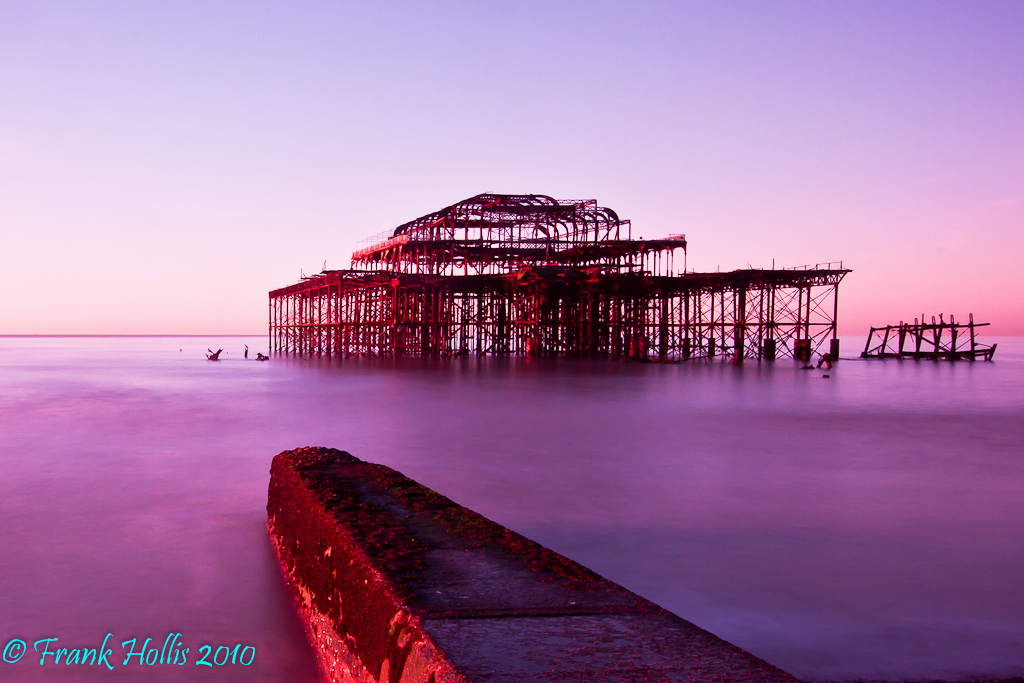
Yup, that'll be caused by the filter. I had the same problem when, inspired by this post, I went out to try and get something. Here's the shot with the white balance 'As Shot'

West%20Pier%20WB%20as%20shot-1.jpg


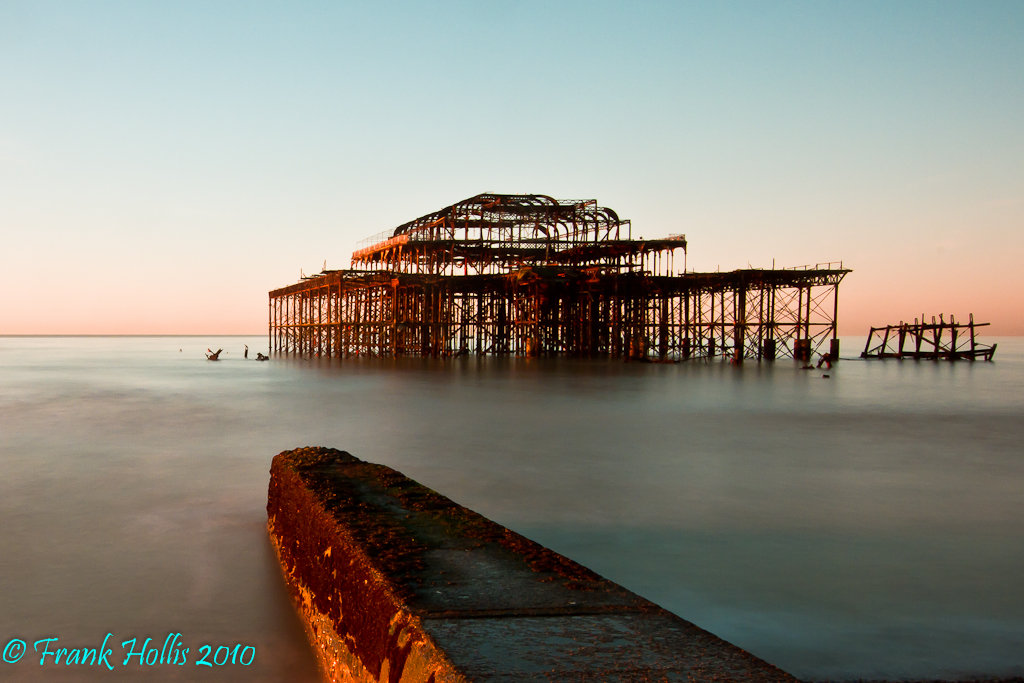
And after fixing the raw file in Lightroom -

Old%20Pier.jpg


I was using a 6-stop B&W ND stacked with a 3-stop ebay special. Not surprisingly, it was the cheap chinese filter that caused the cast. It is now serving as a drinks coaster and I've bought a new 10-stop B&W filter to replace it.
 
Some people set a custom white balance with the filter on to help eliminate the colour cast but it's a bit tricky with a 10 stopper.
 
hollis_f, that's a stunning effort. This thread has been invaluable. Must try some of this for myself.
 
Some people set a custom white balance with the filter on to help eliminate the colour cast but it's a bit tricky with a 10 stopper.

With a filter that's a bit off, you can shoot a custom white balance frame at your leisure and keep it on the memory card for future reference at any time. Or some cameras have some custom memory settings you can store it in.

It did that when using welding glass, which is massively green, and it always got me pretty close.
 
Well, that's certainly food for thought. Any advice on what to do in the case of rain when shooting, I am in Scotland after all.
 
Right, thanks for all the advice guys :D very useful, I have now ordered a B+W NDx1000 filter for £35. So hoping to get some nice shots with that. However the welding glass idea is genius, congrats to whoever came up with that :P
 
An umbrella? :shrug:

I did mean would it show up on the image(the rain), but that is probably the simple answer. When using the camera when it is damp I tend to cover it and the lens with a giant chamois I've got.
 
Back
Top