

You are using an out of date browser. It may not display this or other websites correctly.
You should upgrade or use an alternative browser.
You should upgrade or use an alternative browser.
canon image stabiliser and tripod
- Thread starter terryuk
- Start date

- Messages
- 3,250
- Name
- Pete (really)
- Edit My Images
- No
Don't use IS when on a tripod, it will make your images worse because it will be trying to correct movement that isn't there.


- Messages
- 5,881
- Name
- Richard
- Edit My Images
- Yes
SHould tell you for definate in the manual for the lens
Some of them sense the total lack of movement a tripod has and turn off IS automatically. Although the fact that canon build lenses likes this give you a hint that IS + Tripod is not good.
Note, this only applies to tripod mounted where you have totally locked it off, on a tripod where you are still moving the camera about IS is fine.
Some of them sense the total lack of movement a tripod has and turn off IS automatically. Although the fact that canon build lenses likes this give you a hint that IS + Tripod is not good.
Note, this only applies to tripod mounted where you have totally locked it off, on a tripod where you are still moving the camera about IS is fine.

- Messages
- 381
- Name
- Ed
- Edit My Images
- Yes
I read below and elsewhere, that some Canon lenses like the 70-300 IS, can sense when they are mounted on a tripod.
With this in mind is it best to still switch it off, when mounted on a tripod?
Quote:
Most manufacturers suggest that the IS feature of a lens be turned off when the lens is mounted on a tripod as it can cause erratic results and is generally unnecessary.
Many modern image stabilization lenses (notably Canon's more recent IS lenses) are able to auto-detect that they are tripod-mounted (as a result of extremely low vibration readings)
and disable IS automatically to prevent this and any consequent image quality reduction.
With this in mind is it best to still switch it off, when mounted on a tripod?
Quote:
Most manufacturers suggest that the IS feature of a lens be turned off when the lens is mounted on a tripod as it can cause erratic results and is generally unnecessary.
Many modern image stabilization lenses (notably Canon's more recent IS lenses) are able to auto-detect that they are tripod-mounted (as a result of extremely low vibration readings)
and disable IS automatically to prevent this and any consequent image quality reduction.

- Messages
- 880
- Name
- Bartosz Wozniak
- Edit My Images
- Yes
As far as I am aware, neither the kit lens nor the 18-200mm IS lens have two modes of Stabilisation. It is just either ON or OFF. I would suggest turning them off on a tripod, for the same reasons as everyone else has said.
- Saves battery
- Improves quality of shots
- Saves battery
- Improves quality of shots

- Messages
- 3,962
- Edit My Images
- Yes
I seen a diagram of how the IS works, cant remember the site now.
but basically when its on the is a free moving lens in the middle the counters and movement in horizontal and vertical planes. This re directs the light back to its 'normal' point
you can test by aiming at an object IS on, half pressing the shutter and move the camera up and down a little etc and you will notice the image will remain fairly in the middle, with IS off and do the same the lens markers will just move around the object....its pretty cool
another lump of pointless info lol
but basically when its on the is a free moving lens in the middle the counters and movement in horizontal and vertical planes. This re directs the light back to its 'normal' point
you can test by aiming at an object IS on, half pressing the shutter and move the camera up and down a little etc and you will notice the image will remain fairly in the middle, with IS off and do the same the lens markers will just move around the object....its pretty cool
another lump of pointless info lol

- Messages
- 483
- Name
- chris
- Edit My Images
- No
Well i managed to balls up what could have been some nice lightning shots by leaving the VR ( Nikon ) turned on. :bang::bang::bang:
OP

- Messages
- 1,344
- Name
- Terry
- Edit My Images
- Yes
Thanks guys looks like I need to turn it off then
It was some pictures in another thread that got me thinking
just hope I remember now before I take the shots
I thought I busted my camera the other day untill I realised I had left mirror lock up on
so much to remember for a novice
It was some pictures in another thread that got me thinking
just hope I remember now before I take the shots
I thought I busted my camera the other day untill I realised I had left mirror lock up on
so much to remember for a novice
- Messages
- 483
- Name
- chris
- Edit My Images
- No
Since my mistake i tend to leave it off & turn it on if needed rather than the other way round as hand held shots are for lighter conditions & hopefully be able to spot any problems on the camera screen & shutter speeds that don't need IS, VR etc.
Have fun
Have fun
- Messages
- 4,888
- Edit My Images
- No
I seen a diagram of how the IS works, cant remember the site now.
but basically when its on the is a free moving lens in the middle the counters and movement in horizontal and vertical planes. This re directs the light back to its 'normal' point
you can test by aiming at an object IS on, half pressing the shutter and move the camera up and down a little etc and you will notice the image will remain fairly in the middle, with IS off and do the same the lens markers will just move around the object....its pretty cool
another lump of pointless info lol
I've tried that with my 18-55 and never managed to reproduce the effect...

Mike Jackson
Billy Brownnose
- Messages
- 1,863
- Name
- Mike
- Edit My Images
- Yes
IS On
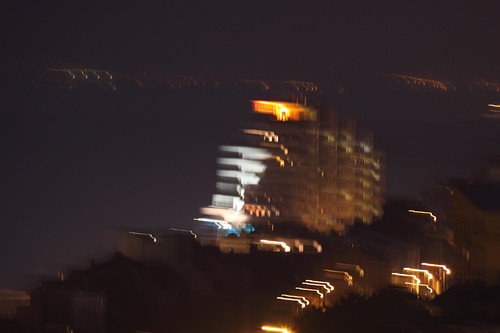
IS off
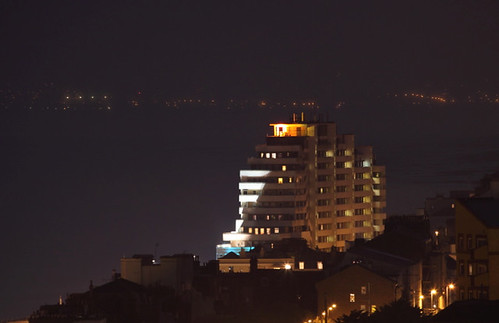
IS off

