Dev or scanning issue??

Messages
11,065
Name
Suz
Edit My Images
Yes
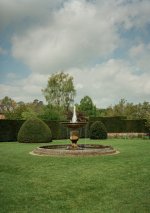
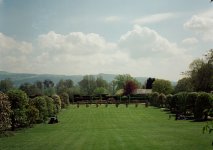
Just got the scans back from the Silbersalz I sent to AW. A couple of them have weird sludgy marks. This one shows it the best. Any ideas what caused this? It's not on every shot but a few other have a 'grubby' look as well. All taken on the Pentax 17. I've never used ECN2 film before. The area above left dragon seems to have dirty brown marks.

0036.jpg
 
Another weird mark on this one. Pale rather than brown. Bottom bit of big cloud just above the tall tree.

0037.jpg
 
Impossible to tell without seeing the negatives, but given the similar placement in all of them I'd wager it's a scanning issue.
 
The marks look a pale blue to me
first horizontal
second two vertical, left and center
third horizontal (looks like some kind of writing)
 
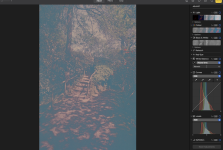
AW have rescanned them all. Interestingly there is now some noticeable banding on some instead. Very odd. Others have a couple of band lines but this one has lots.

0076-6505b.jpeg
 
AW have rescanned them all. Interestingly there is now some noticeable banding on some instead. Very odd. Others have a couple of band lines but this one has lots.

View attachment 482076
I wonder if there was residue present and on some the cleaning has resulted in smears? It doesn't look like scanner banding, which would be straight.
 
I wonder if there was residue present and on some the cleaning has resulted in smears? It doesn't look like scanner banding, which would be straight.

It's a mystery really. There's marks on others in lines but they are pairs or triples not all over so much of the scan.
 
Does Silbersalz film still have the remjet on ? The artefacts look as if they may be caused by less-than-perfect removal of the remjet. I experienced this problem myself when developing Vision 3 films and removing the remjet myself.

It does have the remjet layer. Have a second roll so undecided whether to use that and send it to a different lab or not.
 
I contacted AW again about the weird marks on the above re-scanned ones. They have refunded half the cost of processing as a goodwill gesture.

So looks the answer is in fact - both! It was a dev and scanning issue as they hadn't done either properly :(
 
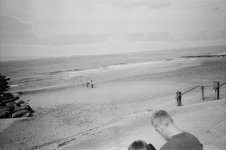
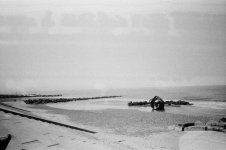
Got the scans back from some slide film that's been knocking about and I'm wondering if there's been a scanning issue. They look very dark but I'm sure there is more in there than is apparent with the scans. They look kind of hazy as well.

All were shot on an SLR with +1 exposure comp as I think the film is about a decade out of date. Don't usually bother adjusting with normal colour film. Gut feeling if these scans are right is that it needed at least +2.


0031-43300.jpeg

0018-71234.jpeg
 
Got the scans back from some slide film that's been knocking about and I'm wondering if there's been a scanning issue. They look very dark but I'm sure there is more in there than is apparent with the scans. They look kind of hazy as well.

All were shot on an SLR with +1 exposure comp as I think the film is about a decade out of date. Don't usually bother adjusting with normal colour film. Gut feeling if these scans are right is that it needed at least +2.


View attachment 485118

View attachment 485117

I never under or overexpose slide film, even if it's expired. While the dies may degrade, it tends to retain its latitude, so using +1 exposure comp will likely blow any highlights.

That said, these look like they might have been underexposed and the lab has then attempted to (unsuccessfully) lift the shadows in the scan. Do you have a light-table (or use your phone screen with a bright white background) to look at them? Do they look foggy on there or, if not, do they look underexposed / does it look like there's any detail in the shadows?
 
I never under or overexpose slide film, even if it's expired. While the dies may degrade, it tends to retain its latitude, so using +1 exposure comp will likely blow any highlights.

That said, these look like they might have been underexposed and the lab has then attempted to (unsuccessfully) lift the shadows in the scan. Do you have a light-table (or use your phone screen with a bright white background) to look at them? Do they look foggy on there or, if not, do they look underexposed / does it look like there's any detail in the shadows?

I didn't realise that with slide film. It is very old and of dubious origins so it may actually be closer to 15 years since it was made and it's just been on the shelf and not stored correctly.

I haven't got the negs back yet but I was going to put them on a light table and have a look with a magnifier and try either re-scanning or just using my phone to see if I can do better.

If I look in the photos app edit window the levels are all squeezed to the middle with no extremes which is a bit odd as well.


Screenshot 2026-06-15 at 10.59.49.png
 
Last edited:
It is generally not worth using outdated slide film unless it has been stored in a freezer..
Colour negative film ismore forgiving, but often gives uncorrectable weird colours.
It a lottery at best..
It is certainly not worth using on anything in the least important even for free.

A colour film that is just a year out of date is probably just fine unless badly stored.
 
Had a crack at scanning a strip of the E6. No better and also covered in every bit of dust and stray cat hair for miles around. Not used vuescan in ages and forgot you have to take the hood thing off for film. Doh!

Fiddled around with a few colour options but no real improvement.
 
Back
Top