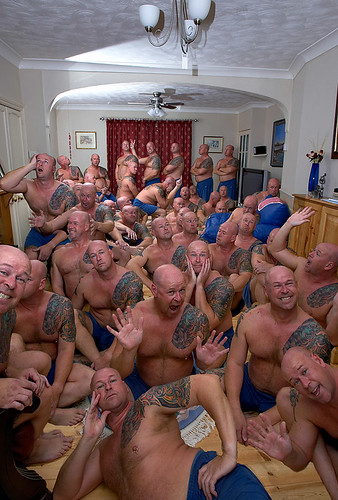
how to create a photo with the same person in it but in different positions?!!

Messages
171
Edit My Images
No
Sorry for the rubbish thread title!!

What i would like to be able to do is create one of those photos that have the same person in it, but they are in the photo several time over.

eg, the photo might have me, standing up, sitting on a chair, sitting on the working surface.

does that make sense?!!

I dont really know what the technique is called and therefore cannot find any tutorials on it. i think it might be done using mask layers??

Could someone explain how to do this in the simplest way possible as i am not familiar with photoshop or point me in the direction of a good tutorial?

thanks


ps sorry for the rubbish explanation.:)
 
Shoot in manual and pretty quickly.
Fire off your shots in different positions.
Back in PP load all the images as different layers and get erasing.
It works best with hard surfaces, sofas and beds etc. squash down as you sit on them and it's a nightmare to get a smooth join.
 
Or you could set camera to long shutter speed in a darkened room and fire a flash every time you're in position. Bit fiddly though, photoshop probably be easier. And obviously impossible outside unless dark.
 
Definitely manual everything, including flash if you're using it. ETTL, iTTL etc will alter output depending on how the scene's composed. The DPC tutorial is helpful. Using a layering technique, you give yourself the flexibility to alter just about everything at will. My strong advice is to use masks and not the eraser tool. You can backtrack and tinker that way. It seems clunky at first, but it's much more powerful.

If you do, indeed, shoot everything manual and use a tripod, then the masking is relatively easy, as all the edges, colours and brightnesses match, so you don't even need to be terribly careful when painting the mask.
 
Lock the camera on a tripod. This is the first and most important step in order to get the images to lock together in photoshop. Good tip on the hard surfaces only and also, try to have the figure separated i.e. not overlapping as this makes it difficult to get a seamless blend. The rest is all about imagination and photoshop skills.

Good fun if you have kids and want to mess about on a rainy day. My daughter loves when we do this.

Good luck. By the way, do you know how layers and layer masks work in photoshop?
 
... and also, try to have the figure separated i.e. not overlapping as this makes it difficult to get a seamless blend. The rest is all about imagination and photoshop skills.

Why should that be a problem? It only takes a little hard work and 40 layers...
265186079_dabaab2415.jpg
 
Back
Top