ipod touch set up for internet

Messages
2,346
Name
Peter
Edit My Images
No
My daughter wishes to use her ipod touch for the internet (even though she has her own pc!). We have a netgear router, with two wired connections to our two seperate desktop pc's. I don't think our router is currently set for wireless. It was at one time when we had a lap top. Can anyone advise how to reset the router to allow access :help::help::help:
 
If it used to be set up for wireless and you didn't change anything when you stopped using the laptop then it should still be configured for wireless.
Try turning the wireless on, on the ipod and see if you can find your network.

Let us know what happens.

Andy
 
Yes... look in settings on the ipod touch and under wireless see if it is detecting YOUR router. if not then you are right that you have to turn on wireless on your router. I suspect this is in the settings you will find in the router page on your pc.

type in 192.168.2.1 or 192.168.1.1 into the address bar of your pc with no www or anything in front. the password and username will prob be admin admin if you havent previously changed it.

you will have to give the wireless connection a Key no. for security from your neighbours then say save changes.

then copy this down and use that on the ipod touch to log onto it and save it. then she will automatically get on whenever she goes on the ipod touch within your range.
 
If you are with sky the username will be admin password sky i dont know what other isp's use once you are in at the left hand side there will be a menu click wireless settings and make sure 'Enable Wireless Access Point' 'Allow Broadcast of Name (SSID) ' are ticked
 
If you give it a security key make sure you use WPA2, this is stronger security that WEP and you can also make a key that you may be able to remember better.
 
If it used to be set up for wireless and you didn't change anything when you stopped using the laptop then it should still be configured for wireless.
Try turning the wireless on, on the ipod and see if you can find your network.

Let us know what happens.

Andy

When we used a laptop on wireless, it was initially connected to port 2 on the router, when setting it up as wireless. That port on the router has since been used for a wired connection, therefore I suspect I have disabled the wireless. Not sure how to turn it on again.

What opperating system are you running and who is your internet sevice provider?

Vista and AOL.

Yes... look in settings on the ipod touch and under wireless see if it is detecting YOUR router. if not then you are right that you have to turn on wireless on your router. I suspect this is in the settings you will find in the router page on your pc.

type in 192.168.2.1 or 192.168.1.1 into the address bar of your pc with no www or anything in front. the password and username will prob be admin admin if you havent previously changed it.

you will have to give the wireless connection a Key no. for security from your neighbours then say save changes.

then copy this down and use that on the ipod touch to log onto it and save it. then she will automatically get on whenever she goes on the ipod touch within your range.

Have typed in both numbers, but it just brought up web pages.


Note, if the ipod searches for an wireless internet connection, we can find neighbours, but not our own, therefore suspect the problems lies with switching on the wireless on the router
 
go to "start" then "network" and there should be an icon with your router right click this then click "view device website" hope this helps

Or alternatively To restore the factory default configuration settings without knowing the administration password
or IP address, you must use the Default Reset button on the rear panel of the router.
1. Press and hold the Default Reset button until the power light blinks on (about 10 seconds).
2. Release the Default Reset button and wait for the router to reboot.
 
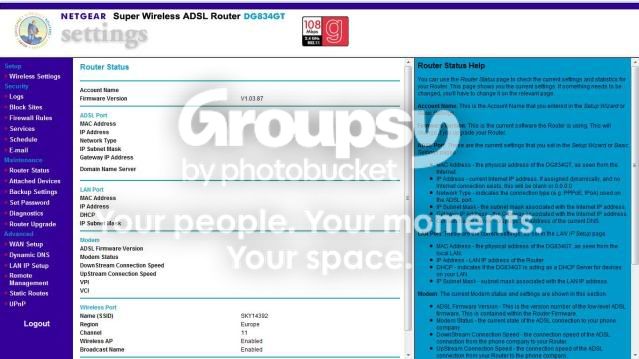
I took some screen shots becouse i thought i would be easier hopefully you will be on a page simillar to this :shrug:
ghkgf.jpg

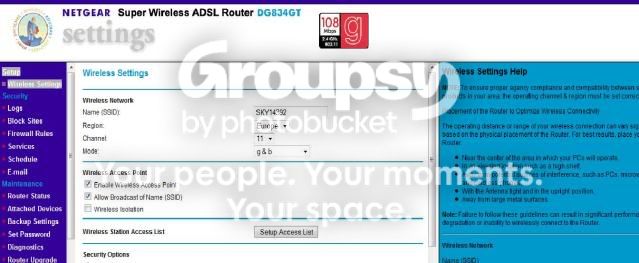
click the link on the side that says "wireless settings"
Helpwireless1.jpg


once here make sure Enable Wireless Access Point and Allow Broadcast of Name (SSID) are ticked
 
At the last part, it asks for a WEP key. After typing in a password, it generated a similar long number/letter entry in all four keys. Is that then ok to hit apply. Can it affect my current wired connections to the router ?

Hit apply but you will need to enter that key into every device that uses the router wirelessly
 
are you typing that same long keyword into the ipod? EXACTLY the same?


you may need your username and password that you log into your broadband account with maybe.
 
are you typing that same long keyword into the ipod? EXACTLY the same?


you may need your username and password that you log into your broadband account with maybe.

I have typed in the same long keyword exactly the same. The ipod finds our router ok, and even has a tick beside it, but refuses to go past ' connecting ' which it hangs at for about 10 to 15 minutes, and never connects. Have tried several different web addresses. I might try going through the whole procedure from the start, by removing the wireless connection on the router and then setting it up again.
 
I don't know how the ipod connection settings are laid out but if it is finding the wifi network, then the issue is with security. Make sure you are typing in the correct user name and password (case sensitive). This is the password you set for the wifi NOT the ones you used to access your router. Also, selecting the correct securtity type. Did you set WEP, WPA or WPA2? If WPA waas it TKIP or AES? Everything on the ipod must be exactly the same as on the router.
 
I don't know how the ipod connection settings are laid out but if it is finding the wifi network, then the issue is with security. Make sure you are typing in the correct user name and password (case sensitive). This is the password you set for the wifi NOT the ones you used to access your router. Also, selecting the correct securtity type. Did you set WEP, WPA or WPA2? If WPA waas it TKIP or AES? Everything on the ipod must be exactly the same as on the router.

On the router I set it to WEP. Is that ok or should I have one of the other settings?
 
On the router I set it to WEP. Is that ok or should I have one of the other settings?

WPA2 is the most secure, followed by WPA and then WEP. However, whatever security you use, the credentials need to be correct for it to work and the device you are trying to connect needs to support it. I have no idea what the ipod touch supports.
 
When you find your wireless network, you have to tell the ipod touch what security you are using.

I think this comes up after you type in your network name into the ipod.

If I remember correctly, it just takes WEP or WPA.
 
Thanks for all the replies. Unfortunately I am still not connecting. I know the ipod has found the wireless network, it has acepted the password, and the signal strength is good. For some reason, it is not then loading any web page, and hangs at loading. Having checked out apple ipod forum, it looks like I not the only person with similar problems. I will need to get my daughter interested in photography, rather than these new tech gadgets,in the meantime looks like I have a lot of further researching to do.
 
On the wireless settings screen click the box "Setup Access List" and see if that has anything in it.

This is used so you can restrict what devices connect to wireless. You can limit devices by MAC address. If this has something in the list and is being restricted that may be why the iTouch wont connect.
 
Back
Top