Linking Different Emailing Accounts - Mail OS X

Messages
1,583
Edit My Images
Yes
Right, here's the story, on the mail app I have 3 account linked up to the program. However[need to check it's not the same with the third] My work e-mail, the outgoing server has never worked with the one the web host has, I created my account with my webhost so that, obviously my e-mail address ends with the website/business name. However, it always SENDS the e-mail as it's from my private e-mail address[when I send myself mail it shows that I sent it from the address I have just recieved it on!] I was OK with this just put it down as something I'll have to deal with, however, I really would like it if the mailboxes could behave as I intended.
Personal one for Personal Stuff, Work for Work and the third for forums etc....

I tried the other week, to re-set up the mailbox, but everytime, once I changed the outgong SMTP server to the 'work' one, it would prompt me for the password linked to the account, I type password in, the same box appears...And again and again. So I don't get ANYWHERE.


Any ideas on if this can be sorted?
 
you generally have to have your ISP outgoing SMTP server as your outgoing for all of your accounts, as the ISP wont normally allow to another one. And your work server would need to allow you to send from a different domain as well.

I usually just select the from address at the top of the email and it sends as if its from that account even though using my ISP smtp mailbox ?
 
I had to read your post about 4 times but I hope I understand what you are saying ie You want mail sent from your work address to go via the work address server etc so.....

In MAIL go to preferences and click on the ACCOUNTS tab

In the right hand pane at the bottom it says "Outgoing Mail Server (SMTP):" and then shows the server. Change this for each account to show the correct account and click "use only this server" underneath.
 
Ian, I do that and it doesn't work, when I send to myself, by the time I recieve it shows my personal email as the sender, hence everyone sending straight back to my account when replying.

Cowasaki, there isn't a 'use this server only' options....?
But yes, that is what I want to do.

I'll explain a little better, cos I've just tried to send again. When I DO change the outgoing mail server, when I click send I immediatley get the little security type dialogue box asking me to enter password for the account. Enter it, click remember it and OK, and then the message sits in outbox, until it comes up with that box telling you to chose another server....Which I have to, and then get back to square one, cos it ends up being sent from there anyway[but actually, don't think it DOES send! :S....Sorry it's late and been a long da, can't rem.]

EDIT: Nope, just sits in the outbox!
 
This is the option...

accs.png
 
I don't have that :( I'm on Tiger.

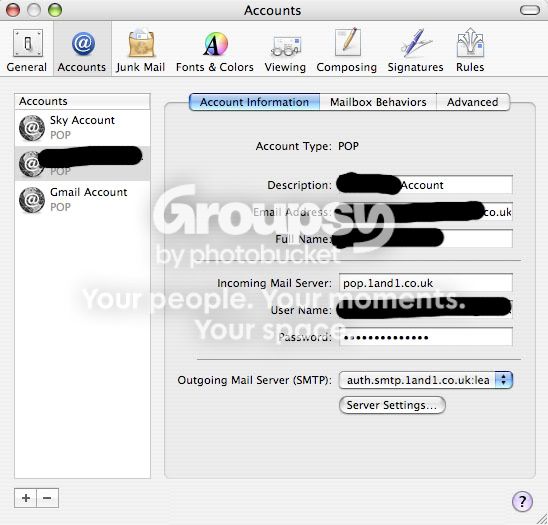
This is my screen
Picture4-2.jpg


BUT, that helps me. I'm with 1and1, too. So why am I having this problem[and always have done - had the domain/mail account/problem coming up to a year now] but you're not???:thinking::(

EDIT: just created an IMAP account of the same, as seen thats what you got[sorry for being nosey] and as I did that, the message came through...So I'm gonna stick with both - because an IMAP version doesnt bother me...as long as it makes the POP version work.
So, actually, thanks!!
 
If you are on Tiger then I am sure that you can specify the outward server when you send an email. Just check the options in preferences for showing the outgoing server and check the full window when you click on NEW MAIL.
 
Just pasting my edit, cos I posted it after you replied.
EDIT: just created an IMAP account of the same, as seen thats what you got[sorry for being nosey] and as I did that, the message came through...So I'm gonna stick with both - because an IMAP version doesnt bother me...as long as it makes the POP version work.
So, actually, thanks!!

There isn't any hidden option, though, is really odd. The only other bit I can 'specifiy' is the username, outgoing mail server, the port, SSL or not, and the password. And that's it, no other mention about servers
 
I don't use POP unless I absolutely have to because it does not allow simultaneous connections so the problem I have is that with my laptop powered up and checking the email and my iPhone doing the same I always have any accounts that are POP coming up with access errors. Also when I get email and I am out at work and I just delete them they are back again when I get home so I have to delete them again.
 
Oh OK, that's good to know for future ref! I never really knew the diff and have always used POP accounts.

Thanks for your help
 
Back
Top