

Nikon F3/T: Clean, lube, adjust (CLA)

Messages
45
Name
Andreas
Edit My Images
No
In the post

Clean, Lube, Adjust (CLA): When does my electromechanical SLR need servicing?

we asked ourselves when an electromechanical SLR needs servicing (CLA—Clean, Lube, Adjust) and what the criteria for that might be.

Today we’ll take a look at a complete CLA for a Nikon F3/T, which we’ll be performing ourselves. To do this, we’ll disassemble the camera as much as necessary.

First, we’ll look at disassembling an F3 for spare parts to gain some experience. Mistakes we make here have no consequences. Unlike with the camera we want to service.
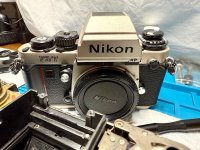


IMG_8843.jpeg

Following on from my report on the Nikon FA, let us see how to maintain a CLA for a Nikon F3/T.

The F3/T and F3 should have some technical similarities with the FA, as they were only three years apart (1980 - 1983). However, the two concepts differ significantly.

The F3 has a horizontal focal plane shutter, the FA a vertical one.

The not fully digital F3 has a metering cell in the base and a replaceable viewfinder.

A microprocessor on top of the not interchangeable prism controls the digital electronics in the FA sporting six silicon photodiodes for light measurement.

As a candidate for a CLA, I have a well-used, bright F3/T whose exposure compensation dial (ASA) is stiff. The mirror mechanism also needs to be cleaned and lubricated. And the shutter speeds need to be checked.

Disassembling an F3 isn't exactly easy, which naturally adds to the appeal :)

IMG_8181.jpeg.13e152b745977c675f12deabe3eb14ed.jpeg

Original spare parts, new, for the F3 I have enough.

I was able to purchase remaining stock from a repair shop that had already been taken over by someone else.

A stroke of luck for me as an F3 fan and collector.

IMG_8182.jpeg.bec051270963b9cec6b8c17a1fc9159c.jpeg

Brand new shutter …

IMG_8183.jpeg.b9afe4ac25151356c74babeefedf89af.jpeg

… as well as circuit board for the F3.

Preliminary considerations

While the Nikon F3 is straightforward to disassemble and reassemble, it does present its challenges.

Removing the mirror box on an F3 Press worked, but during reassembly, I had trouble coupling the mirror box and camera mechanism. I also lost control of a pulley that connects the aperture simulator to the functional resistance element under the rewind knob.

That shouldn't happen this time.

Jim Holman, International Camera Technicians, at work

For the CLA, I'll be following the excellent four-part video series from ICT, International Camera Technicians.

Jim Holman, Master Technician at ICT, guides us through the necessary work, offering many practical tips and advice from his experience.

One of the few masters you have to seek out and find, see

ICT, International Camera Technicians: Nikon F3 - Disassembly & Service

Among other things, we'll be cleaning the contacts on the top and bottom of the camera, especially the contact for the LCD illumination with the infamous red button, which so often becomes unreliable or fails.

Whether we'll then go further and remove the mirror box to clean and lubricate the mechanics there is still an open question.

In any case, we'll adjust the electronics and the curtain travel times, using the camera tester again.

Anyway, I have two F3s for practice, decommissioned for spare parts. So the chances of a successful mission are good.

Preparing for the CLA: Removing the F3-mirror box

1.jpg.9db656b96989c5468ba414e7609edae5.jpg

Here I have a decommisioned F3 body that's already missing a few parts.

However, the area under the top cover and above the bottom cover is still intact, and it can be released mechanically using the small lever on the front plate (release side).

Ideal for practicing removing and replacing the mirror box!

Let’s start right away.
 
Last edited:
Removing the mirror box is straightforward.

During installation, connecting the mechanism between the housing and the mirror box is tricky, but manageable with Larry Lyells' excellent instructions in the SPT Journal and a few practice runs.

Here are some impressions; this F3 had some of the adjustment elements on the top already removed.

1.jpg.2024c4a30ef7df7cb656db2facc34424.jpg

2.jpg.5c8344151c80f71a11d6c4190e811e35.jpg

3.jpg.98a87fcdcb401537084435fae482820d.jpg

4.jpg.310b133169a84dd66d7f712438ec8b9a.jpg

This is where the rewind crank, accessory shoe, exposure compensation/ASA, and the FRE (functional resistance element) meet. Among other things, three cables need to be desoldered.

A cleaning would also be necessary ☺️

5.jpg.1bc448ea994bacf8415092e8f2860051.jpg

The rubber ring on the shutter speed dial can be removed. However, since it's brittle, I cut it in half. I glue it back on later, leaving the precise cut invisible.

6.jpg.58934c5648042df3620f4fec0eb99241.jpg

7.jpg.bf143464a6bc9c44e169fa93c3aed275.jpg

8.jpg.2892bd79428f56da77c5a9e67eb781b7.jpg

Multi-exposure lever.
 
9.jpg.e8e0d7dc584ce4b4cdd9aba2aad7b8e5.jpg

10.jpg.7283ae64b4d341fdbb70493be4fcfc77.jpg

Seven potentiometers for adjusting the electronic circuit.

11.jpg.b770d28a873c8f352c74f8904bf8071d.jpg

The mirror-charge lever located on the bottom, rewind side.

12.jpg.17df56cbae4ea0fc84d56eb5e1b24663.jpg

13.jpg.47d0022e492dbe581b4dc57beffa9192.jpg

The FRE (functional resistance element).

Here, the F3 uses binary values to transmit the position of the aperture simulator, exposure compensation, and ASA to the electronic control system.

Gold-plated wipers move across contact track patterns, creating binary words composed of 0s and 1s.

The disk to which the contact tracks are applied is presumably made of glass and is susceptible to forces such as drops and impacts, which could cause it to break. A weak point in the otherwise tough F3.
 
14.jpg.e026ab69a50c69c3733b26042c00fcd7.jpg

Further potentiometers for adjusting.

15.jpg.986f3227941dd3091e49d3e99292103d.jpg

Some cables to desolder.

16.jpg.198078877f146f8799dc237bc1adb907.jpg

17.jpg.64bc4d47d166a50b7e3ae66c4bc88712.jpg

18.jpg.b7f29b0b82c6105ce3416f6540f71839.jpg

The LCD with illumination and viewfinder LED is attached to this part of the board; here it is separated.

19.jpg.afba916262bd130aa02c7ca6317b1137.jpg

20.jpg.b8a5253de3bb034a1af861c9f207f1d6.jpg

23.jpg.b2c9fc8c1ebe5ae39a181841296c1ef1.jpg

Eight screws fix the front panel with the mirror box to the housing.
 
29.jpg.fa571f41f272361b653f86f437bd6166.jpg

The semi-transparent mirror …

30.jpg.9b194dda3584b5dfba3c9cd4e3113764.jpg

… and the SPD (silicon photo diode) for exposure measurement, which measures the light partially deflected by the mirror.

31.jpg.22b8ddc2abebf1687072859e791865b4.jpg

The horizontal focal plane shutter with titanium foil.

32.jpg.948f992c86431ca017435834700ccda9.jpg

For testing purposes, the shutter can be cocked using the motor/drive coupler and pliers.

33.jpg.3be052af39b34d243f011b5bb27aadc7.jpg

Position of the mirror-charge coupler with spring on the bottom of the housing.

34.jpg.0aca1880a9036bd619b537be73b7fb56.jpg

The clutch for the aperture simulator which is moved when the aperture ring on the Nikkor lens is turned.

35.jpg.58f1425351b18fc68567ebea516a3995.jpg

Using this pulley, it rotates the FRE to the right of it, which is removed here.

36.jpg.321130cfee9ad31cd3fb0038b9141b89.jpg

With a Nikkor 50/1.4 Ai(-s) lens, the gear with the cable may only move from aperture 1.6.
 
37.jpg.f2b83f63f583026071af411463c821a0.jpg

Gloves protect against oil, old grease, sticky rotten foam and glue. And the camera from fingerprints.


It's getting serious: We're working on the F3/T

38.jpg.ec062c7a1440649ccf7e42a3a253e28f.jpg

Now that we've explored all the steps for disassembly and practiced reinstalling the front plate, nothing stands in the way of our candidate getting the CLA ready.

A quick check revealed that the exposure compensation/ASA dial is difficult to turn. Time for a clean, including checking the area under the top cover (rewind side) and on the bottom of the F3/T.

The front plate doesn't need to be removed, as the mirror, release magnet, and shutter are all working perfectly.

The LCD should also be fine, but I haven't checked that. If not, we'll replace it.

We'll definitely clean the contacts on the LCD backlight. This probably flickers on most F3s. The cause is dirt on the contacts; this area is not tightly sealed.

The critical process of coupling the front panel and the housing as well as adjusting the FRE are described here:

Nikon F3 Repair article

Here you'll also find all the information you need to disassemble an F3 down to the shutter.

The Nikon F3 offers numerous adjustment options

for both electronics and mechanics. A camera tester is required for most settings.

We'll look at each station individually, assuming the factory settings are correct unless someone has touched the camera afterward.

Many of these settings are controlled via the potentiometers on the front panel, which we've already seen.

As is typical with horizontal focal plane shutters, the curtains travel times can be adjusted after removing the base plate. There are separate settings for the fastest shutter speed of 1/2000 second.


So far, it's clear that the Nikon F3 is easily serviceable by DIY.

Adjusting the settings requires a camera tester that offers more than just measuring shutter speeds more or less accurately.

I use the Reveni Labs camera tester, which is modeled on the functionality of the classic Kyoritsu testers, which are no longer manufactured. It's an inexpensive alternative, small, light, and uses the latest electronic measuring technology.

What I can't do is adjust the flange focal distance, the distance between the image plane (film) and the lens mount. In my opinion, the factory settings are sufficient here, unless the camera body has been warped due to force.


While the disassembly and adjustment work may seem complicated, it's not really that complicated after some practice.

With the available excellent instructions, many SLRs can be serviced, troubleshooted, or repaired. Abandoned SLRs of the same type are available for spare parts.

I'm a little nervous

because this F3/T is in excellent condition, and I don't want to change it for the worse with my clean/lube/adjust.

But this nervousness comes with every project. Good preparation, working slowly and carefully are the antidotes. Being sloppy at work usually takes its toll immediately.


I'm looking at the area under the top cover wind side. This is where the shutter magnet is located, which I'll be cleaning. Its contact surfaces must separate properly in order to correctly set the shutter speeds.

1.jpg.e261d9e5a62163a797c5dba7b1df9253.jpg

The screw ring above the trigger can be loosened by hand force and a rubber cloth that increases the friction

2.jpg.24258a27f1cad1186c5c0b920fe494f2.jpg

3.jpg.64bac04d9294855545314940299dea07.jpg

4.jpg.8922cc71c32e3c9024b6c42ba3931341.jpg

Trigger, winding lever and power switch are removed.

5.jpg.46f5557d678455f83a4e2e83bc417edf.jpg

6.jpg.f399b6686f09c0c559637734aae6faec.jpg
 
Last edited:

7.jpg.a3c2f9227f1984b64ca3139c35c8252b.jpg


Shutter-speed knob and self-timer switch are taken off.

I cut open the rubber band on the knob so I could remove it without any stress. The rubber loses its elasticity over time and can become brittle.

8.jpg.b21c79a08b7313647e9a19f1b3ab4cd3.jpg

9.jpg.0e9ae5f4fa1676fedb974956e3663cc5.jpg

Multiple exposure lever removed.

10.jpg.0c99dd3fb8026b034e132f723cfdd022.jpg

Right top cover removed, 1 screw.

12.jpg.65f7a579870e9138d917dd68c45e42d5.jpg

13.jpg.c901c52724e88d85608de3e809431cb5.jpg

The F3/T has additional seals compared to the F3. At least, that's my understanding.

14.jpg.fce6aa87a57e7be5f69f8b9afb73e723.jpg

15.jpg.ce33a356b1c9a0b2b2e8e479f4196595.jpg

Shutter-speed selector and wind-gear unit folded up, 6 screws.

Below, under a transparent plastic shield, is the shutter magnet
 
16.jpg.1be5322315c1ded47959ee9ac61f4268.jpg

Cleaning the contact surfaces with electronics cleaner. Isopropyl alcohol and benzine are also suitable.

17.jpg.238928be043ea645014b663b95cca017.jpg

Removing dirt with isopropyl alcohol.

18.jpg.eb1afd880d1dca41cbe1182ef4ecc4e6.jpg

The structure for the speed dial is sealed with a rubber gasket.

19.jpg.9a29116f1e4cbbab408c195d2540297a.jpg

Cleaning with isopropyl alcohol.

20.jpg.4e9a23c21d92a87a33bcefb3f24c9b06.jpg

A foam seal under the multiple exposure lever.

21.jpg.8d21162a934e91f32fdf138267da4c27.jpg

Rubber gasket.

22.jpg.7d93c5afc3c0d9be26cc1d2965916753.jpg

23.jpg.7484b882c1e246c3e47ff67944c7716e.jpg
 
24.jpg.abe843b8e6506d8c807448be897412a1.jpg

25.jpg.25fbafe81596615db5c40c0cdb849786.jpg

Clean the latch and spring for the power switch (plastic) with isopropyl alcohol, then apply a little silicone grease to the recesses. This makes the ring easier to rotate.

26.jpg.d237ef4605bee9af389754ba3c097a59.jpg

27.jpg.4f860d012ea4e418e6b259845591a616.jpg

28.jpg.9e88d8bdc06c259b508199d65446b1b1.jpg

29.jpg.eef28f0945d28b8ab0da5a6581c7de67.jpg

The same cleaning process applies to the detent and spring of the winding lever. I use a little grease for lubrication, since both are made of metal.

30.jpg.eb2d9630f6f7386b1f3f7861a33f9c70.jpg

31.jpg.dac5508de73a790c065ca44b36022c17.jpg

Cleaning the shutter magnet has been achieved, the wind-side top cover has been reinstalled and the camera has been tested.

We'll continue with the rewind-side top cover and cleaning the FRE (functional resistance element) under the exposure compensation/ASA dial.
 
Last edited:
Rewind side: Cleaning the functional resistance element (FRE)

The F3 uses the FRE under the rewind crank to process the position of the aperture simulator, the set ASA as well as exposure compensation and forwards these to the exposure control.

Although well protected from dust and moisture, cleaning after about 40 years is a good thing to do.

Quote
Functional Resistance Element (FRE)

X.jpg.06be716cf183453ebea23f09c6cab80e.jpg

Nikon F3 Technical Manual, p. 24 (PDF)
Expand

1.jpg.77bdb8d0d32f04141c809708c78a8ce4.jpg

2.jpg.b12bd9043290002d5f6f8baff5921606.jpg

Structure on rewind side removed.

3.jpg.f581e092d00857a1df4dcd54056916e6.jpg

Top cover, 3 screws.

4.jpg.bd0e067bf2d10091f87844560911f842.jpg

Adhesive strips as a seal.

5.jpg.f15ac786c9643f11d78ce567680f51fb.jpg

6.jpg.f0dfb022f5eda793b7304a589c9bc4b7.jpg

FRE structure removed.

7.jpg.f65d2d90e05da80ddcc38fa895789825.jpg

Area under the FRE.
 
Last edited:

8.jpg.a1566522ca225b467f7600ff8faab2c4.jpg


On the contact track, grinding marks from the wiper sliding over it can be seen.

9.jpg.3df9a4f30753582b9a1cedff008532c6.jpg

10.jpg.9fdc8536ef46ebaece76dd515664ca73.jpg

FRE structure disassembled for cleaning.

A spring is inserted on the underside of the gear, against whose resistance the aperture ring of a Nikkor lens rotates via a cable.

11.jpg.f2ffc093b9fab4131bbd38dc74a0ae33.jpg

12.jpg.7405bde7d581416df29976be7cee7c8b.jpg

The cable is guided from the aperture coupler above the lens bayonet through the mirror box via a pulley to the FRE. There, the pulley couples with the FRE's gear.

13.jpg.ca8587c4f00646e65172a2b29c79f9e4.jpg

14.jpg.6137bea669b8ce63ffe4f65ac6d2a061.jpg

I cleaned the FRE, all contacts, and the contact track underneath with electronics cleaner and reinstalled it. The LCD display is plausible.

15.jpg.ded15ff8b5d5a4e97d0a73f86210dbb2.jpg
 
16.jpg.5555142164b0c1e5cb745134b02a7805.jpg

Now we move on to cleaning the contacts of the LCD backlight. The light source is a tiny light bulb.

Cleaning the LCD/ADR backlight contacts

The LCD and ADR (aperture direct readout) illumination of the F3 is powered by a tiny light bulb that's activated externally via a small red button.

As long as the button is pressed, the light glows, or it glows dimly, flickers, or doesn't light up at all. Dust, dirt or condensation can affect the contacts.

A feature of the F3 that is often criticized as being unwieldy and unreliable.

Let's take a look.

1.jpg.278faa88979875956a38c683fed1a614.jpg

Cover removed, 2 screws.

The bulb is hidden under the metal cover on the left, only its two connecting wires are visible.

2.jpg.401a3f1d21a9967a76623bcb1b9a8f8a.jpg

3.jpg.35ce936473f1b6801e1d360932e92e02.jpg

The red button, in front of which is a small gray cube that rests against the circuit board's contacts. It's a piezoelectric element that emits voltage when deformed.

This is the case here when the red button is pressed and held. Voltage is switched to the lamp and it lights up.

The piezoelectric element is inserted loosely and can be removed.

5.jpg.d8db924920bc26020b7b53920e734638.jpg

4.jpg.c021c9fd4a405f277a171ab1731f9403.jpg

Cleaning with electronic cleaner, including the contacts on the circuit board.

6.jpg.6529e7c6d8ca6c960137dd3f6b237d00.jpg

7.jpg.8592bd9c53765908b29f68a640b2022b.jpg

With constant pressure on the red button, the lamp glows quietly and as brightly as Nikon intended.

The backlight illuminates the viewfinder LCD and a prism in the ADR window, which is located above the engraved aperture value on the Nikkor lens's aperture ring.

These contact problems can therefore be easily resolved.
 
8.jpg.04507675c8bd4947c4138d5dc270a4e7.jpg

The viewfinder display unit is back in place.

9.jpg.268832ef8991f365b284e0783022f1e8.jpg

Here are two foam seals that I'm reinstalling.

10.jpg.f1a3963e3ec720137c2c4d347312e3c8.jpg

Cleaning with isopropyl alcohol.

11.jpg.02bf8bad92603231e1a457aec562ee86.jpg

The F3/T is fully assembled. I just need to attach the rubber band around the shutter speed dial. Everything works perfectly.

Finally, it's time to test the camera. We'll look at the curtain travel times, the shutter speeds, and the exposure metering.
 
Adjusting the curtains travel times and aperture priority

1.jpg.d0c906eeb9a69f4a18ed075a8273f0f9.jpg

2.jpg.225e574d509b55f63e0256461410d20b.jpg

The two ratchet wheels for adjusting the curtain travel times are accessible via the bottom of the F3/T.

3.jpg.4131713f742670b80aa02ab8cc73a7da.jpg

To bypass the always-on 1/80 second shutter speed when the back is open, I lock the frame counter with a coin.

Now I can advance to frame 1 and set the shutter speed to 1/2000 second.

4.jpg.24816dc90124d9eba052fc04a8e52085.jpg

5.jpg.1cb7056c17ffe472f9f5ee58a00f49f2.jpg

The target value for the curtains travel times is 11 milliseconds, which I just about achieve.

Both shutter rollers run at almost the same time, which minimizes the exposure error.

6.jpg.2242f0fd45d637eee202a7ab15aee70d.jpg

7.jpg.4996913ec86db9772404a895f32a6eee.jpg

5a.jpg.7c336a136dcf3d99968a791697c7c621.jpg

I can also reduce the EE (exposure error) in aperture priority.

However, I don't have a calibrated lens for measuring this. The results also vary depending on the light intensity. Therefore, I take many measurements until I'm satisfied with the average value.

The adjustment is made using the fourth potentiometer on the front of the rewind side.
 
This completes the project.
  • The shutter magnet, FRE, and the contacts for the LCD/ADR backlight have been cleaned.
  • I applied small amounts of lubricant to a few spots,
  • and the shutter and aperture priority are adjusted.
  • It wasn’t necessary to remove the front panel with the mirror box. I would only do that if the mirror mechanism needed lubrication, the shutter had a problem, or the F3/T wasn’t releasing electronically (release magnet).


Conclusion
  • A CLA that lives up to its name requires quite a bit of work.
  • This usually involves disassembling the SLR to some extent in order to access the critical components. These include the magnets, switch contacts, potentiometers for adjusting the electronics, and the mechanical parts inside the mirror box.
  • However, you should only perform the work that is absolutely necessary—for example, if there are problems or if the SLR has been exposed to dirt, sand, or moisture. The less you take the camera apart, the lower the risk of damaging anything.
  • If you have a CLA done at a repair shop, be sure to clarify in advance exactly what work will be performed so you know what you’re paying for.
  • Working on an SLR—especially when it comes to the electronics—may seem complicated. It is, but you can learn it step by step. I’d like to recommend my self-study guide: DIY self-study course on servicing and repairing electromechanical SLRs: Information for practitioners, beginners, advanced repairers
+++

⚠️ A word of caution


Please keep in mind that you’ll be using highly flammable solvents for service work, and their fumes are harmful to your health. Soldering also produces fumes that should not be inhaled. Dangerous high voltages can be present when handling electronics, especially in conjunction with electronic flash units and mains. Therefore, familiarize yourself with the safety regulations beforehand and ensure your safety. Depending on the activity, protective gear may be advisable.

All information is provided without guarantee. Any action you take upon the information in this report is strictly at your own risk.

This report describes my personal experience and approach; it does not constitute a professional or certified repair instruction. I am not liable for any property damage or personal injury resulting from actions taken based on the information provided in this report.

Acknowledgments

Without the work of Master Larry Lyells, in particular, we wouldn’t have the detailed technical information we need today for service/repair of electromechanical SLRs.

The SPT Journal and The Camera Craftsman, which he helped shape significantly as an author, and which contain all the necessary information and instructions are available for a fee through Learn Camera Repair.

We owe our access to them to Eugene Pate, the founder of Learn Camera Repair.

As a Shodan in Jiu-Jitsu, I view camera repair as part of my Do, the Way. I am grateful to my revered Grandmaster, Erich Ebetshuber, 10th Dan in Jiu-Jitsu, for everything I have been privileged to learn from him
 
Last edited:
Wow congrats on your skill. I bought a F4 and the shutter wasn't working and thought if I get to the shutter mechanism I could unstick it erm well got this far and gave up :rolleyes:
252-p-Ogow-Xc.jpg
 
Thanks! :)

I've worked on a few projects involving the Nikon F4.

What exactly was the problem with yours?

Are you familiar with the technical documentation that's available? It can help with troubleshooting:

Nikon F4: Documents for service/repair; limits for DIY
Everything worked except the shutter, from instructions got maybe 2/3 thirds dismantled but was held up by a small screw....it was locktite-ed in and needed something to dissolve it (which I didn't have) and just lost interest. And why dismantling thought of things on re-assemble e.g. how would ever get the rubber or felt (IIRC) on the base plate smooth again like new.
 
Everything worked except the shutter, from instructions got maybe 2/3 thirds dismantled but was held up by a small screw....it was locktite-ed in and needed something to dissolve it (which I didn't have) and just lost interest. And why dismantling thought of things on re-assemble e.g. how would ever get the rubber or felt (IIRC) on the base plate smooth again like new.

Which screw are you referring to? Can you describe where it is located, or show a photo?

I had problems with the adhesive locks on the tripod mount screws in the F4, as well as with a screw on the top that holds the front panel in place.
 
Which screw are you referring to? Can you describe where it is located, or show a photo?

I had problems with the adhesive locks on the tripod mount screws in the F4, as well as with a screw on the top that holds the front panel in place.
Well I can't remember as it was about 4 years ago and was just following instructions that said this screw has to be undone..all a shame really as the camera is it mint condition with original box and took a gamble on ebay and thought I could get the shutter working (like a T90) with a few bangs on something like a carpet. Anyway bought a basic f4 from Japan and used the viewfinder so never got back to the repair.
 
Well I can't remember as it was about 4 years ago and was just following instructions that said this screw has to be undone..all a shame really as the camera is it mint condition with original box and took a gamble on ebay and thought I could get the shutter working (like a T90) with a few bangs on something like a carpet. Anyway bought a basic f4 from Japan and used the viewfinder so never got back to the repair.

Unfortunately, you can still see the T90 being mistreated on YouTube. Hitting it doesn’t provide a lasting solution—it won’t remove the stickiness from the shutter blades or the contamination on the magnets. At best, the impact will separate the parts for a short time. Then it works again—until the problem occurs once more.

But even then, one must assume that the shutter and the aperture—which are controlled by magnets (two and one) no longer correspond to the setpoint. Minor delays in the opening of the magnets have an impact on the ultra-short switching operations. Only cleaning helps.

The F4 has a much more complex shutter mechanism; using force is never a solution ;)

What are you going to do with the disassembled F4?
 
Last edited:
What are you going to do with the disassembled F4?
Well as I've got another F4 I just don't seem to have the time these days to even use about 26 cameras that I own, let alone to continue to repair the F4...I know what would happen if I kicked the bucket in that my sons would just pick all the parts that are in a plastic bag and dump them. There are only a few places that would/want to repair a F4 and if they do, charge about £180 to repair the shutter, so not many places would want spare parts for the F4 if I tried to sell the dismantled bits on ebay.
 
Last edited:
Well as I've got another F4 I just don't seem to have the time these days to even use about 26 cameras that I own, let alone to continue to repair the F4...I know what would happen if I kicked the bucket in that my sons would just pick all the parts that are in a plastic bag and dump them. There are only a few places that would/want to repair a F4 and if they do, charge about £180 to repair the shutter, so not many places would want spare parts for the F4 if I tried to sell the dismantled bits on ebay.
I tried to adjust the shutter on an F4 for exposure times shorter than 1/1000 of a second, but I was unable to do so. This may not mean anything, but I believe these shutters were not designed to be repaired.

In the SPT Journal on the F4, it states that when faults occurred, the shutters were replaced as a single unit.

At 1/8000 second, even the slightest deviations in the curtain travel times—that is, the time it takes for the two shutter curtains to complete their cycle—are fatal.

I, too, have a disassembled F4 in a box that I use for spare parts.
 
Unfortunately, you can still see the T90 being mistreated on YouTube. Hitting it doesn’t provide a lasting solution—it won’t remove the stickiness from the shutter blades or the contamination on the magnets. At best, the impact will separate the parts for a short time. Then it works again—until the problem occurs once more.

But even then, one must assume that the shutter and the aperture—which are controlled by magnets (two and one) no longer correspond to the setpoint. Minor delays in the opening of the magnets have an impact on the ultra-short switching operations. Only cleaning helps.

The F4 has a much more complex shutter mechanism; using force is never a solution ;)

What are you going to do with the disassembled F4?
If the T90 shutter mechanism is gooed up you would be in trouble, but just a few taps might getting the magnets working again, on the net a guy has shown how easy it is to reenergise the magnets...I would have a go if my T90 stopped working but hope to prevent this problem by firing it about every two months.
I still do repairs if easy and about 9 months ago got my Konica Fs-1 working properly..the problem was pressing the shutter button and all the exposure readings were only showing now and again in viewfinder...well rather than taking the top plate off just put contact cleaner onto the shutter button which worked it way down and cleaned the contacts.
Years ago the Konica FT-1 was a nightmare as tried to get three working that I got from the bootie cheap, the problem was the flexible printed circuits are clamped together so in time the contact deteriorated, well from the net just take the printed circuits apart and clean them...erm didn't work for me so gave up.
 
Last edited:
If the T90 shutter mechanism is gooed up you would be in trouble, but just a few taps might getting the magnets working again, on the net a guy has shown how easy it is to reenergise the magnets...I would have a go if my T90 stopped working but hope to prevent this problem by firing it about every two months.
I still do repairs if easy and about 9 months ago got my Konica Fs-1 working properly..the problem was pressing the shutter button and all the exposure readings were only showing now and again in viewfinder...well rather than taking the top plate off just put contact cleaner onto the shutter button which worked it way down and cleaned the contacts.

Triggering the Canon T90 mechanism at regular intervals, as is often recommended, does not help. The contact surfaces of the magnets are likely contaminated by lubricant vapors. As a result, they no longer separate—or do not separate immediately—so the mechanism no longer functions or functions only partially.

The popular YouTube trick involving a magnetized screwdriver to activate the release magnet demonstrates this. When current flows through the coils, it affects the resulting magnetic field, which helps separate the switching surfaces from one another. However, this is not a solution, as it does not resolve the underlying problem, contamination. The same applies to the two shutter magnets and the aperture magnet, which can only be accessed through a thorough disassembly.

On the contrary, triggering the shutter can also damage the shutter blades, since most T90s likely have the problem of a deteriorating damper in the shutter. If the blades are stuck and the shutter is triggered, spring force acts on the jammed curtains; see the pictures here:

The Canon T90 in use today: Working reliably with one of the most powerful 35mm cameras comes at a price

In my opinion, every T90 today needs a CLA, which is definitely doable—even if it does take some work.

One of my next projects on the list is replacing the damper with butyl rubber. If you remove the remnants of the damper and clean the shutter, the camera will work again. But the damper is part of the system, and in the long run, the shutter will be strained if it’s missing.
 
Triggering the Canon T90 mechanism at regular intervals, as is often recommended, does not help. The contact surfaces of the magnets are likely contaminated by lubricant vapors. As a result, they no longer separate—or do not separate immediately—so the mechanism no longer functions or functions only partially.

The popular YouTube trick involving a magnetized screwdriver to activate the release magnet demonstrates this. When current flows through the coils, it affects the resulting magnetic field, which helps separate the switching surfaces from one another. However, this is not a solution, as it does not resolve the underlying problem, contamination. The same applies to the two shutter magnets and the aperture magnet, which can only be accessed through a thorough disassembly.

On the contrary, triggering the shutter can also damage the shutter blades, since most T90s likely have the problem of a deteriorating damper in the shutter. If the blades are stuck and the shutter is triggered, spring force acts on the jammed curtains; see the pictures here:

The Canon T90 in use today: Working reliably with one of the most powerful 35mm cameras comes at a price

In my opinion, every T90 today needs a CLA, which is definitely doable—even if it does take some work.

One of my next projects on the list is replacing the damper with butyl rubber. If you remove the remnants of the damper and clean the shutter, the camera will work again. But the damper is part of the system, and in the long run, the shutter will be strained if it’s missing.
Well I thought the reason why all the T90s on ebay that are not working is because owners switched to digital and left them in cupboards unused for years but firing then now and again would prevent this, anyway I've had my T90 for about 15 years and because of using other cameras only use it now and again and always have fired it about every two months..maybe I'm lucky. Does the F4 have the same problem, with the shutter, if left unused for years?
 
Last edited:
This completes the project.
  • The shutter magnet, FRE, and the contacts for the LCD/ADR backlight have been cleaned.
  • I applied small amounts of lubricant to a few spots,
  • and the shutter and aperture priority are adjusted.
  • It wasn’t necessary to remove the front panel with the mirror box. I would only do that if the mirror mechanism needed lubrication, the shutter had a problem, or the F3/T wasn’t releasing electronically (release magnet).


Conclusion
  • A CLA that lives up to its name requires quite a bit of work.
  • This usually involves disassembling the SLR to some extent in order to access the critical components. These include the magnets, switch contacts, potentiometers for adjusting the electronics, and the mechanical parts inside the mirror box.
  • However, you should only perform the work that is absolutely necessary—for example, if there are problems or if the SLR has been exposed to dirt, sand, or moisture. The less you take the camera apart, the lower the risk of damaging anything.
  • If you have a CLA done at a repair shop, be sure to clarify in advance exactly what work will be performed so you know what you’re paying for.
  • Working on an SLR—especially when it comes to the electronics—may seem complicated. It is, but you can learn it step by step. I’d like to recommend my self-study guide: DIY self-study course on servicing and repairing electromechanical SLRs: Information for practitioners, beginners, advanced repairers
+++

⚠️ A word of caution

Please keep in mind that you’ll be using highly flammable solvents for service work, and their fumes are harmful to your health. Soldering also produces fumes that should not be inhaled. Dangerous high voltages can be present when handling electronics, especially in conjunction with electronic flash units and mains. Therefore, familiarize yourself with the safety regulations beforehand and ensure your safety. Depending on the activity, protective gear may be advisable.

All information is provided without guarantee. Any action you take upon the information in this report is strictly at your own risk.

This report describes my personal experience and approach; it does not constitute a professional or certified repair instruction. I am not liable for any property damage or personal injury resulting from actions taken based on the information provided in this report.

Acknowledgments

Without the work of Master Larry Lyells, in particular, we wouldn’t have the detailed technical information we need today for service/repair of electromechanical SLRs.

The SPT Journal and The Camera Craftsman, which he helped shape significantly as an author, and which contain all the necessary information and instructions are available for a fee through Learn Camera Repair.

We owe our access to them to Eugene Pate, the founder of Learn Camera Repair.

As a Shodan in Jiu-Jitsu, I view camera repair as part of my Do, the Way. I am grateful to my revered Grandmaster, Erich Ebetshuber, 10th Dan in Jiu-Jitsu, for everything I have been privileged to learn from him
Wow how brave are you , The work you do is impressive , Well done.
 
Well I thought the reason why all the T90s on ebay that are not working is because owners switched to digital and left them in cupboards unused for years but firing then now and again would prevent this, anyway I've had my T90 for about 15 years and because of using other cameras only use it now and again and always have fired it about every two months..maybe I'm lucky. Does the F4 have the same problem, with the shutter, if left unused for years?

In my experience, it doesn’t matter whether or not you move electromechanical SLR cameras that have been sitting in a closet for a long time. The reason for this is likely that modern lubricants have a longer shelf life and are used in smaller quantities.

Older mechanical SLR cameras require more of these lubricants, so problems are more likely to arise when the lubricants become viscous, resinous, or runny.

On the other hand, intensive use can also deplete the lubricants. Switch contacts can become contaminated by evaporating lubricants, but moving the camera can help resolve this. All of this is based on my own experience and observations.

The good news is that we have excellent technical documentation for a great many electromechanical SLR cameras. If I can disassemble an SLR camera down to the shutter and reassemble it so that it works again, I can repair anything. Replacement parts come from decommissioned SLR cameras of the same type. The same goes for the electronics, which I can replace entirely if a repair at the component level isn’t possible.

I see the limit with the Nikon F4 from 1988, which can still be partially repaired on one’s own but already requires hardware and software from Nikon for adjustments that are no longer available.

A repair shop is unlikely to take on such work, since no one wants to pay for the labor involved. But if you do it yourself, that doesn’t matter.

As for the F4’s shutter, the only problem I’m aware of is that an (early?) production run had a design flaw. This was fixed; see SPT Journal: January-February 1993.
 
Back
Top