

Out of focus help required

Messages
140
Edit My Images
Yes
This will be the first time I have uploaded a picture to this site so I apologise if it does not work.

The reason I am uploading is because I am after some help. I am relatively new to the world of digital photography and after taking numerous pictures of various subjects I have noticed that they all seem to fall short of that beautiful sharp focus I often envy.

The camera is a Nikon D5100 and the lens is the Nikon 55 - 300. Not the best lens on the market by a long shot but surely it must be better than this.

I apologise about the subjects, exposure etc but I was after your thoughts on the sharpness of the pics. Am I doing somerthing wrong ?? :bonk:


DSC_1217 by Vinny V 2591, on Flickr
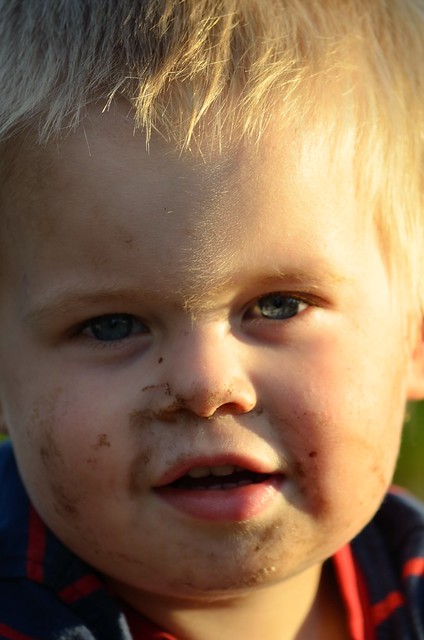

DSC_1239 by Vinny V 2591, on Flickr
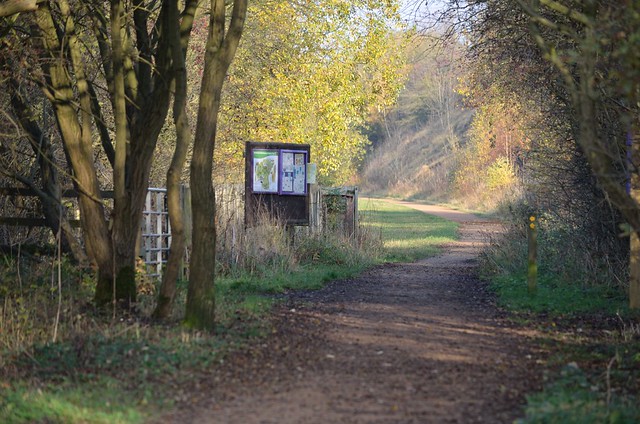

DSC_1567 by Vinny V 2591, on Flickr

Many thanks
V
 
In the first pic, the point of focus seems to be slightly behind the eye (look at the hair) You are shooting with a very small DOF, so you are very susceptible to technique issues (like moving forwards or backwards slightly as you take the shot

Does it do the same tripod mounted shooting a still subject?
 
I really can't see an issue with the sharpness Vinny. As Richard mentioned maybe the use of a tripod or perhaps a faster shutter speed may help. I have no idea how to see the EXIF data to see what settings have been used.

But, look ok to me.
 
Thankyou both for the prompt replies.

I have dug out the setting information for each pic and whilst doing so have probably realised that the error may be as Richard suggested. Narrow depth of field with a reasonably slow shutter speed.

Picture 1

Camera Info
Device: Nikon D5100
Lens: VR 55-300mm F/4.5-5.6G
Focal Length: 300mm
Focus Mode: AF-A
AF-Area Mode: Single
VR: ON
AF Fine Tune:
Aperture: F/7.1
Shutter Speed: 1/60s
Exposure Mode: Aperture Priority
Exposure Comp.: 0EV
Exposure Tuning:
Metering: Center-Weighted
ISO Sensitivity: Auto (ISO 250)


Picture 2

Camera Info
Device: Nikon D5100
Lens: VR 55-300mm F/4.5-5.6G
Focal Length: 300mm
Focus Mode: AF-A
AF-Area Mode: Single
VR: ON
AF Fine Tune:
Aperture: F/7.1
Shutter Speed: 1/125s
Exposure Mode: Aperture Priority
Exposure Comp.: 0EV
Exposure Tuning:
Metering: Center-Weighted
ISO Sensitivity: Auto (ISO 100)


Picture 3

Camera Info
Device: Nikon D5100
Lens: VR 55-300mm F/4.5-5.6G
Focal Length: 155mm
Focus Mode: AF-A
AF-Area Mode: Single
VR: ON
AF Fine Tune:
Aperture: F/5.6
Shutter Speed: 1/125s
Exposure Mode: Aperture Priority
Exposure Comp.: 0EV
Exposure Tuning:
Metering: Center-Weighted
ISO Sensitivity: Auto (ISO 100)

V
 
Might be worth switching to AF-C focussing rather than AF-A (AF-A lets the camera determine which focus mode to use). This will force the camera into continuous servo foucssing as long as you have the shutter half pressed. Use the centre focus point (it's the most accurate) and keep it over the subjects eye. If the your subject moves, AF-C mode should help maintain the focus.

I'd also say that your shutter speeds are quite low even using VR. If it didn't have VR you'd be looking for a min shutter speed of 1/500 ish at 300mm. I guess 1/250 should be fine with VR, 1/125 isn't too much trouble but 1/60 as in your last example is pushing your luck.

FWIW I think the first is a really nice image.
 
Agree with Graham regarding the shutter speed hand held as your focal length is at 300mm. It's also possible that at the full length of the zoom ie 300mm the sharpness isn't quite as good as at mid range.

As i mentioned before, it doesn't appear too "unsharp"
 
I'd say this:

Shot 1 - very hard to tell without a closer crop to show what's in focus. Looks like the focus has just been missed slightly, landing between the cheek and ear so the eyes aren't totally sharp. But that's just from looking at the small, screen-res image.

EDIT: going on flickr to view it, I can see camera shake from the low (1/60s) shutter speed that was used. This will give the appearance of it being out-of-focus.

Shot 2 - the hairs on the bridge of his nose are pin-sharp but I think at that close proximity where DoF is getting narrower, it could be that the eyes aren't totally sharp.

EDIT: Again, through flickr I can now see the bridge/forehead are sharp but because the DoF is so narrow, the eyes just fall behind he focus area so are soft. Get the eyes sharp and you have a totally transformed shot :)

Sgot 3 - looks fine on screen.

EDIT: Looking at the large version on flickr I think the light-green tree hanging down behind the sign is the focus point and is sharpest, and the sign and fence panel are just in front so are ever-so slightly soft. Nothing massive to worry about here unless you aim to print massive. :)
 
Last edited:
I feel that the general consensus is that my shutter speeds may need to be a little higher or use a tripod. Moving subjects consider AF-C.
The camera also has 3D tracking which I have tried but feel it isn't really up to speed or I am just to old fashioned.
My sincere thanks for all of the advice you have offered.
V
 
I feel that the general consensus is that my shutter speeds may need to be a little higher or use a tripod. Moving subjects consider AF-C.
The camera also has 3D tracking which I have tried but feel it isn't really up to speed or I am just to old fashioned.
My sincere thanks for all of the advice you have offered.
V

See how you get on with 3D but I've never found it particularly useful. I think it probably works ok with big contrasty objects, an aeroplane against a clear sky for example.

For fairly predictable movement like your children examples, single point should work well, just keep your centre point over the eye.
 
first i would take it of afa and set to af-c and center point focus,
I also noticed your shutter speeds are slow for 300mm( remember because of the crop factor 1.5x the min shutter speed of 450/sec should be used for 300mm) so taken that you have vr on the lens, at 1/60th sec that is borderline if the lens has 3 stop of vr, anything above that should be ok, just keep a good posture.
where these raw or jpeg.
and as said always aim for the eyes.
 
Last edited:
first i would take it of afa and set to af-c and center point focus,
I also noticed your shutter speeds are slow for 300mm( remember because of the crop factor 1.5x the min shutter speed of 450/sec should be used for 300mm) so taken that you have vr on the lens, at 1/60th sec that is borderline if the lens has 3 stop of vr, anything above that should be ok, just keep a good posture.
where these raw or jpeg.
and as said always aim for the eyes.

Thanks Scott.
If I use the AF-C setting the camera is always adjusting the focus based on the focus point selected.

If I then focus on the eyes and move the camera to recompose, the camera will adjust the focus taking the focus away from the eyes if that makes any sense??

Am I missing something ?? :bonk:

Forgot to add that they were taken in RAW

V
 
Last edited:
Hi Vinny, first off charming shots albeit slightly soft.

In reverse order, the last one just looks as though you could have done with a smaller aperture (larger f number) to get a bigger depth of field as the foreground, including the leading trees is out of focus. Even looking at the largest size on flickr, the noticeboard and beyond looks acceptably sharp to me.

As others have noted, the second one looks sharp on the bridge of the nose so I think you just need to make sure the focus is on the eyes and perhaps try to increase your dof again to make sure enough of the face is sharp.

The first one looks slightly soft throughout so I think you just missed focus slightly on that one. There may be a number of reasons why that is. First off (and again already noted) 1/60 is very slow for 300mm especially on an crop body. If you have VR this may help, but even so it seems very slow to me. Remember that VR can help counteract movement in the camera, but it can't help with any movement in your subject.

Secondly I'm not sure what the focus modes are called on Nikon but I personally wouldn't use the continuous focus mode for static subjects. On my Canon the continuous focus mode will try to refocus constantly and sometimes shifts about slightly even if I don't move the focus point. As you have noted it will also prevent you from being able to focus and recompose.

On the subject of focus and recompose, some people find it can be less than perfectly accurate sometimes. This link explains it better than I can. A lot of people don't seem to suffer any problems using the focus recompose technique, but I find I seem to get better sharpness selecting a focus point closer to where I want the subject to be and minimising my recomposing than I do if I always use my centre point. YMMV, but I mention it so you can try it out and see if it works better or worse for you!

Finally, you are shooting in RAW which is a good thing, but RAW files will always appear softer than a jpg - even when perfectly focused - so you will need to add some sharpening in post production (the jpg will appear sharper as the camera will add some sharpening for you).
 
Thanks Scott.
If I use the AF-C setting the camera is always adjusting the focus based on the focus point selected.

If I then focus on the eyes and move the camera to recompose, the camera will adjust the focus taking the focus away from the eyes if that makes any sense??

Am I missing something ?? :bonk:

Forgot to add that they were taken in RAW

V
Hi v, first thing try moving the focus points around you have 11 and try get one on the eye. also i recomend setting the back (ae-l/af-l)button for autofocus and use that instead of the shutter, its faster and easier and just keep the button in to keepfocusing and just keep in afc mode then.
If you focus on what you want take finger of the (ae-l/af-l) button focus will be locked and all the shutter does is take the photo, this is also better for moving objects (kids).
also i noticed that the iso were low, dont be affraid to use manual mode with auto iso on set from 100-3200, then you set you shutter speed for kids as fast as possible i start around 500th sec and you set you apature and let the camera worry about the iso.

also just noticed these were raw, what program are you using, raws do need a far bit of sharpening.
 
Last edited:
Gents,

Thankyou all for the advice and the link provided by Matt made for interesting reading.

I think I will try all of the techniques you have mentioned and when I am next off work which will be next Friday, I will head out for the day and just try them one at a time on probably static objects to begin with.

I will let you know how I got on and post some further pictures for your professional scrutiny.

Sincere thanks
V
 
It has been some time since my original post and I have now tried the techniques that have been so kindly suggested.

I conducted some practice shots using a tripod, increased the shutter speeds and tried using the different focus methods suggested................ The difference was nil, none, nothing !!!!!!............

I contacted Nikon and sent the lens back to them only to be advised that it was fine and to send in the body back with a sample of pictures.... I have now received an e mail to say that it was a fault with the main circuit board which has been replaced under the warranty and should be back with me in a few days.

Hopfully this will be the end if it and I can crack on and attempt some works of art.

I just wanted to say a huge thanks to all for their advice and I'll post pictures soon.

V
 
Just a quick one.. Did you turn VR OFF when on the tripod?
If not, you will suffer phantom shaking, where the VR is compensating for movemwnt that doesnt exsist and can actually make images soft.

Its good that Nikon have fixed a potential fault, but you may find without using the above advice, the images still might be slightly soft.
Also remember most lenses are their weakest at the extremes of focal length.

Try bringing the 55-300 back to 200 or 250. You may find it considerably sharper.
 
Hi Vinny, love the second shot, it reminds me of my son and he's 13. From what I can see it doesn't look too OOF to be honest. As others have said, increase your shutter speed and try again. You should be at least double your speed IMO. I can never keep my kids still for more than a millisecond so you've got to be quick with the little buggers. Honestly think the last shot is great too, so you're almost there.
 
TCR4x4 said:
Just a quick one.. Did you turn VR OFF when on the tripod?
If not, you will suffer phantom shaking, where the VR is compensating for movemwnt that doesnt exsist and can actually make images soft.

Its good that Nikon have fixed a potential fault, but you may find without using the above advice, the images still might be slightly soft.
Also remember most lenses are their weakest at the extremes of focal length.

Try bringing the 55-300 back to 200 or 250. You may find it considerably sharper.

As a matter of course I always leave the VR on and did not know about using the tripod with it.

That is an excellent piece of advice which I will follow from now on....... Thankyou

V
 
modchild said:
Hi Vinny, love the second shot, it reminds me of my son and he's 13. From what I can see it doesn't look too OOF to be honest. As others have said, increase your shutter speed and try again. You should be at least double your speed IMO. I can never keep my kids still for more than a millisecond so you've got to be quick with the little buggers. Honestly think the last shot is great too, so you're almost there.

Thankyou,
I truly appreciate the advice and am quite looking forward to getting the camera back to try again.

I'll post some more pics when I can get out and about and see if there is any difference.

V
 
Hi Vinny, as a complete amature and user of a different system, I have to say that the focus on your shots are very close to spot on and I hope that the repair of the camera transforms your thoughts on your photography. Good luck and hope to see some more of your work in the near future.
 
Back
Top