

You are using an out of date browser. It may not display this or other websites correctly.
You should upgrade or use an alternative browser.
You should upgrade or use an alternative browser.
"Panasonic G series" Owners Thread
- Thread starter hillwalkinggirl
- Start date

- Messages
- 1,635
- Name
- Malcolm
- Edit My Images
- Yes
Some more images from my recent trip to Africa.
Panasonic G9ll with Olympus 40-150mm f2.8 Pro lens.
 Ververt Monkey.jpg by Malcolm Fisher, on Flickr
 Girafffe.jpg by Malcolm Fisher, on Flickr
 Chobe sunset-2-2.jpg by Malcolm Fisher, on Flickr
Panasonic G9ll with Olympus 40-150mm f2.8 Pro lens.
Ververt Monkey.jpg by Malcolm Fisher, on FlickrGirafffe.jpg by Malcolm Fisher, on FlickrChobe sunset-2-2.jpg by Malcolm Fisher, on Flickr
Last edited:

- Messages
- 3,702
- Name
- Keith
- Edit My Images
- Yes
Thanks buddyHi Keith, l got mine from pergear.com and it took a few days to arrive. I did use a diffused ring flash to help fill shadows and soften the light. I must say l am impressed with the sharpness of the pergear 60mm f2.8.

- Messages
- 8,976
- Name
- Bazza
- Edit My Images
- No
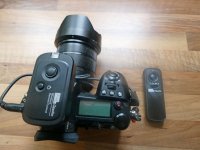
just a quick note. I managed to get a wireless remote shutter trigger from China for the panasonic G9 camera. It is the Pixel Oppillas/L1 for Panasonic. The camera requires a 2.5mm cable 3pole on one end and a 4 pole on the other. found on Amazon web site
Last edited:

- Messages
- 2,994
- Name
- Steve, Coventry, England
- Edit My Images
- Yes
I thought I had a 50mm lens, but it seems I gave it away 18 months ago, but whilst looking for it, I remembered I had a cheap (£15 at the time) C mount lens and M43 adapter on a G3 I converted to IR for the kids.
Put it on a G9 to try it, and quite pleased with it, I have some doubts that the f1.8 is genuine, and the corners are a bit soft until you get above F4, but it will certainly do what I wanted for no cost

Nothing great, but reasonable enough.
Put it on a G9 to try it, and quite pleased with it, I have some doubts that the f1.8 is genuine, and the corners are a bit soft until you get above F4, but it will certainly do what I wanted for no cost
Nothing great, but reasonable enough.
- Messages
- 3,702
- Name
- Keith
- Edit My Images
- Yes
Nice, and great result on finding the lens. I've never considered a M43 adapter to explore other lenses.I thought I had a 50mm lens, but it seems I gave it away 18 months ago, but whilst looking for it, I remembered I had a cheap (£15 at the time) C mount lens and M43 adapter on a G3 I converted to IR for the kids.
Put it on a G9 to try it, and quite pleased with it, I have some doubts that the f1.8 is genuine, and the corners are a bit soft until you get above F4, but it will certainly do what I wanted for no cost
View attachment 421064
Nothing great, but reasonable enough.

- Messages
- 1,473
- Name
- Alby
- Edit My Images
- No
Apple Blossom with the Panasonic G3 and TTartisans 25mm f2. Taken at Chawton House estate in Hampshire.
 Apple Blossom by Ajophotog, on Flickr
Apple Blossom by Ajophotog, on Flickr
- Messages
- 3,702
- Name
- Keith
- Edit My Images
- Yes
Panasonic G9 and 100-400mm lens
Usually I edit the RAWs but the last couple of outings I have edited the J Pegs, and I think I prefer it.
When I crop the RAWS I can't get as close as I can with the J Pegs, which allow a much heavier crop and they still look really good on the laptop. I guess if they were blown up to a larger size they would suffer after a really heavy crop, but I only produce photos for laptop use and I am loving the results with the Jpegs. The following image is a small square out of the middle of the image, the Robin was pretty small in the original. This is a massive crop, so much so that I didn't have to reduce the image as usual to get it on the forum.

Usually I edit the RAWs but the last couple of outings I have edited the J Pegs, and I think I prefer it.
When I crop the RAWS I can't get as close as I can with the J Pegs, which allow a much heavier crop and they still look really good on the laptop. I guess if they were blown up to a larger size they would suffer after a really heavy crop, but I only produce photos for laptop use and I am loving the results with the Jpegs. The following image is a small square out of the middle of the image, the Robin was pretty small in the original. This is a massive crop, so much so that I didn't have to reduce the image as usual to get it on the forum.
- Messages
- 2,994
- Name
- Steve, Coventry, England
- Edit My Images
- Yes
Panasonic G9 and 100-400mm lens
Usually I edit the RAWs but the last couple of outings I have edited the J Pegs, and I think I prefer it.
When I crop the RAWS I can't get as close as I can with the J Pegs, which allow a much heavier crop and they still look really good on the laptop. I guess if they were blown up to a larger size they would suffer after a really heavy crop, but I only produce photos for laptop use and I am loving the results with the Jpegs. The following image is a small square out of the middle of the image, the Robin was pretty small in the original. This is a massive crop, so much so that I didn't have to reduce the image as usual to get it on the forum.
View attachment 421085
I was reading the other day that many people use mainly JPEGs on the G9, and its processing is considered to be extremely good, making it very hard to do better processing RAWs, and I agree with you, it is good,
Affinity does a good job on any slight noise, without noticeably losing detail.
I still set it to record the RAWs to the second card, but I no longer keep them after I have checked I am happy with the JPEGs
I do have a custom setting where the sharpening and noise reduction on the JPEGs is turned right down, then I apply it in Affinity
- Messages
- 3,702
- Name
- Keith
- Edit My Images
- Yes
Interesting you say that, as the one thing with the JPegs is I find the sharpening applied is not quite as clean as I can do myself on a RAW, but it's pretty close. If it's not too complicated I would be grateful to know how you apply those settings.I was reading the other day that many people use mainly JPEGs on the G9, and its processing is considered to be extremely good, making it very hard to do better processing RAWs, and I agree with you, it is good,
Affinity does a good job on any slight noise, without noticeably losing detail.
I still set it to record the RAWs to the second card, but I no longer keep them after I have checked I am happy with the JPEGs
I do have a custom setting where the sharpening and noise reduction on the JPEGs is turned right down, then I apply it in Affinity
- Messages
- 2,994
- Name
- Steve, Coventry, England
- Edit My Images
- Yes
Do you mean how to turn it down on the camera, or how to apply it with Affinity?Interesting you say that, as the one thing with the JPegs is I find the sharpening applied is not quite as clean as I can do myself on a RAW, but it's pretty close. If it's not too complicated I would be grateful to know how you apply those settings.
- Messages
- 3,702
- Name
- Keith
- Edit My Images
- Yes
How to set the camera to leave the sharpen to you in edit buddy.Do you mean how to turn it down on the camera, or how to apply it with Affinity?
- Messages
- 2,994
- Name
- Steve, Coventry, England
- Edit My Images
- Yes
OK, Menu, REC (red camera icon top left), page one, Photo Style, select Standard ( can do the same with other styles), then down button (the ring under the menu button) then you can adjust Contrast, Sharpness, Noise Reduction and Saturation.How to set the camera to leave the sharpen to you in edit buddy.
I set Contrast and Saturation to 0, Sharpness and Noise reduction to -5 and Saturation to 0
I then set everything else to how I would normally use it and save all the settings one of the 5 Custom settings.
Then go back and change the Standard settings to what they were.
- Messages
- 3,702
- Name
- Keith
- Edit My Images
- Yes
Thanks mate, I'll have a play when I get the chance.OK, Menu, REC (red camera icon top left), page one, Photo Style, select Standard ( can do the same with other styles), then down button (the ring under the menu button) then you can adjust Contrast, Sharpness, Noise Reduction and Saturation.
I set Contrast and Saturation to 0, Sharpness and Noise reduction to -5 and Saturation to 0
I then set everything else to how I would normally use it and save all the settings one of the 5 Custom settings.
Then go back and change the Standard settings to what they were.

woof woof
I like a nice Chianti
- Messages
- 44,117
- Name
- Alan
- Edit My Images
- No
Mrs WW at a church event.
GX80, Panasonic 14mm f2.5 at f2.5, 1/160 and ISO 6,400.

I hope the sharpness survived the posting process.
100% from that.

There are times when MFT surprises me and today it did again and in a good way. I'm very happy with the ISO 6,400 picture after running Adobe denoise and this tiny lens on the GX80 makes this tiny lens and small camera package a joy to use.
GX80, Panasonic 14mm f2.5 at f2.5, 1/160 and ISO 6,400.
I hope the sharpness survived the posting process.
100% from that.
There are times when MFT surprises me and today it did again and in a good way. I'm very happy with the ISO 6,400 picture after running Adobe denoise and this tiny lens on the GX80 makes this tiny lens and small camera package a joy to use.
Last edited:
- Messages
- 8,976
- Name
- Bazza
- Edit My Images
- No
Nearly sliped up before I took the G9 out for a proper run through. I clean all my camera sensors and have done for a long time. Of course I have been using spade swabs for full frame cameras to now. Of course the spade swabs are too big for the G9 so just ordered some 12mm across the spade head .Just incase others do clean their own four thirds camera.I have also a loupe -round swabes -blower and Artic butterfly, so well equiped to do the job.
Nothing worse than sending a camera away for this simple job and be without it for "x" amount of time and hope they have donethe job properly
Nothing worse than sending a camera away for this simple job and be without it for "x" amount of time and hope they have donethe job properly
Last edited:
- Messages
- 8,976
- Name
- Bazza
- Edit My Images
- No
Well at last it has arrived.virtually impossible to get in the uk, or at least I have not found one other anywhere than from China
so what is so different you may ask and what is it for. first of all the panasonic G9 remote wireless shutter release is not that common . Not so much the transmitter/receiver but the link cable from receiver to the camera.
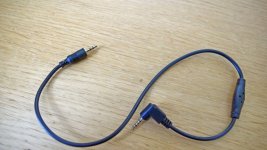
it needs a 2.5mm cable with a 3 pole on one end and a 4 pole on the other. The 4 pole end goes into the camera which is strange to say he least. So this is a spare one I ordered
so what is so different you may ask and what is it for. first of all the panasonic G9 remote wireless shutter release is not that common . Not so much the transmitter/receiver but the link cable from receiver to the camera.
it needs a 2.5mm cable with a 3 pole on one end and a 4 pole on the other. The 4 pole end goes into the camera which is strange to say he least. So this is a spare one I ordered
Last edited:
- Messages
- 2,994
- Name
- Steve, Coventry, England
- Edit My Images
- Yes
Well at last it has arrived.virtually impossible to get in the uk, or at least I have not found one other anywhere than from China
so what is so different you may ask and what is it for. first of all the panasonic G9 remote wireless shutter release is not that common . Not so much the transmitter/receiver but the link cable from receiver to the camera.
View attachment 421683
it needs a 2.5mm cable with a 3 pole on one end and a 4 pole on the other. The 4 pole end goes into the camera which is strange to say he least. So this is a spare one I ordered
It is actually common to the G3 upwards (I haven't checked on the G2 and G1, but probably them too)
I buy from aliexpress as it's cheaper, about £1.25 each.
You can buy the plugs here as well, but they are dogs to solder.
- Messages
- 3,702
- Name
- Keith
- Edit My Images
- Yes
Enjoying my close up work editing the JPegs at the moment.
This image is sharper and more vibrant on the laptop and the resizing takes some quality out of it.
Pana G80 + 12-60mm F4.5 1/250 ISO800

This image is sharper and more vibrant on the laptop and the resizing takes some quality out of it.
Pana G80 + 12-60mm F4.5 1/250 ISO800

- Messages
- 9,096
- Name
- David
- Edit My Images
- Yes
I'm a fan of auto ISO as manually selecting it is just another thing to do and in doing it you might miss the moment. I'm also a fan of having whatever the max is available as if you take a picture and the noise is too bad you can delete it but don't take the picture at all and, well, you've just got no picture.
I must admit, that's the logic I lean toward.
When out birding, wanting a high SS and a decent DoF, and you know results are good at say 3200 ISO, you're best to hold your ISO at 3200 to prevent your SS dropping or your f/ number dropping. If that makes sense.

- Messages
- 10,200
- Name
- Brian
- Edit My Images
- Yes
Its a fair point. What mode are you shooting in?When out birding, wanting a high SS and a decent DoF, and you know results are good at say 3200 ISO, you're best to hold your ISO at 3200 to prevent your SS dropping or your f/ number dropping. If that makes sense.
- Messages
- 9,096
- Name
- David
- Edit My Images
- Yes
Its a fair point. What mode are you shooting in?
Normally S mode, sometimes A mode, sometimes switching between the two, but yes semi automatic. There are many different situations, I don't know why I mentioned birding, I'm more likely to do street. Or even more challenging, down in a dingy tube station, people are moving unpredictably, main subject is up close but you also want background people in focus.

- Messages
- 576
- Name
- Andrew
- Edit My Images
- Yes
Hi all, just a quick question on batteries, I am only getting around 150 shots with my Panny G5 with the BLC-12E battery before it needs charging again, is this normal or is the battery not in good health?, I have no idea how old the battery is as it came with the camera second hand, Panasonic quote 310- 320 shots, so only getting around half the quoted shots lol. Not a massive problem, but it always seems to beep and turn off just at the wrong moment.
- Messages
- 576
- Name
- Andrew
- Edit My Images
- Yes
Any recomendations ? keep reading about non genuine batteries swelling in the camera and not coming back out lol, so a bit nervous having no experience.Non-genuine batteries are just over £20 for two.
Never counted the shots, but that does seem low.
- Messages
- 10,200
- Name
- Brian
- Edit My Images
- Yes
I tend to stick to trusted brands. Duracel in this case.Any recomendations ? keep reading about non genuine batteries swelling in the camera and not coming back out lol, so a bit nervous having no experience.
Do fine in my G80.
- Messages
- 9,096
- Name
- David
- Edit My Images
- Yes
I've got a couple of Lumix bodies: DSTE spares for one, Expro spares for the other. No Problems.
Camera manufacturers make some pretty wild claims regarding number of shots. In the real world 150 sounds about right.
I could ask, are you using manual or electronic shutter, I'm sure that makes a difference. And what else are you doing to flatten the battery, ie turning it On & Off? chimping ? What screen brightness level, etc.?
Camera manufacturers make some pretty wild claims regarding number of shots. In the real world 150 sounds about right.
I could ask, are you using manual or electronic shutter, I'm sure that makes a difference. And what else are you doing to flatten the battery, ie turning it On & Off? chimping
? What screen brightness level, etc.?
- Messages
- 10,200
- Name
- Brian
- Edit My Images
- Yes
I've always wondered. When I'm going for a walk I have the camera off, only switching it on when I see a shot I fancy. I have screen/viewfinder on auto, and a short time out. Am I using more battery than just leaving it on?I've got a couple of Lumix bodies: DSTE spares for one, Expro spares for the other. No Problems.
Camera manufacturers make some pretty wild claims regarding number of shots. In the real world 150 sounds about right.
I could ask, are you using manual or electronic shutter, I'm sure that makes a difference. And what else are you doing to flatten the battery, ie turning it On & Off? chimping

- Messages
- 9,096
- Name
- David
- Edit My Images
- Yes
Who knows! Maybe nothing in it, but there must be lots little things, ibis, beeping sounds, processing engine, AF, it must add up.I've always wondered. When I'm going for a walk I have the camera off, only switching it on when I see a shot I fancy. I have screen/viewfinder on auto, and a short time out. Am I using more battery than just leaving it on?

- Messages
- 314
- Name
- Ian
- Edit My Images
- Yes
Sparrowhawk on the shed roof in the garden
G9 + 100-400mm lens
 Sparrowhawk (1) by Ian Wilkinson, on Flickr
 Sparrowhawk (2) by Ian Wilkinson, on Flickr
 Sparrowhawk (3) by Ian Wilkinson, on Flickr
G9 + 100-400mm lens
Sparrowhawk (1) by Ian Wilkinson, on FlickrSparrowhawk (2) by Ian Wilkinson, on FlickrSparrowhawk (3) by Ian Wilkinson, on Flickr- Messages
- 1,151
- Name
- James
- Edit My Images
- Yes
Wow great shots, thanks for sharingSparrowhawk on the shed roof in the garden
G9 + 100-400mm lens
woof woof
I like a nice Chianti
- Messages
- 44,117
- Name
- Alan
- Edit My Images
- No
I've not had a problem with the 100-400mm on my GX80 or GX9 and certainly no damage to the lens mounts. The only issue I can report is that the zoom function is stiff and I gather this is a common thing. I don't know if they're all stiff but it does seem to be a very common report.
- Messages
- 314
- Name
- Ian
- Edit My Images
- Yes
I previously had the 100-300mm but traded it in for a used !00-400mm in excellent condition as I wanted a bit more reach. Absolutely no problems on my G9 and the zoom function is fine. I'm very happy with the results I am getting. I also have a GX80 but I've not tried the 100-400mm on that yet.
- Messages
- 3,702
- Name
- Keith
- Edit My Images
- Yes
My Panasonic G9 is stuck in silent mode, it is greyed out on the menu and when I try to open it it says “cannot change in this menu” or words similar.
I don't know if I have changed something else that needs putting back first to open the option back up? I have gone all the way through all the menus and I can't think of a way to get out of silent mode, any advice gratefully received.
WHOOOOPS - update, button on front of camera that switches to silent mode. Completely forgot that was there and must have caught it accidentally.

I don't know if I have changed something else that needs putting back first to open the option back up? I have gone all the way through all the menus and I can't think of a way to get out of silent mode, any advice gratefully received.
WHOOOOPS - update, button on front of camera that switches to silent mode. Completely forgot that was there and must have caught it accidentally.
Last edited:
- Messages
- 8,976
- Name
- Bazza
- Edit My Images
- No
Just about to say that but you beat me to it. Couple of things I have added to he G(9and that is the kit lens the 12-60 mm leica lens and the !00-300 Lumix lens Yesaterday wrist strap arrived
I debated for a long time if to get the Peak design cuff or the peak design clutch as I already have the next strap for the G9 and another for my Nikon cameras. then I noticed a paracord version on Amazon as below
so I bought it and it is so comforable but still using the PK quick release buttons . This I attached to the bottom of the camera so it didn't get in the way of the camera buttons and well clear of the battery lid. this still left me clear to use the camera straps as normal. the little hex key I now keep on my key ring
thse PK cords are tested for up to 8000 lb weight so no fear of them breaking
at least now shoujld my grip loosen eithout a neck strap the camera should be safer
I debated for a long time if to get the Peak design cuff or the peak design clutch as I already have the next strap for the G9 and another for my Nikon cameras. then I noticed a paracord version on Amazon as below
SUNYA Camera Wrist Strap for Photogr... Sold by SUNYA SPORTS (EU) £11.89 |
thse PK cords are tested for up to 8000 lb weight so no fear of them breaking
at least now shoujld my grip loosen eithout a neck strap the camera should be safer
Last edited:

- Messages
- 1,737
- Name
- Roger
- Edit My Images
- Yes
Glad you found it Keith, i had the same thing so i know how you felt.My Panasonic G9 is stuck in silent mode, it is greyed out on the menu and when I try to open it it says “cannot change in this menu” or words similar.
I don't know if I have changed something else that needs putting back first to open the option back up? I have gone all the way through all the menus and I can't think of a way to get out of silent mode, any advice gratefully received.
WHOOOOPS - update, button on front of camera that switches to silent mode. Completely forgot that was there and must have caught it accidentally.
- Messages
- 3,702
- Name
- Keith
- Edit My Images
- Yes
It's a big relief to find the issue and know your camera hasn't developed a fault.Glad you found it Keith, i had the same thing so i know how you felt.