The Capture One Users Thread

Messages
4,786
Name
Graham
Edit My Images
No
After discussion with @lindsay here is a dedicated thread for Capture One (C1) users.

It may seem odd timing, given my last post here was about a new forum dedicated to C1. However, not everyone will want to join yet another forum, and not every C1 user is going to be enthused enough with C1 to get involved in a forum that just discusses C1.

I've been meaning to do this for some time, as there seems to be enough interest and enough posts for it to be helpful to have them in a single thread. And here it is.

Hopefully, people will find it useful.

Finding this thread when you want to post to it. Apologies if everyone already knows this :-(

An issue with dedicated threads is finding them when you want to add something, and there is a bookmarking tool available to help with this.

If you look at the icons at the top right of this post, you will see a "bookmark" icon.

Clicking on this icon will add a link to the post you are looking at, into your personal bookmarks list.

Once saved, accessing this list is through clicking on your username and avatar to the right of the menu bar.

Clicking reveals two options: one to access your account and the other to access a list of your saved bookmarks.

And to state the obvious, clicking on the bookmark name will take you to the post you were on when you saved the bookmark.

As far as I can see there is no way to jumping to the most recent post in the thread, but at once you are in the thread, you can quickly jump to the most recent post by using the posting numbers at the bottom of the screen.
 
16.8. Release new features video. (just over 1 hour)

The official C1 video introducing the enhanced (AI) denoising, the AI culling tool assistant, and improved wireless tethering with Canon cameras.

The AI culling assistant only works on human eyes, and checks for focus and whether or not they are open. Although it's in a public release, it's still in beta and C1 are asking for feedback.

The improved Canon tethering only works with two Canon camera models and appears to result from a collaboration between Canon and C1, with Canon making firmware/hardware tweeks and C1 making tweeks to their tethering tools. They don't know whether it will come to other Canon models (that's up to Canon) but they (C1) are trying to encourage other camera manufacturers to work with them on improving tethering.

The denoising (beta) was discussed here:


Despite the denoising being the thing I am most excited about, C1 are even more excited about the AI culling assistant and the improved tethering, both of which take up most of the video.

The video is here:

View: https://www.youtube.com/watch?v=R2c1KD6CdQI&t=3761s
 
Using the Skin Tool for landscapes
Several videos around on this, but this is recent and also uses the newish AI masking tools with the skin tool.

The misnamed skin tool gives a very subtle colour grading tool for landscapes (for all colours), even if it's meant for evening out blotchy skins.

View: https://www.youtube.com/watch?v=l0YZToUo_7A
 
Adding Borders

I must have upvoted a request to add a borders feature to C1 and received this today (but I can't remember doing it)

Capture One Product Manager responded to idea Add a function / tool to create borders


Capture One Product Manager
Hi Jayne, while not a dedicated Borders tool, the Contact Sheets tool introduced last year is a great tool to generate images with borders in a batch.
You can simply create a contact sheet with 1 column and 1 line (this will create one page per image), select the size and the color of your border, and export.
 
After discussion with @lindsay here is a dedicated thread for Capture One (C1) users.

It may seem odd timing, given my last post here was about a new forum dedicated to C1. However, not everyone will want to join yet another forum, and not every C1 user is going to be enthused enough with C1 to get involved in a forum that just discusses C1.
I think this is a good idea, although I'd expect it to be low traffic. I have signed up for the separate C1 forum, but I suspect I'll never remember to look there when I need it!

The bookmark also looks like a good idea, we'll have to see how well it works out. Thanks Graham
 
Capture One: the mother of Lightroom.

This has cropped up in another thread, but might be of interest to C1 users.

Michael Jonsson (the original architect of Phase One Capture One) left C1 after some sort of internal disagreement about the direction of C1 to develop and market a program called Raw Shooter, which was then bought by Adobe and laid some of the foundation of the LR we see today.

There is an interesting article here on the program, and how it influenced the development of LR. Users (like me) of Raw Shooter Premium received free licenses to LR when Raw Shooter was discontinued.

 
I think this is a good idea, although I'd expect it to be low traffic. I have signed up for the separate C1 forum, but I suspect I'll never remember to look there when I need it!

The bookmark also looks like a good idea, we'll have to see how well it works out. Thanks Graham
I know what you mean. I'm also on a micro four thirds forum and I just forget it's there. It also doesn't have a very memorable name.... I have to go to my bookmarks to remind myself. I couldn't tell you what it was even now :ROFLMAO:
 
Capture One vs DarkTable

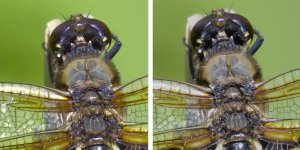
Lots of things are wrong with this as a comparison; it's really me testing my newish nikon 28-400 as an everyday carry for opportunistic wildlife photography- mainly to help ID insects.

It's an ISO 1600 file, processed in DT and C1 using DTs standard denoising and C1s AI denoising. DT also has AI denoising, but I haven't tried it yet.

Exported as a TIF from DT and opened alongside the NEF in C1. The image below is a screenshot of the two-up display in C1.


I thought the comparative the sharpness and noise were interesting. I'm not sure how well these will show up, but the DT results are pretty impressive. DT is a complex to use, and I'm sure I haven't got the best out of DT, which has a reputation of handling highlights extremely well, but I've blown the highlights in the DT version :-(

I should also have exported the C1 file as a TIF. But I felt I had spent enough time on it. I also made a comparison with DXO PhotoLab but didn't like the results from it as much as those from either DT or C1.

But I still thought, these might be of interest for anyone contemplating having a look at DT. Especially as C1s CEO has just intimated that price increases for C1 are now going to be an annual event :-(

DT is on the left and C1 on the right

2026-07-13 DT vs C1 v2.jpg
 
I am _still_ thinking about my proposed trial of the latest C1Pro, to see if there's an advantage in the "new" negative conversion capabilities. (Elsewhere, @myotis , you mentioned taking months to make decisions. That's me, too, complicated by only having a week's trial, so I need a week clear enough for me to focus on this task.)

An issue is that I don't want massive Vuescan Raw files cluttering up my hard drive, so I've been envisaging a two stage process. First, scan the negatives and create Raw files. Second, process these in C1Pro and create JPEGs (or maybe TIFFs for a few of the better images... in general, I'm happy with JPEGs for most of my usage). Third, import these JPEGs into my C1Pro catalogue (as if they'd just come out of Vuescan). Fourth, move the Raw files offline.

I guess I could scan the Raws directly to a USB drive, and import them into a special catalogue there for conversion, then export back to my main hard drive.

Either way, I was wondering if this temporary Raw processing stage would be a good case for a Session rather than a catalogue?
 
I am _still_ thinking about my proposed trial of the latest C1Pro, to see if there's an advantage in the "new" negative conversion capabilities. (Elsewhere, @myotis , you mentioned taking months to make decisions. That's me, too, complicated by only having a week's trial, so I need a week clear enough for me to focus on this task.)

An issue is that I don't want massive Vuescan Raw files cluttering up my hard drive, so I've been envisaging a two stage process. First, scan the negatives and create Raw files. Second, process these in C1Pro and create JPEGs (or maybe TIFFs for a few of the better images... in general, I'm happy with JPEGs for most of my usage). Third, import these JPEGs into my C1Pro catalogue (as if they'd just come out of Vuescan). Fourth, move the Raw files offline.

I guess I could scan the Raws directly to a USB drive, and import them into a special catalogue there for conversion, then export back to my main hard drive.

Either way, I was wondering if this temporary Raw processing stage would be a good case for a Session rather than a catalogue?
Ah, in my case, if I was going to scan film, I would scan it with a camera directly into a C1 session.

Failing that, I think I would scan the files with Vuescan into Tiffs or DNGs and save these Tiffs or DNGs to an external drive.

I would catalogue these TIFFS/DNGs with C1 and just leave the files on the external drive: working with them in C1 just as I do with my camera raws.
 
Ah, in my case, if I was going to scan film, I would scan it with a camera directly into a C1 session.

Failing that, I think I would scan the files with Vuescan into Tiffs or DNGs and save these Tiffs or DNGs to an external drive.

I would catalogue these TIFFS/DNGs with C1 and just leave the files on the external drive: working with them in C1 just as I do with my camera raws.
The camera scan thing won't work for me, I have none of the essential bits (like appropriate camera, lens etc etc)!

So if I use the second suggestion, I'm interested in what I can do when the external drive is not connected. Preview image size is 2048 px; would I be able to export a 1024 image without attaching the external drive (after having done some basic PP)?
 
The camera scan thing won't work for me, I have none of the essential bits (like appropriate camera, lens etc etc)!

So if I use the second suggestion, I'm interested in what I can do when the external drive is not connected. Preview image size is 2048 px; would I be able to export a 1024 image without attaching the external drive (after having done some basic PP)?


Actually I see this doesn't seem to take you to the normal export dialogue, and it just gives a quick proof at the preview size, so it doesn't answer your question.

If you have your raw files on an SSD external drive, you could keep the raws and the catalogue on the same external drive. Unless it's keeping an external drive, connected that is the problem. All my files are on external drives, and always connected.
 
Last edited:
Thank you for starting this topic, I have played around with quite a few post processing options, but always return to capture one. It is not geared towards me in the slightest, I am not a professional, do not do portrait or studio work, and have a micro four thirds set up, it doesn’t even support the newer OM lenses(!), and it is stupidly expensive, but I love the way it deals with ORF files, and I feel at home with the programme, definitely a case of ‘heart over head’.

I did look at dark table, but it felt a bit too complex for me, thank you for flagging it up though. Andy Hutchinson on YouTube has done some recent reviews of the program.
 
Thank you for starting this topic, I have played around with quite a few post processing options, but always return to capture one. It is not geared towards me in the slightest, I am not a professional, do not do portrait or studio work, and have a micro four thirds set up, it doesn’t even support the newer OM lenses(!), and it is stupidly expensive, but I love the way it deals with ORF files, and I feel at home with the programme, definitely a case of ‘heart over head’.

I did look at dark table, but it felt a bit too complex for me, thank you for flagging it up though. Andy Hutchinson on YouTube has done some recent reviews of the program.
I have often tried to move away from Capture One, because of the cost, but have failed at every attempt.

Are you sure C1 doesn't support your OM lenses? With few exceptions, modern lenses with modern cameras embed the lens correction profile information into the exif of the raw, which is then read by the raw processing software.

And although traditionally, raw processors have needed to develop their own custom profiles, but, this is being done less and less with modern cameras and lenses.

C1 say that they now only produce custom profiles if they feel they can improve on the profiles provided by the lens manufacturer. In C1 with the lenses of concern, is it saying that C1 is using a "generic" or "manufacturer'" profile?

The manufacturers' profiles are more sophisticated the software makers' profiles in that they use a matrix of values that correct for aperture and focussing distances, but they don't don't correct for edge sharpness fall off, which the C1 custom profiles correct for; but only for a single focussing distance.

While C1 has its origins in professional studio and commercial photography, and has recently been adding some specialist tools for portrait/fashion/studio/event.e-commerce photographers, what do you feel is missing in C1 that means it isn't geared towards your kind of photography?
 
Back
Top