Interesting blog about the iPad

Yes, I move my finger a cm or two left then right instead of 10-15 cm in thin air... It could be argued it takes less effort and easier to use a track pad.

As for zooming, thats what the scroll lines are for at the sides of the track pad, easy... As for pinch to zoom I've never been very happy about it, it's counter intuative to me, luckily HTC phones allow both pinch to zoom and tapping.

This is coming from someone who actually wants a slate/touch screen device, they won't be easier, just different.

well we'll have to agree to disagree here because I think you are wrong! ;)

but that's just my OPINION! :thumbs::thumbs:
 
Not that I'm aware of, but I don't need that.
 
Well I agree with you about everything apart from where people envision where the blame lays. I really think the perception is that apple is not at fault for any crashing, I even think it myself.

Anyway back to the topic of the iPad, I wonder if there is potential for it to become a graphics tablet. I don't know how the wacom pen and touch tablet works but if an app is developed that differentiates between the surface area of the contact then I see no reason why a pen and touch enabled app couldn't be mad for the ipad that could enable it to work in such a way with the added benefit of the screen in font of you kind of like my Sympodium tablet I use. The connection could be through the pin to stop any video latency over a wireless network. would be interesting

No chance unfortunately, capacitive screens have a major weakness, accuracy. Even with a stylus it won't be any where near accurate enough. The Wacom tablets use a combination of capacitive/resistive screen tech (resistive being FAR more accurate) so you won't be able to get very accurate with it. Capacitive screens (AFAIK) also don't understand pressure.

This is why a good resistive screen (and there are some rubbish ones out there) is by far the better screen for me.:p
 
No chance unfortunately, capacitive screens have a major weakness, accuracy. Even with a stylus it won't be any where near accurate enough. The Wacom tablets use a combination of capacitive/resistive screen tech (resistive being FAR more accurate) so you won't be able to get very accurate with it. Capacitive screens (AFAIK) also don't understand pressure.

This is why a good resistive screen (and there are some rubbish ones out there) is by far the better screen for me.:p

ok, but the screen I use on my tablet is just a lcd screen and it works ok, probably not as good or accurate as a wacom one but it does the job because i can see what I am looking at instead of looking somwhere else
 
yeah well individual flash can be the issue not just the flash plugin. I code in flash and inefficient code that causes infinite loops etc will crash the plugin, thats not the plugins fault thats my fault for the inefficient code

Does safari not do what IE8 does? When one tab crashes it just resets the tab without affecting the actual browser or rest of the tabs

VNC duplicates the display yes and then I can control it - but thats what I would want for using it as a tablet right? I want to see the image on my iPad the same as I can on my monitor and adjust it accordingly?

why would I want to extend my screen onto the pad?

What would be brilliant is if you had the choice of just displaying the image on the touch device and the controls and random rest of the stuff on the main monitor? That way you can do all the touch use on the screen without having extra bumf all round.

This is also something I would love in a slate/tablet.
 
What would be brilliant is if you had the choice of just displaying the image on the touch device and the controls and random rest of the stuff on the main monitor?
I coulda sworn I said that already :P

Indeed it would be awesome. :D
 
ok, but the screen I use on my tablet is just a lcd screen and it works ok, probably not as good or accurate as a wacom one but it does the job because i can see what I am looking at instead of looking somwhere else

That may be a resistive screen? Not sure about those type of screens as they may have sensors round the screen (I assume there is a lip around the monitor?).

Anyway I would love to try it myself which is why I am so much more interested in a full touch computer. :)
 
That may be a resistive screen? Not sure about those type of screens as they may have sensors round the screen (I assume there is a lip around the monitor?).

Anyway I would love to try it myself which is why I am so much more interested in a full touch computer. :)

it's not touch sensitive though, just penenabled, it uses Electromagentic resonance technology, whatever that is
 
Why when you're editing the same image?

because otherwise I either have to move from one screen to the next to choose my tool or i have to drag the toolbar from one screen to the other to change tools.

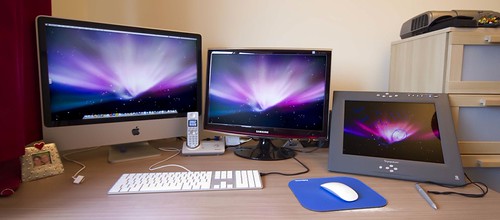
My setup is like this:

4155344350_f92a3e63e4.jpg


my tablet is screen 3, so i'd love a toolbar on both screens so i can changes on both the left and the right without moving to change tool. If I am working on the Tablet I have to drag the toolbar over to it and then when I want to work with the mouse on the 24inch screen I have to drag it back. Otherwise when I'm using the pen on the tablet if I leave the toolbar on the main screen I have to put the pen down get the mouse and move it over. Obviously I can use keyboard shortcuts but I can only do so much with them, I want to change layers and all that good stuff with the pen and the mouse on both screens

make sense?
 
Hotkeys ftw :)
 
Hotkeys ftw :)

I don't do enough in PS to have a hotkey for every change of brush, transparency, adding masks, changing brush size and all that and remember it all. For me a 2nd toolbar would be ideal
 
because otherwise I either have to move from one screen to the next to choose my tool or i have to drag the toolbar from one screen to the other to change tools.

My setup is like this:

4155344350_f92a3e63e4.jpg


my tablet is screen 3, so i'd love a toolbar on both screens so i can changes on both the left and the right without moving to change tool. If I am working on the Tablet I have to drag the toolbar over to it and then when I want to work with the mouse on the 24inch screen I have to drag it back. Otherwise when I'm using the pen on the tablet if I leave the toolbar on the main screen I have to put the pen down get the mouse and move it over. Obviously I can use keyboard shortcuts but I can only do so much with them, I want to change layers and all that good stuff with the pen and the mouse on both screens

make sense?

lol. Ok, I see why you need that now. I thought you were just using the one screen.
 
I don't do enough in PS to have a hotkey for every change of brush, transparency, adding masks, changing brush size and all that and remember it all.
You just need one of these ;)

Me, I'm a lefty. So I use my pen with my left hand, and the mouse with my right. Doesn't bother me not having the tools on the same screen.
 
Back
Top