Talking about ai...
I use ai extensively in technical matters for work. I also use it as a tool for learning.
As an experiment, I just threw a photo a random file I downloaded based on when I was investigating the Canon R5ii into ChatGPT, with a prompt:
"Can you access the EXIF data on this photo. Can you make some suggestions on how to create a better balance to make it appear more natural, and what settings I could have used instead ?"
This is the sort of stuff it can return to you, and help you learn. Quite amazing really.
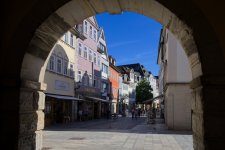
The photo... I do not know where I got it from now, so unfortunately cannot credit the photographer. :-(
View attachment 491510
--
Yes — I can access the EXIF data that is still embedded in this JPEG. There is an important catch, though:
the camera exposure settings have been stripped from the file, almost certainly because the image has been processed/exported through ACDSee.
EXIF I can recover
| EXIF field | Value |
|---|
| Camera | Canon EOS R5 Mark II |
| Date/time | 8 August 2026, 14:21:51 |
| Orientation | Normal |
| Software | ACDSee Ultimate 2026 |
| Artist | Dongning LI |
| Resolution | 2172 × 1448 |
| X/Y resolution | 240 dpi |
| GPS | GPS block exists, but the actual coordinates aren't exposed by the JPEG metadata I'm seeing |
| Shutter speed |  Not present Not present |
| Aperture | Not present |
| ISO | Not present |
| Focal length | Not present |
| Metering mode | Not present |
| Exposure compensation | Not present |
So unfortunately I can't tell you
exactly what you shot at.
But the photograph itself tells us quite a lot.
What's happening with the exposure
1
The
composition is actually very good. The arch is being used as a natural frame, and the bright blue sky and colourful buildings make the centre of the image attractive.
The problem is
tonal balance.
The arch occupies a huge proportion of the frame, and roughly
31% of the image's pixels are below a luminance of 20/255. That's extremely dark. Meanwhile, almost nothing is actually clipped in the highlights.
That tells me something quite useful:
You didn't really have a highlight-clipping problem. You had an underexposed-shadow problem.
The camera was faced with a classic high-dynamic-range situation:
If the camera metered predominantly for the bright street/sky, the arch naturally went almost black.
Why it feels slightly unnatural
Your eye would perceive the scene approximately like this:
- Arch: dark, but you would still see its texture and stone detail
- Buildings: bright
- Sky: deep blue
- Shadows under the buildings: relatively open
The photograph instead has:
- Arch: almost black
- Buildings: bright
- Sky: very saturated/deep blue
- Street: reasonably exposed
So the arch becomes a
black vignette rather than something that feels like an object in the same lighting environment.
It's actually quite a common "looks great on the camera LCD" problem.
What I would do in post-processing
I wouldn't simply raise the overall exposure.
That would make the buildings and sky too bright.
Instead, I'd make this a
local tonal correction.
My starting point in Lightroom / ACR
I'd try approximately:
Global
- Exposure: +0.1 to +0.25
- Contrast: -5
- Highlights: -10
- Shadows: +20 to +35
- Whites: -5
- Blacks: +5 to +10
Then create a mask for the arch:
Arch mask
- Exposure: +0.3 to +0.5
- Shadows: +35 to +55
- Blacks: +10 to +20
- Texture: +5 to +10
The important bit is that I
wouldn't lift the entire image. I'd open the arch selectively.
I'd also reduce the blue slightly
The sky is very strongly saturated.
I'd try:
- Blue saturation: -5 to -10
- Blue luminance: +5
Possibly also reduce overall saturation very slightly, around
-3.
Not because the blue is technically wrong — it's beautiful — but because the combination of
very dark arch + extremely blue sky makes the photograph look more processed than it needs to.
But here's the really interesting part: what I would have done in-camera
With an R5 Mark II, I would have approached this differently.
You had three good options.
1. My preferred option: expose for the highlights + lift shadows
I would probably have used:
Evaluative metering + about +1/3 EV exposure compensation
and then relied on the R5 II's excellent dynamic range to recover the arch in RAW.
Something approximately like:
ISO 100
f/8
1/250–1/500 sec
+1/3 EV
Obviously the shutter speed depends on the actual light and lens.
The critical point isn't those exact numbers.
It's:
Your histogram suggests there was considerable room before highlight clipping. So I suspect you could have given the whole image a little more exposure.
2. Even better: bracket the exposure
For this particular composition,
I'd probably bracket.
For example:
-2 EV / 0 EV / +2 EV
or, if the dynamic range wasn't quite that extreme:
-1.5 / 0 / +1.5 EV
Then either:
- choose the best single RAW, or
- blend the exposures.
The latter would give you:
bright exterior + detailed arch
without needing to push the shadows aggressively.
And because essentially nothing in the scene is moving significantly, this is an excellent candidate for HDR/bracketing.
3. The "photographer's trick": deliberately expose the arch
There's another possibility.
If the arch is an important compositional element rather than simply foreground shadow, I'd actually consider
metering the arch.
You could expose so that the stonework remains clearly visible and let the sky become somewhat brighter.
Then recover the sky in RAW.
That would change the photograph from:
to:
I think the second is more sophisticated.
And there is another clue in your file
The JPEG has been processed by:
ACDSee Ultimate 2026
That makes me suspect the image you're showing me isn't the original camera JPEG.
If you still have the
original CR3 RAW, that's what I'd really like to work with.
The difference could be substantial.
The R5 Mark II gives you considerably more information in the RAW file than this 2172×1448 JPEG contains. If this JPEG has already been processed, the very dark arch may actually contain recoverable information that has simply been compressed away in the export.
My overall verdict
Composition: 8.5/10
Colour: 8/10
Exposure balance: 6/10
Potential after correction: 9/10
I
wouldn't radically change this photograph. The composition is strong. I'd just make the arch about
one stop visually lighter, slightly reduce the intensity of the blue, and soften the overall contrast.
The key lesson for the original capture is:
And because this is an
R5 Mark II, I'd be particularly inclined to use the camera's dynamic range rather than accepting that almost-black foreground.
If you have the
original CR3, upload that. I can inspect the actual capture metadata and tell you
exactly what ISO/aperture/shutter speed/focal length you used, and then we can work out what I'd change for the same shot.
Damn! :-o