Black spots on Scans

Messages
3,277
Name
Wayne
Edit My Images
No
Almost unbelievable but true, last night I was congratulating myself on the detail in my recent photographs and starting to think that I was really getting somewhere !

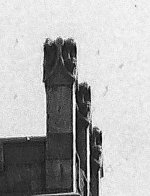
I thought I saw a flock of birds around a clocktower when to my absolute horror they, at first sight, appeared to be another kind of fault in my pathetic process.


Clock tower

Darwen Market.jpg


Detail of chimneys at top right of clocktower

Clock tower detail.jpg


Black marks


Clock tower black marks.jpg
 
Well that needs sorting out, have you enlarged previous negs to see if there is a pattern for how you develope? Hmm I haven't dev negs for about 20 years and hope I don't have any problems restarting using B/W and home dev for my night shots.
 
Well that needs sorting out, have you enlarged previous negs to see if there is a pattern for how you develope? Hmm I haven't dev negs for about 20 years and hope I don't have any problems restarting using B/W and home dev for my night shots.
Its the first time I have noticed them Brian, its all going wrong at once, one thing after a flipping other.

I am going the get the looupe out at the weekend (bank holiday) and have a couple of happy hours checking over some of my negs in detail.
 
Well Wayne I sure an expert will probably have an answer as I haven't a clue to what went wrong..all I know is to be consistent when dev negs h'mm well that is if you get it right in the first place ;)
 
Dust would seem to be the most likely problem.

Just came across this guide to "things that can go wrong with scanned film"

 
Taking this example with your last one, my guess without sering the negatives is that you're collecting dust and dirt on an industrial scale while your film is drying. My suggestion if you can't clean things up is this

 
Possibly contamination on the film, maybe from degraded light seal foam or some sort of particulates in the developer? If they're dark on the scan then they will be light / transparent on the actual negative.
Agreed, black spots on the positive image is going to be dust or fibres on the film when exposed or physical damage to the emulsion, I really don't think it is a film drying problem unlike the white spots earlier.
 
Back
Top