
You are using an out of date browser. It may not display this or other websites correctly.
You should upgrade or use an alternative browser.
You should upgrade or use an alternative browser.
catclick's 52 week challenge 2021 - Done & Dusted
- Thread starter catclick
- Start date


OP

- Messages
- 458
- Name
- Catherine
- Edit My Images
- Yes
Loving the patterns shot... works really well.
Close up is lovely... an ahh shot!
Who doesn't like puffins?
Nice pair Kat
Thanks. I think puffins are so cute!
OP
- Messages
- 458
- Name
- Catherine
- Edit My Images
- Yes
Fab puffins! I’m hoping to get to Bempton Cliffs soon!
Nice close up image, lovely colours
I love puffins! So quirky and special to see them.


OP
- Messages
- 458
- Name
- Catherine
- Edit My Images
- Yes
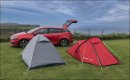
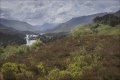
Thank you! Glen Affric is one of my favourite places. so many shades of green. There was still a little snow left on the mountain. Just had a fabulous road trip taking in many stunning places. Thankfully not camping at Glen Affric - midge nightmare!The red really works in your Personal Space.
Beautiful vista for Green. Great sky too - is that snow on the top of those peaks? The composition is lovely with the trees at the riverside providing a focal point.
I actually desaturated the tent pic, it was so bright. Just a phone shot. Campsite with a stunning view at Dunnet Head.
Last edited:

- Messages
- 7,331
- Edit My Images
- No
It does look a beautiful place. I'm heading to the Hebrides soon - really hoping it's not too bad with the midges! I had wondered if you'd changed the reds as the tent and car look similar. I find reds can be bit tricky sometimes.Thank you! Glen Affric is one of my favourite places. so many shades of green. There was still a little snow left on the mountain. Just had a fabulous road trip taking in many stunning places. Thankfully not camping at Glen Affric - midge nightmare!
I actually desaturated the tent pic, it was so bright. Just a phone shot. Campsite with a stunning view at Dunnet Head.
OP
- Messages
- 458
- Name
- Catherine
- Edit My Images
- Yes
Hoping to get to the Outer Hebrides next year - 3rd time lucky (grrrr COVID). It truly is stunning and so many photo opportunities! They look silly, but get a midge net and pray for winds over 5mph, keeps them away.It does look a beautiful place. I'm heading to the Hebrides soon - really hoping it's not too bad with the midges! I had wondered if you'd changed the reds as the tent and car look similar. I find reds can be bit tricky sometimes.

Scots_quine
In memoriam
- Messages
- 1,753
- Name
- Joan
- Edit My Images
- Yes
I loved the outer Hebrides - that was back in my pre-photography days. But the scenery is stunning.
OP
- Messages
- 458
- Name
- Catherine
- Edit My Images
- Yes
You just need to go back with your camera this time Joan.I loved the outer Hebrides - that was back in my pre-photography days. But the scenery is stunning.



OP
- Messages
- 458
- Name
- Catherine
- Edit My Images
- Yes
Yes. At 11pm, beginning June.Rattray Head Lighthead?.


Scots_quine
In memoriam
- Messages
- 1,753
- Name
- Joan
- Edit My Images
- Yes
D
Deleted member 68495
Guest
OP
- Messages
- 458
- Name
- Catherine
- Edit My Images
- Yes
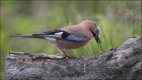
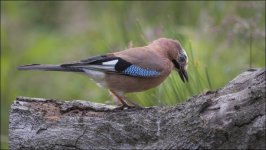
Beautiful capture of the Jay
Superb looking budgie!
Cracking shot @catclick .
Nicely captured Cat
No, it's definitely a jay
No, it's definitely a jay
Stunning colours in there and a beautiful bird. Shame they have such a bad reputation. Excellent capture.
Thank you!Looking down
Great shot of the Jay. We have quite a few around home and they are very skittish. So we'll done for getting this shot.
OP
- Messages
- 458
- Name
- Catherine
- Edit My Images
- Yes
Week 27 - Indigenous - LINK
View: https://www.flickr.com/photos/catclick/51313584653/in/datetaken-public/
View: https://www.flickr.com/photos/catclick/51313584653/in/datetaken-public/
Last edited:

- Messages
- 8,684
- Name
- Ian
- Edit My Images
- No
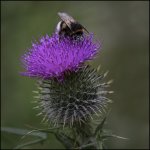
Are you screengrabbing with the snip tool or somesuch? The black borders on the non-Flickr version are what make me ask.
(This is a screengrab from your Flickr image - Test image - will remove)
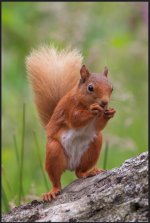
Edit to add: It's not the forum then (if you're screen grabbing). Must be whatever tool you're using to make a copy for the thread. What do you use?
(This is a screengrab from your Flickr image - Test image - will remove)
Edit to add: It's not the forum then (if you're screen grabbing). Must be whatever tool you're using to make a copy for the thread. What do you use?
Last edited:
OP
- Messages
- 458
- Name
- Catherine
- Edit My Images
- Yes
Are you screengrabbing with the snip tool or somesuch? The black borders on the non-Flickr version are what make me ask.
(This is a screengrab from your Flickr image - Test image - will remove)
Copied the original file on Windows explorer. Resized image to lower resolution in Photoshop and added 5 pixel black border. Saved the file. Used the attach file option to upload to Talk Photography. Same as I always do. The website did look a bit different when I was adding the file this week.Edit to add: It's not the forum then (if you're screen grabbing). Must be whatever tool you're using to make a copy for the thread. What do you use?
Last edited:
OP
- Messages
- 458
- Name
- Catherine
- Edit My Images
- Yes
Are you screengrabbing with the snip tool or somesuch? The black borders on the non-Flickr version are what make me ask.
(This is a screengrab from your Flickr image - Test image - will remove)
Edit to add: It's not the forum then (if you're screen grabbing). Must be whatever tool you're using to make a copy for the thread. What do you use?
I will try to add my last weeks image with no changes. It has done the same again

Scots_quine
In memoriam
- Messages
- 1,753
- Name
- Joan
- Edit My Images
- Yes
I click on the 'add image' icon to upload my photos. Any help?
OP
- Messages
- 458
- Name
- Catherine
- Edit My Images
- Yes
I tried that one too - just the same.I click on the 'add image' icon to upload my photos. Any help?
- Messages
- 8,684
- Name
- Ian
- Edit My Images
- No
When you open the image on your desktop (before you upload it here) does it have the same colour issue?
OP
- Messages
- 458
- Name
- Catherine
- Edit My Images
- Yes
No. It is exactly as I have done with previous images. Process in lightroom, put a border round in photoshop and save at lower resolution/ The image of the Jay was exactly the same image as previously with no changes. Only this week that has been affected.When you open the image on your desktop (before you upload it here) does it have the same colour issue?
Is it possibly a colour space issue? Is it definitely RGB being exported in photoshop?
edit - although attaching previous images that were fine, does seem odd!
Nothing different to usual. Presuming RGB as I don't touch it. (don't know how)

- Messages
- 11,255
- Name
- Tim
- Edit My Images
- Yes
I wonder if there has been an update (Windows or PS)causing the colour shift.
I've not noticed it from flickr, but I found that an image I had moved from LR to PS (to add instagram borders, and pretty much nothing else), and saved back was darker when viewed in Picasa (it was fine in LR).
I selected "Use Colour Management" in Picasa and it returned to the way I expected.
My Save uses:
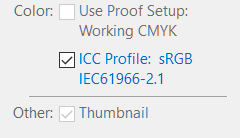
But I'm pretty sure that's standard...
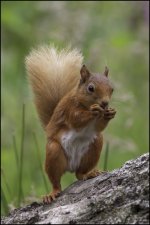
Anyway. Good capture of the squiggle, looking at you and an action shot.
I've not noticed it from flickr, but I found that an image I had moved from LR to PS (to add instagram borders, and pretty much nothing else), and saved back was darker when viewed in Picasa (it was fine in LR).
I selected "Use Colour Management" in Picasa and it returned to the way I expected.
My Save uses:
But I'm pretty sure that's standard...
Anyway. Good capture of the squiggle, looking at you and an action shot.